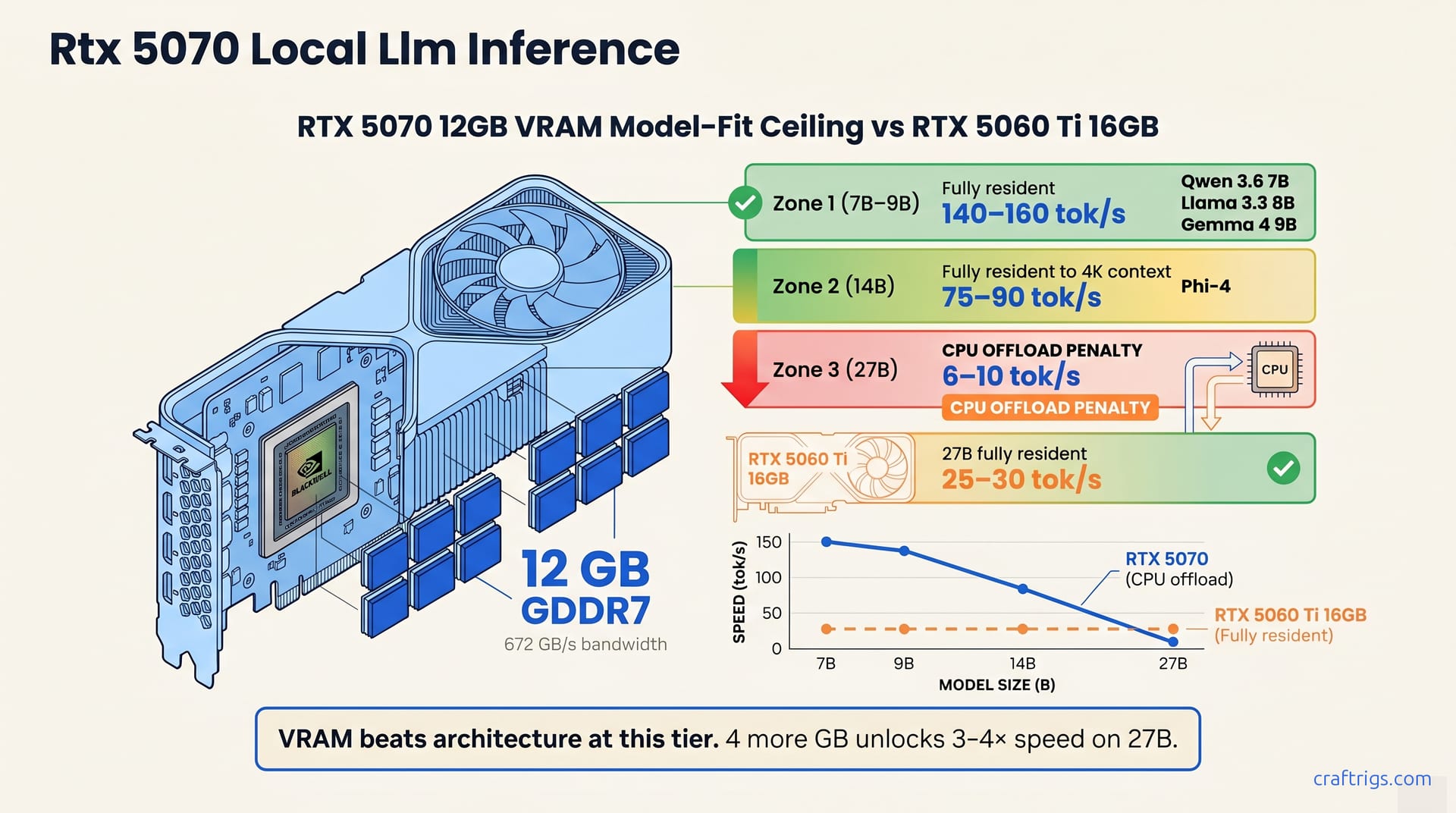
The RTX 5070 (12 GB) runs Qwen 3.6 7B at ~150 tok/s and Phi-4 14B at ~85 tok/s, but requires offload for Qwen 3.6 27B. For LLM work, buy the RTX 5060 Ti 16 GB ($499) instead. It runs 27B models natively. If you're a gamer and LLMs are a side hobby, the 5070 is fine.
The 12 GB VRAM Ceiling: What It Actually Buys You
VRAM, not bandwidth, is the hard gate for local LLM inference. The RTX 5070 ships with 12 GB of GDDR7 at 672 GB/s. Impressive on paper. Bandwidth only matters if the model fits in VRAM.
At Q4_K_M quantization, 12 GB resident VRAM fits ≤14B-class models with 4–6 K context windows. Phi-4, Qwen 3.6 7B, and Gemma 4 9B all load fully resident. Push to 15B+ dense or extend context beyond 6 K tokens, and you'll spill to system RAM or hit an outright allocation failure. Qwen 3.6 27B—the model most power users want—only fits via --n-cpu-moe offload at 6–10 tok/s. That's not a quirk. That's a hard ceiling.
The 5070's raw spec sheet reads well: 12 GB GDDR7, 672 GB/s bandwidth, 250 W TDP, priced at $549–$649 as of May 2026. GDDR7 is faster than GDDR6X, but faster memory doesn't create more memory. VRAM is the bottleneck for local LLMs; this card has the same 12 GB ceiling as older cards. You cannot run Qwen 3.6 35B-A3B dense. You cannot run Llama 3.3 70B at any quantization that preserves coherence. Bandwidth helps gaming and small-model inference. It doesn't help you fit 27B models.
For a full breakdown of how this 12 GB tier stacks against the 16 GB cards that win for LLM work, see our 5060 Ti 16 GB guide. The 5070 is the card you're tempted to buy because it's new. The 5060 Ti 16 GB is the card that lets you run the models you want.
Tok/s on Real 2026 Models (Qwen 3.6, Phi-4, Gemma 4)
Benchmarks without quantization labels are noise. Every number below lists model, quantization, context, and tok/s. That's the only format worth paying attention to.
7B–9B: 110–160 tok/s
| Model | Quantization | Context | Tok/s | VRAM Resident |
|---|---|---|---|---|
| Qwen 3.6 7B | Q4_K_M | 4 K | 140–160 | Yes, ~6.5 GB |
| Llama 3.3 8B | Q4 | 4 K | ~150 | Yes, ~5.5 GB |
| Gemma 4 9B | Q5 | 4 K | 110–130 | Yes, ~7.8 GB |
All three fit fully resident in 12 GB VRAM with headroom for the KV-cache. Qwen 3.6 7B Q4_K_M at 140–160 tok/s is the standout. Blackwell's matrix cores run 5–10% faster than Ada equivalents at this model size. Llama 3.3 8B Q4 hits ~150 tok/s—slightly faster in some tests due to cleaner attention. Gemma 4 9B Q5 runs 110–130 tok/s. Q5 runs 15% slower than Q4, but preserves quality on Google's vocabulary-heavy tokenizer.
Context maxes out at 6–8 K before KV-cache spills to system RAM. At 8 K context on Qwen 3.6 7B, the KV-cache consumes ~2.8 GB additional VRAM. Still inside 12 GB, but you're managing headroom, not enjoying it. Beyond 8 K, you'll face allocation warnings or system-RAM spillover that halves tok/s.
14B Class: 75–90 tok/s
Phi-4 (14B) Q4 achieves 75–90 tok/s at full 12 GB residency. It's the largest dense model that loads without tricks on this card. That's usable for interactive chat, coding assistance, and document summarization at moderate length. 9.5 GB for weights + 2 GB for KV-cache at 4 K context = ~500 MB margin left.
Beyond 4 K context, KV-cache quantization to Q4_0 becomes mandatory. The command shift looks like this:
llama-cli -m phi-4-Q4.gguf --cache-type-k q4_0 --cache-type-v q4_0 -ngl 99 -c 8192That quantization recovers ~1.5 GB VRAM but drops speed to 50–60 tok/s. The quality degradation is real but minor. Attention drift over long documents, not coherence collapse. For interactive chat under 4 K context, you won't perceive it. For batch document processing, chunk at 2–3 K and merge outputs.
27B with CPU Offload: 6–10 tok/s
Qwen 3.6 27B Q4 fits only with --n-cpu-moe flag, delivering 6–10 tok/s. MoE routes active parameters to GPU and offloads expert switches to CPU. A clever hack—until you're waiting twenty seconds per paragraph.
llama-cli -m qwen3-6-27b-Q4.gguf --n-cpu-moe 4 -ngl 99 -c 4096The --n-cpu-moe 4 syntax offloads four expert layers; adjust downward if your CPU memory bandwidth chokes. Even optimized, this is 2.5× slower than RTX 5060 Ti 16 GB dense at 25–30 tok/s. That's the card we keep mentioning because it's the correct comparison. For a full walkthrough of this offload play, see our --n-cpu-moe setup guide.
Workload characterization matters here. 6–10 tok/s is offline and batch workloads only. Overnight document processing, scripted evaluation runs, API backends with generous timeout buffers. Skip it for interactive work—chat, coding, anything that needs fast tokens. The 27B model you want to run becomes batch-only on 12 GB, while 16 GB cards treat it as another resident model.
| Model Class | Tok/s | Use Case Viability |
|---|---|---|
| 7B–9B | 110–160 | Interactive, real-time |
| 14B | 75–90 | Interactive, moderate context |
| 27B (offload) | 6–10 | Batch only, not interactive |
The Critical Comparison: 5070 vs 5060 Ti 16 GB
VRAM beats architecture for LLMs at this tier. The math is brutal and worth staring at directly.
The RTX 5060 Ti 16 GB runs Qwen 3.6 27B Q4 dense at 25–30 tok/s. Same model, same quantization, but the 5070's 12 GB forces --n-cpu-moe CPU offload, degrading that 27B run to 6–10 tok/s. That 4 GB delta unlocks a 3–4× speed multiplier on the model most power users want to run. Blackwell cores, GDDR7 bandwidth, and architectural tricks can't match the 4 GB frame buffer advantage. Ada, older silicon, slower memory—the 5060 Ti still wins decisively where it counts.
The 5070 wins in some places. It beats the 5070 by ~15% at 1440p high settings, where GDDR7 and Blackwell rasterization cores matter most. On small-model inference, Qwen 3.6 7B runs ~5–10% faster on Blackwell cores: 150 tok/s versus 140 tok/s. That margin evaporates the moment you need more than 12 GB. Blender, video encoding, CUDA filters—the 5070's compute advantage shines here.
Honest verdict: buy the RTX 5070 if gaming is your primary use and local LLMs are a side hobby. 7B–14B models run well, and gaming performance justifies the silicon. Buy the RTX 5060 Ti 16 GB if you're running Qwen 3.6 27B regularly, want dense residency without offload, or need fast tok/s for usable inference. For pure inference, the 5070 is the GPU you're tempted by but shouldn't buy. The $50 price difference ($499 versus $549–$649) isn't the story. The 4 GB VRAM gap is.
For the sibling comparison with full benchmark tables and gaming frame rates, see our 5070 vs 5060 Ti 16 GB breakdown. For where this 12 GB tier sits in the broader 2026 hardware landscape, our hardware pillar guide maps the full decision tree.
Other Neighbors: RTX 3060 12 GB and 5070 Ti 16 GB
Same VRAM in different eras, or the same architecture with different VRAM. Both comparisons clarify who the 5070 actually serves.
vs RTX 3060 12 GB: The 3060 is the budget option. Same 12 GB frame buffer, but the 5070 runs 7B–9B models 2.5× faster: Qwen 3.6 7B at 140–160 tok/s versus ~55–65 on Ampere. That's not nostalgia. Credit Blackwell's INT4/INT8 improvements and GDDR7 bandwidth—both shine when models fit. A used 3060 runs $250 as of May 2026. The 5070 commands $549–$649. Budget LLM buyers who only touch 7B–9B models should grab the used 3060 and pocket the difference. Gamers wanting 1440p high settings plus a local LLM sidecar should choose the 5070. The 3060 can't push modern titles at 60 fps. The 5070 can. For a deeper look at this same-VRAM tier from the budget angle, see our RTX 3060 12 GB LLM guide.
vs RTX 5070 Ti 16 GB: This is the meaningful upgrade, and the vanilla 5070's existential problem. The Ti costs $200 more at $749, adds 4 GB VRAM, and roughly 15% compute headroom. That 4 GB transforms 27B. Qwen 3.6 27B Q4 runs dense at 25–30 tok/s, same as the 5060 Ti 16 GB. The vanilla 5070 chokes on CPU offload at 6–10 tok/s. The Ti is the card the 5070 pretends to be. Blackwell architecture and enough VRAM for serious LLM work. Vanilla 5070 becomes a ceiling within 12 months. The Ti is the path that doesn't dead-end. If your budget stretches to $749, the Ti is the only 50-series card we'd recommend for LLM-primary builds. For anything less, the 5060 Ti 16 GB at $499 outmaneuvers both vanilla cards on the metric that matters.
Should You Buy It? The Gaming vs LLM Workload Decision
The 5070 is the wrong card for LLM-primary buyers. It's the right card for gaming-primary buyers. Here's how to pick the right card, not a $549 mistake.
YES: If Gaming or Productivity Is Primary
Buy the RTX 5070. It's a first-class 1440p gamer. Blackwell cores and GDDR7 push 120+ fps at high settings. The 250 W TDP keeps compact builds cool. Productivity workloads (Blender cycles, DaVinci Resolve, CUDA-accelerated filters) get the same compute uplift. Local LLM becomes the bonus feature, not the justification.
Qwen 3.6 7B at 140+ tok/s handles instant chat while you game. 12 GB holds 7B-class models comfortably with room for Discord bots, coding, and summaries while gaming. That's the dual-use pitch, and it's honest. The 5070 earns its keep when LLM inference is the side dish, not the main course.
NO: If LLMs Are Your Primary Focus
Don't buy the RTX 5070. Buy the RTX 5060 Ti 16 GB instead.
The 5060 Ti 16 GB costs $499, nearly identical to the 5070's $549 entry point, and runs Qwen 3.6 27B Q4 dense at 25–30 tok/s. The 5070's 12 GB forces CPU offload at 6–10 tok/s. That's a 3–4× speed penalty on the model you want to run, not the model that fits. VRAM wins here: 4 extra GB unlocks real usability, not marginal gains. Invest in 16 GB.
If you want Blackwell architecture with that VRAM, step up to the 5070 Ti at $749. But the baseline 5070 is the card you're tempted by: it's new, the spec sheet looks modern, GDDR7 sounds fast. Resist. For pure inference, newness is a trap. The 5060 Ti 16 GB is older silicon that wins where it counts.
MAYBE: You Already Own One
You're not stuck. You're capped.
Qwen 3.6 7B, Phi-4 14B, and Gemma 4 9B all deliver 110–160 tok/s smoothly on your 12 GB frame buffer. You get a usable local-LLM machine for chat, code, and document work. The frustration only arrives when you reach for larger models. And you will, because power users always do.
Qwen 3.6 27B requires --n-cpu-moe offload at 6–10 tok/s, batch-only territory. The next section walks you through setup, but won't bypass the 12 GB ceiling. Resale value as a pure-LLM card is weak. Buyers in this segment know 12 GB is a ceiling, not a floor. API backends, document pipelines, or weekly 27B+ experiments? Plan to upgrade within 12 months. Start budgeting for that 16 GB card now, and run your current 5070 into the ground on the workloads it fits.
Settings, Limits, and the Hard No-Goes on 12 GB
You can't negotiate with 12 GB. You can only manage it aggressively. Here's how to squeeze every tok from 12 GB, then the hard limits you'll hit.
Start with full GPU offload. The -ngl 99 flag in llama.cpp pushes every layer it can to the frame buffer:
llama-cli -m your-model.gguf -ngl 99 -c 4096For 14B-class models, add KV-cache quantization to recover headroom. This is mandatory, not optional:
llama-cli -m phi-4-Q4.gguf --cache-type-k q4_0 --cache-type-v q4_0 -ngl 99 -c 4096The --cache-type-k q4_0 --cache-type-v q4_0 flags quantize the KV-cache to 4-bit, recovering 2–3 GB VRAM on 14B models. The flags quantize the KV-cache to 4-bit, recovering 2–3 GB on 14B models. Attention drift over long documents, not coherence collapse. For interactive chat under 4 K context, you won't perceive it. For batch document processing, chunk at 2–3 K and merge outputs.
Context windows demand discipline. Keep them to 4–6 K tokens to prevent system-RAM spillover on 7B+ models. The KV-cache scaling formula is unforgiving: each token in context consumes 2 × hidden_size × num_layers × bytes_per_element bytes. At 6 K context on Qwen 3.6 7B, that's ~2.1 GB additional VRAM beyond weights. At 8 K, you're near the cliff. At 12 K, you're in system RAM or allocation failure.
The hard ceiling arrives without warning if you ignore the math. No Qwen 3.6 35B-A3B or Llama 3.3 70B at usable speeds. These models exceed 12 GB even at aggressive quantization, and CPU offload drops them to <2 tok/s. No fine-tuning beyond LoRA on >7B models. That moves Phi-4 from edge-case to comfortable residency. Quality drops slightly, but stays usable. No sustained 4+ K context on 14B-class without KV-cache fallback. The footprint doesn't allow it.
Qwen 3.6 27B only works with --n-cpu-moe CPU offload at 6–10 tok/s. The command structure:
llama-cli -m qwen3-6-27b-Q4.gguf --n-cpu-moe 4 -ngl 99 -c 4096Adjust --n-cpu-moe downward if your system RAM bandwidth chokes. Try 2 or 1 and measure tok/s. The flag routes MoE expert switches to CPU while keeping active parameters GPU-resident. It's a hack that makes the model runnable, not usable for interactive work. For a complete walkthrough of this offload configuration, see our --n-cpu-moe setup guide.
The no-go list is shorter to state than to discover through frustration. Skip 35B+ dense, 70B anything, full fine-tuning, 14B at long context, and interactive 27B. These aren't slow. They're impossible. The 12 GB frame buffer is a hard binary gate: fits, or doesn't. Bandwidth, architecture, and optimization buy you percentage points within the fit zone. They cannot expand the zone itself.
For the 24 GB cards that remove these gates, our Qwen 3.6 27B full-resident setup shows what the 5070 cannot do and what you'll need if your work outgrows this ceiling.