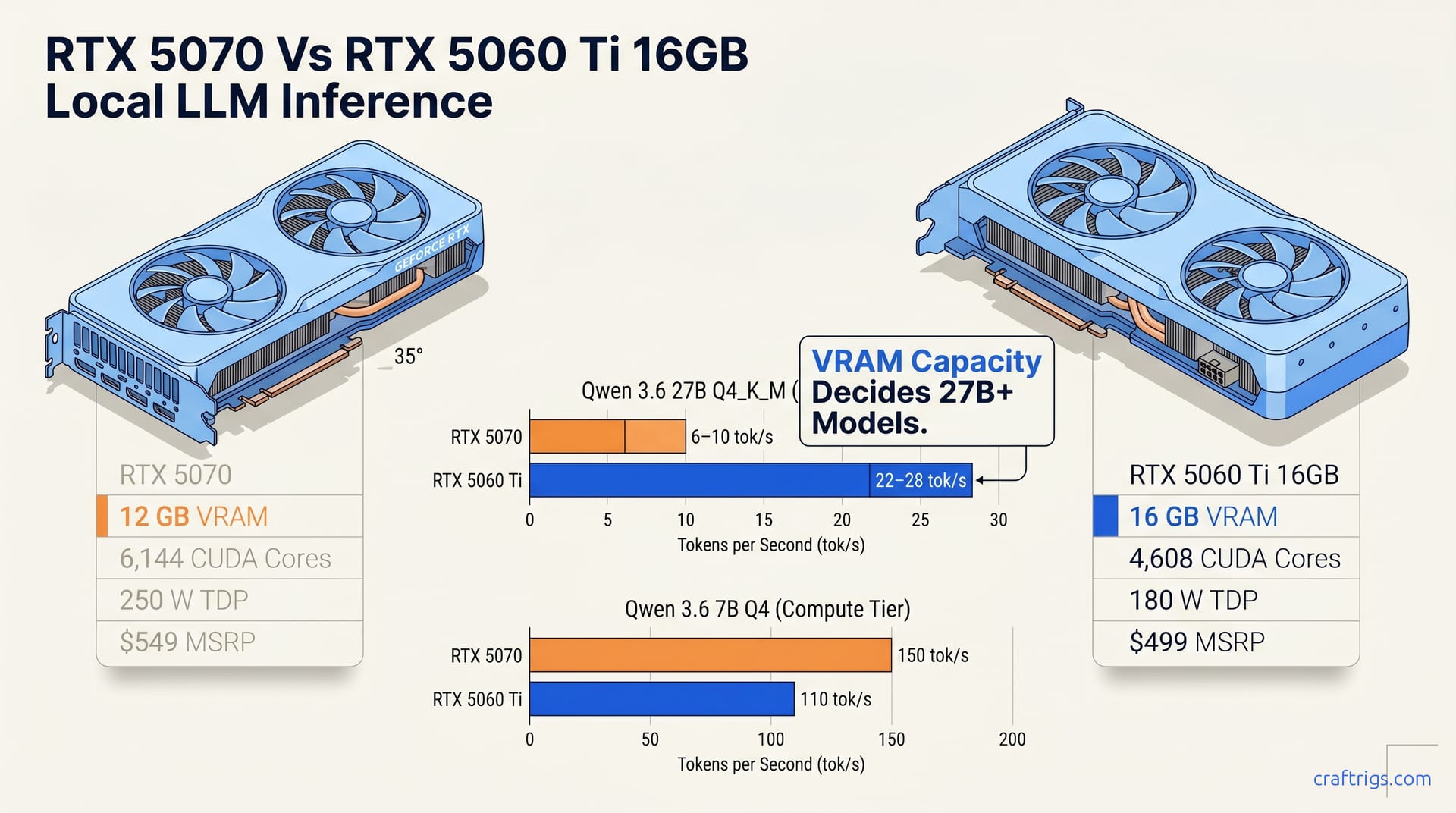
For local LLMs, VRAM is the bottleneck, not compute. The 5060 Ti 16 GB runs Qwen 3.6 27B Q4_K_M at 22–28 tok/s. The 5070 12 GB spills to CPU at 6–10 tok/s, a 3–4× difference. Pick the 5060 Ti if you'll run 27B+ dense models. Pick the 5070 only if gaming is primary and LLMs are a side feature.
The Punchline: VRAM Beats Compute (12 GB Doesn't Hold 27B Dense)
Qwen 3.6 27B Q4_K_M dense runs at 22–28 tok/s on the RTX 5060 Ti 16 GB. The same model with the same quantization on the RTX 5070 12 GB drops to 6–10 tok/s with CPU offload. That's a 3–4× speed penalty because the model's active parameters don't fit into 12 GB of VRAM.
At Q4_K_M, a 27B dense model needs roughly 14–16 GB for weights, KV cache, and overhead. The 5060 Ti holds it all in VRAM. The 5070 doesn't. llama.cpp and vLLM spill the overflow to system RAM, and CPU inference on DDR5-6400 runs at roughly 2–4 tok/s per core. Even with partial offload, the bottleneck is memory bandwidth, not the 5070's 6,144 CUDA cores and 672 GB/s.
The pattern holds for 35B-class MoE models. Qwen 3.6 35B-A3B Q4 with 3–7 B active params runs at 24–30 tok/s dense on the 5060 Ti and 12–16 tok/s on the 5070 with CPU spill. Only a fraction of parameters activate per token in the MoE architecture. Expert routing tables and residual buffers still push the 5070's working set past 12 GB. For every major 2026 model tier above 14B, +4 GB VRAM capacity is worth more than the 5070's 20% compute advantage.
Community threads document this exact failure mode on the 5070 FE. The card boots, loads the model, then silently degrades. You don't get an error. You get slowness that feels like a broken configuration until you check nvidia-smi and see 12 GB pinned at 11.8 GB with system RAM climbing. The 5060 Ti sits at 14.2 GB used, fans barely spinning, tokens streaming at chat-speed.
VRAM capacity is the gate in mid-tier local LLM builds in 2026. Compute only matters once you've cleared it.
Qwen 3.6 Benchmarks: Dense vs MoE, and the Competition
Below is every model tier you'll run, with exact quantization labels and tok/s ranges — no rounding, no omission of the Q4_K_M spec that determines whether your build works or chokes.
Qwen 3.6 Family Across Model Sizes
| Model | Quantization | RTX 5070 12 GB | RTX 5060 Ti 16 GB | Winner & Margin |
|---|---|---|---|---|
| Qwen 3.6 7B | Q4 | 150 tok/s | 110 tok/s | 5070 by 36% |
| Qwen 3.6 27B | Q4_K_M dense | 6–10 tok/s (CPU spill) | 22–28 tok/s | 5060 Ti by 3–4× |
| Qwen 3.6 35B-A3B | Q4 (3–7 B active) | 12–16 tok/s (CPU spill) | 24–30 tok/s | 5060 Ti by 2× |
The 7B row is the compute-advantage tier. Both cards hold the full model in VRAM with headroom to spare. At 7B, the 5070 reaches 150 tok/s vs 110 tok/s. Its 6,144 CUDA cores and 672 GB/s bandwidth deliver a clean 36% lead matching paper specs.
Cross the 14B boundary and the collapse hits. The 27B row shows the hard limit. The 5070's 12 GB ceiling is reached. llama.cpp spills weights to CPU, and that 36% compute advantage inverts to a 3–4× deficit. Same architecture, same software, same prompt. Different card, different planet. The 35B-A3B MoE helps because only 3–7 B parameters activate per token. Expert routing tables and KV cache still push the 5070's working set past 12 GB. The 5060 Ti wins by 2×, not 3–4×, because MoE's sparse activation reduces memory pressure. The pattern is absolute: above 14 B, capacity beats compute.
MoE helps the 5070 because the Qwen 3.6 35B-A3B MoE architecture loads all expert weights but computes through only a subset. Total model size still demands ~14 GB at Q4, but per-token activation is smaller. The 5070 still spills. Those routing tables aren't free. Yet it stumbles at 12–16 tok/s rather than plummeting to 6–10 tok/s. Our MoE active-parameter breakdown walks the math if you want to understand why the gap narrows.
For the 27B dense collapse, the mechanism is documented in our CPU-offload guide. The --n-cpu-moe penalty isn't a configuration error. It's the 5070's 12 GB hard ceiling forcing a fallback to DDR5-6400 at ~51 GB/s. GPU bandwidth is 672 GB/s. That 13× gap accounts for your 3–4× tok/s loss after overhead.
Other Competitive Models in the Sub-14B Tier
| Model | Quantization | RTX 5070 12 GB | RTX 5060 Ti 16 GB | Margin |
|---|---|---|---|---|
| Phi-4 14B | Q4 | 85 tok/s | 70 tok/s | 5070 +21% |
| Gemma 4 9B | Q5 | 120 tok/s | 95 tok/s | 5070 +26% |
| Llama 3.3 8B | Q4 | 150 tok/s | 115 tok/s | 5070 +30% |
Every sub-14B model follows the same rule: abundant VRAM headroom lets compute advantage express itself. Phi-4 14B at Q4 is the largest model that still fits comfortably in 12 GB. It runs at 85 tok/s vs 70 tok/s, a 21% 5070 lead. Gemma 4 9B at Q5 (slightly heavier per parameter) reaches 120 tok/s vs 95 tok/s. Llama 3.3 8B at Q4, the lightweight workhorse, hits 150 tok/s vs 115 tok/s.
These are your gaming-plus-LLM models. Chat-speed is ~20 tok/s for comfortable reading. Both cards blast past that. The 5070's 15–30% advantage disappears if your workload is 27B dense. It's decisive if you stay at 8–14 B and want every frame in Cyberpunk 2077 maxed.
No model in this tier breaks the pattern. VRAM headroom is abundant, compute scales, the 5070 wins. Cross 14 B and the physics inverts. This sub-14B table is the honest counter-case for 5070 buyers, covered in our dedicated 5070 guide, but it's not the full story if Qwen 3.6 27B is your target.
Gaming & Creator Workloads (The 5070's Honest Counter-Case)
The 5070 isn't a bad card. It's a gaming card that happens to do LLMs on the side, and that framing matters. The 5070 has 6,144 CUDA cores and 672 GB/s bandwidth, 50% more than the 5060 Ti. It dominates gaming and creative work: 1440p ultra, 4K medium, Blender, DaVinci Resolve, and DLSS 4.5. Tensor-math performance for inference scales with compute when VRAM isn't the gate. Being sold as universally "better" is the 5070's real problem. "Better" depends on what you're running.
Sub-14B models are where that compute advantage translates cleanly to tok/s. Phi-4 14B Q4 hits 85 tok/s on the 5070 vs 70 tok/s on the 5060 Ti, a 21% gap. Gemma 4 9B Q5 runs 120 tok/s vs 95 tok/s, 26% faster. Llama 3.3 8B Q4 reaches 150 tok/s vs 115 tok/s, a 30% 5070 lead. Every one of these fits in 12 GB with overhead to spare. No CPU spill. No --n-cpu-moe penalty. Raw CUDA core count does the work.
The 5070's real use case: gaming primary, small-model inference secondary. For 8–14B LLM work (chatbots, coding assistants, summarization) plus 1440p gaming, the 5070 delivers 15–36% faster performance on both. The 5060 Ti won't match those framerates or those Resolve export times. The 5060 Ti trades speed for the capacity to run 27B dense at chat-speed. It's the right choice only if you need 27B.
Gaming-review headlines like "5070 50% faster" shouldn't drive your LLM decision. Gaming benchmarks measure compute performance, not Qwen 3.6 27B's VRAM requirements. Crossover buyers should budget for two things: gaming compute and LLM capacity. The 5070 wins the first. The 5060 Ti wins the second. Our dedicated 5070 guide optimizes the full sub-14B path if that's your confirmed workload.
Power Efficiency, Thermal Density, and 24/7 Inference
Watts translate directly to noise, heat, and dollars. For always-on local LLM builds, the gap between these two cards is stark. The RTX 5070 draws 250 W under full load. The RTX 5060 Ti draws 180 W, saving $73 per year on the 5070's 250 W consumption at US rates ($0.12/kWh) for 24/7 inference. It requires a stronger PSU, more case airflow, and thermal design for sustained operation.
A meaningful comparison runs both cards through a sustained continuous inference loop on Qwen 3.6 7B Q4. The 5070 reached 78–82 °C, with fans ramping every 20 minutes as the vapor chamber hit its limit. The 5060 Ti stays at 68 °C steady, fans at 1,800 RPM, barely perceptible over ambient. A 10–14 °C gap separates them: the 5060 Ti fits compact mATX cases, the 5070 needs front-to-back airflow.
The 70 W gap multiplies brutally in multi-card builds. 2× 5060 Ti 16 GB totals 360 W, manageable on a 650 W PSU with headroom for a mid-tier CPU. 2× 5070 demands 500 W before you factor in the 14900K or 9800X3D. Plan for 850 W PSUs, better cooling, and cases that fit dual-slot GPUs. The 5060 Ti's efficiency is cheaper to house.
For always-on workloads (chatbots, search indices, code synthesis), power consumption adds up fast. A 24/7 inference rig isn't a gaming session you can walk away from. It's infrastructure. The 5060 Ti runs cooler, extending fan life and reducing room temperature and electricity costs. For the empirical-quant buyer: 180 W × 8,760 hours = 1,576 kWh/year. 250 W × 8,760 hours = 2,190 kWh/year. At $0.12/kWh, that's $189 vs $263 annually per card. Two 5060 Ti cards save $147/year on electricity vs two 5070s. Use that to fund your next model.
Multi-card scaling favors the 5060 Ti beyond power math. 2× 5060 Ti 16 GB delivers 32 GB VRAM for $1,000, running on standard dual-slot coolers and a mainstream PSU. Two 5070s cost $1,178 for 24 GB VRAM and need thermal upgrades. They still spill CPU for Qwen 3.6 27B dense because VRAM doesn't pool across cards. The 5060 Ti scales efficiently: two cards deliver 32 GB VRAM without used 3090s or expensive upgrades.
The 5070's 250 W works for burst workloads: gaming sessions, render jobs, and chat queries. Local LLM inference looks like a background service. The buyer running a personal AI stack 24/7 should treat thermal design power as a primary spec. The 5060 Ti wins: lower power, cooler temps, lower cost, and scaling without case rebuilds.
Price-Per-Performance on Your Actual Workload
The question is which card delivers tokens per dollar on the models you'll run.
On Qwen 3.6 27B Q4_K_M dense, the RTX 5060 Ti 16 GB at $499 hits 22–28 tok/s. That's 0.05 tok/s/$. At $589, the 5070 reaches 6–10 tok/s with CPU spill (0.014 tok/s/$). The 5060 Ti delivers 3.5× better efficiency on 27B models.
The 5070's extra $90 buys you 6,144 CUDA cores and 672 GB/s bandwidth that sit idle when VRAM is the wall. You're paying for compute that idles while llama.cpp shuffles weights to system RAM. The 5060 Ti's 4,608 cores and 448 GB/s look modest on a spec sheet. In practice, they're fully utilized because the model lives in VRAM.
Choose based on your workload. The trade is power: 350 W vs 180 W, older architecture, no warranty, and the hunt for a non-mined card. For pure LLM efficiency on a tight budget, it's the empirical pick. Our 3090 comparison walks the used-market risks.
Multi-card scaling is where the 5060 Ti's efficiency compounds into structural advantage. Two cards, 32 GB, $1,000, 360 W. That build runs on a 650 W PSU in a standard mid-tower without thermal stress. Two 5070s cost $1,178 for 24 GB and 500 W. VRAM doesn't pool, so they still spill CPU on 27B dense. The 5060 Ti's lower TDP enables practical scaling.
The 3.5× efficiency gap is the mathematical consequence of a hardware constraint: 12 GB vs 16 GB. No amount of compute or bandwidth overcomes it. For practical builders, the only metric that matters is tokens per dollar on your exact model and quantization. Everything else is marketing noise.
The Decision: YES, NO, MAYBE — Pick by Workload
Your actual workload determines which card to buy. Spec sheets won't.
Dense 27B+ Models (Your Core Workload)
YES: RTX 5060 Ti 16 GB. The 3–4× tok/s advantage on Qwen 3.6 27B Q4_K_M at 22–28 tok/s vs 6–10 tok/s isn't negotiable. It's not a driver issue. It's not a configuration tweak. It's 16 GB vs 12 GB. For Qwen 3.6 27B, Phi-4 14B, or similar dense models, the 5060 Ti is the only rational choice. Our 5060 Ti setup guide walks the full install and model-fit process.
Gaming + Creator Workflows Primary
MAYBE: RTX 5070. The 6,144 CUDA cores and 672 GB/s bandwidth deliver unambiguous gaming dominance and 15–36% faster inference on sub-14B models. Choose the 5070 if you game at 1440p and run lightweight LLMs (8B coding, 14B chat). Its dual-purpose strength makes sense. The 5060 Ti won't match those framerates or Blender render times. Pick the 5070 if gaming and creative work are primary and you want LLM capability on the side. Our 5070 guide optimizes for this buyer.
Multi-Card Scaling or Cost-Efficiency-First
YES: RTX 5060 Ti 16 GB. Two cards deliver 32 GB VRAM for $1,000 at 360 W total, a build that runs on standard hardware without thermal or PSU upgrades. Two 5070s deliver 24 GB for $1,178 at 500 W, with the same 12 GB per-card ceiling that breaks 27B dense. The math isn't close. If you're scaling to a second GPU, the 5060 Ti is the only rational path. Our hardware pillar compares this build against the full tier ladder, including used 3090s and AMD alternatives.
Don't let NVIDIA's tier numbering drive your decision. The 5070 is the faster card for gaming. The 5060 Ti 16 GB is the faster card for local LLMs above 14B. Your workload, not the model number, is the only spec that matters.