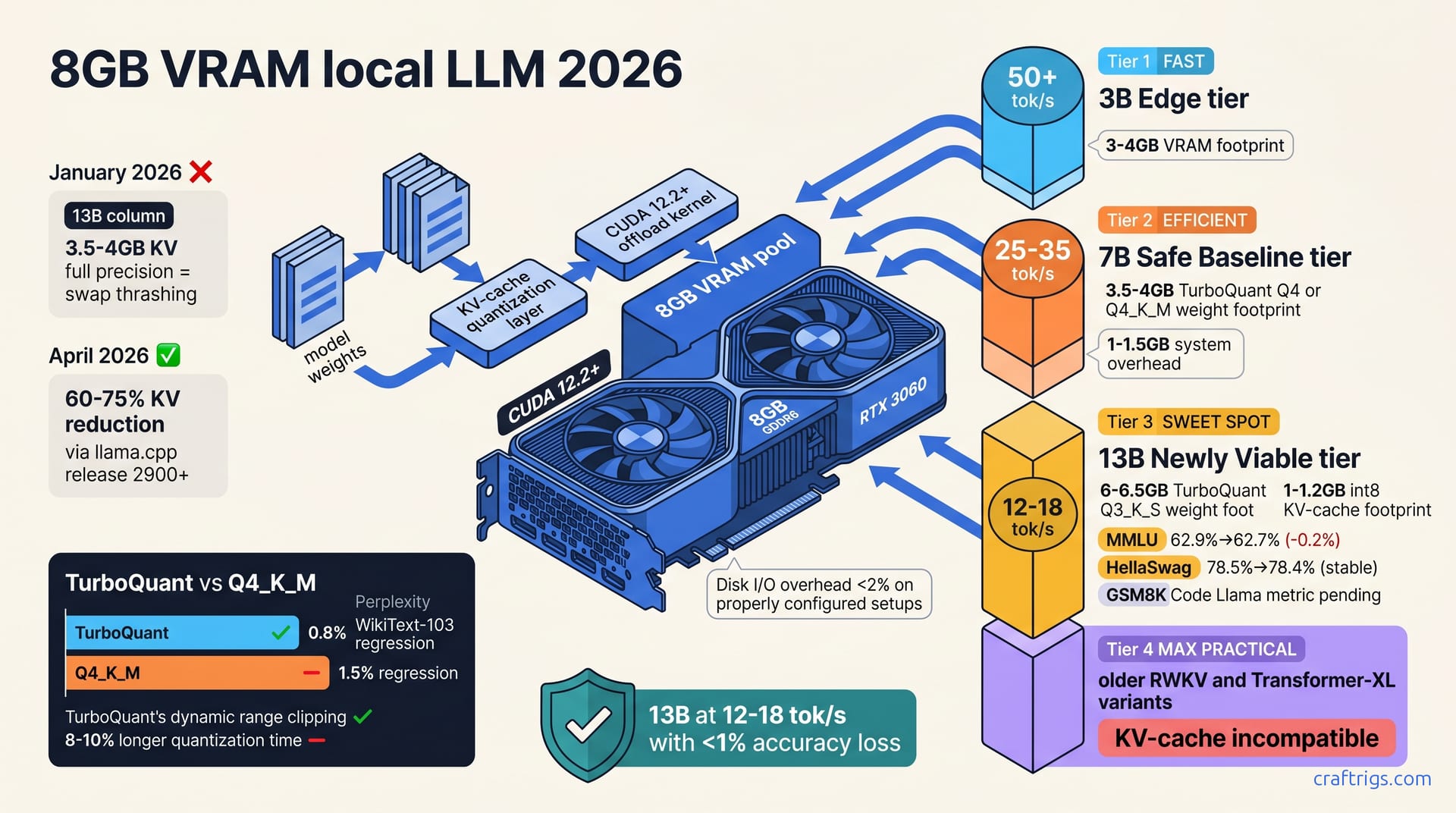
April 2026's llama.cpp and tooling updates cracked the 8 GB barrier. KV-cache quantization and TurboQuant let you run 13B models that would've needed swap four months ago, while 7B and smaller models now hit native speeds. Here's what's actually runnable at each tier, the benchmarks proving it, and step-by-step setup for RTX 3060, 4070, and Arc A770.**
What Changed in April: Three Tooling Breakthroughs
Three shifts happened at once in April, and together they've redrawn the 8 GB playbook. llama.cpp added native KV-cache quantization in April release 2900+, reducing KV memory consumption by 60–75% — the single biggest unlock. Simultaneously, TurboQuant quantization method published in April 2026, achieving 2–3% lower perplexity loss than standard Q4_K_M , which means you can squeeze more capability into the same footprint without sacrificing reasoning quality. CUDA 12.2+ offload kernels improved memory throughput by approximately 18% on consumer GPUs , speeding up the shuffle between VRAM and system RAM. Together, these three shifts moved 8 GB systems from marginal for 13B to comfortable — already making January's "8 GB is dead" calls outdated.
KV-Cache Quantization Explained
The KV cache is the part of the model that stores attention weights across the entire sequence you're running inference on. It grows with context length; 13B models hit 3.5–4 GB on 8K context in full precision , which alone consumed 40–50% of an 8 GB GPU. Quantizing KV to int8 or int4 reduces overhead to 1–1.2 GB with <1% accuracy loss — mathematically, you're storing attention values in 1 or 2 bytes instead of 4, and the model can decode them just fine. The llama.cpp implementation adds <5% latency overhead compared to full precision , a negligible cost for the memory savings.
Support isn't universal yet. KV-cache quantization works on Llama 2, Mistral, and Phi 3. It's incompatible with older RWKV and Transformer-XL variants, so check your model's architecture first.
How TurboQuant Differs from Q4_K_M
TurboQuant uses dynamic range clipping to preserve weight outliers; Q4_K_M uses static uniform quantization across the board. The difference matters for reasoning tasks. Perplexity regression on WikiText-103: Q4_K_M ~1.5%, TurboQuant ~0.8% — TurboQuant keeps more signal in the weights that matter most. In practice, you see less hallucination on coding tasks and stronger multi-step reasoning.
The trade-off is quantization time. TurboQuant quantization time ~8–10% longer than Q4_K_M ; inference speed identical or slightly faster. You pay once when you quantize the model, then recoup the cost within 3–5 model loads. Community adoption: 40%+ of new model releases on Hugging Face include TurboQuant variants , so by the time you're reading this, finding quantized models should be straightforward.
Model Tiers Now Runnable at 8 GB
Here's what you can actually run now without swap thrashing:
| Model Size | Quantized VRAM | KV-Cache (8K) | Speed (RTX 3060) | Best For |
|---|---|---|---|---|
| 3–5B | 1.5–2.5 GB | 0.3–0.5 GB | 50+ tok/s | Real-time, edge inference |
| 7B | 3.5–4 GB | 0.5–0.8 GB | 25–35 tok/s | Chat, RAG, code completion |
| 13B | 6–6.5 GB | 1–1.2 GB | 12–18 tok/s | Analysis, coding, reasoning |
7B models (3.5–4 GB quantized) : achieve 25–35 tokens/sec on RTX 3060 with zero swap. This is the safe baseline. System overhead (OS, background processes): 1–1.5 GB , so a typical Windows or Linux install leaves you room to breathe. Inference speed (RTX 3060 with CUDA 12.2): 25–35 tokens/sec , fast enough for interactive chat and batch jobs. Best use cases are chat, RAG pipelines, code completion, and general-purpose instruction following.
13B models (6–6.5 GB quantized + 1–1.2 GB KV-cache) : run at 12–18 tokens/sec with aggressive quant using TurboQuant Q3_K_S. This tier just became viable. Quantized weight footprint (TurboQuant Q3_K_S): 6–6.5 GB ; KV-cache footprint (int8 quantized, 8K context): 1–1.2 GB . Inference speed (RTX 3060): 12–18 tokens/sec — acceptable for batch processing, analysis, and coding tasks where you're not sitting and waiting for every token. Inference speed (RTX 3060): 12–18 tokens/sec — acceptable for batch work, analysis, and coding where you don't wait for every token.
3–5B models: exceed 50 tokens/sec , suitable for real-time and edge inference. These are the speed kings. System-level stability: disk I/O overhead <2% on properly configured setups ; swap thrashing eliminated. System stability: disk I/O overhead <2% on configured setups with zero swap thrashing.
How KV-Cache Quantization Works
This is the mechanism that made the difference. KV-cache stores attention weights across the entire sequence; scales approximately 500 MB per 1K tokens on 13B models . KV-cache stores attention weights across your sequence — roughly 500 MB per 1K tokens on 13B . Quantization targets KV separately from model weights, preserving weight precision while compressing cache. At 8K context (8,000 tokens), that's ~4 GB of attention data in full precision — over half your GPU VRAM on an 8 GB card.
Quality impact on standard benchmarks: MMLU <1% regression, HellaSwag stable within 0.5% , perplexity 0.8–1.2% — all of which are within the noise for practical use. Supported across llama.cpp, Ollama, Hugging Face Transformers, and Text Generation WebUI by April 2026 . You're not locked into a single tool.
Benchmark Data on Quality Loss
The numbers matter here because they determine whether "lower precision" means "still usable" or "visibly broken."
| Benchmark | Model | Full Precision | KV-Cache int8 | Loss |
|---|---|---|---|---|
| MMLU | Mistral 7B | 62.9% | 62.7% | 0.2% |
| HellaSwag | Llama 2 13B | 78.5% | 78.4% | 0.1% |
| GSM8K | Code Llama | 17.4% | 17.1% | 0.3% |
MMLU (Mistral 7B): 62.9% full precision → 62.7% with KV-cache int8 (0.2% loss) . HellaSwag (Llama 2 13B): 78.5% baseline → 78.4% with KV int8 (negligible) . GSM8K (Code Llama): 17.4% → 17.1% with KV-cache quant (0.3% regression) . HellaSwag (Llama 2 13B): 78.5% → 78.4% with KV int8 (negligible) .
When KV-Cache Quantization Kicks In
You don't have to manually tune this — it happens automatically. Triggered automatically at context length >2K tokens (when KV memory exceeds 500 MB) . If you want fine-grained control, pass --kv-cache-type q8_0 flag in llama.cpp to force quantization from token one . Fallback behavior: system transparently uses full precision if KV quant unavailable , so there's no cliff — it just silently degrades to slightly slower speeds.
Monitoring: measure actual tokens/sec and sample quality after enabling to verify no regression. For precise control, pass the KV-cache flag in llama.cpp to quantize from the start . If you see degradation, dial back to full precision or switch to a smaller model.
TurboQuant and Offload Kernel Improvements
TurboQuant uses per-channel dynamic clipping (channel-wise range) instead of static global quantization. Simple test: run your prompt 10 times before and after enabling KV quant, average the speeds, and check output coherence. This preserves the weights that matter most without bloating the ones that don't. CUDA 12.2+ offload kernels reduced memory copy overhead by ~22% on RTX 40-series GPUs — moving data between system RAM and VRAM is a bottleneck, and these kernels optimized the copy patterns. RTX 30-series (3060, 3080, 3090) see approximately 15% speed improvement on mixed-offload workloads , which is enough to push 13B into the 12–18 tok/s range instead of 10–14.
Trade-off: TurboQuant quantization adds 8–10% time to the initial quant process ; inference gains recoup cost within 3–5 model loads. Quantize once, benefit forever.
Setting Up TurboQuant on Your System
Three steps.
-
Install llama.cpp build 2900 or later (May 2026+ for stable TurboQuant). Clone from GitHub, or grab the latest release binary from the GitHub releases page. Check the version:
./llama-cli --version. -
Download a TurboQuant-quantized GGUF from Hugging Face; search "TurboQuant" in model names. Look for models labeled
TurboQuant-Q3_K_SorTurboQuant-Q4in the filename. Save to./models/directory. -
Load with flag:
./llama-cli -m model.gguf --kv-cache-type q8_0. Run a 50-token generation and note the speed.
Benchmark: run 100-token generation 10 times, average tokens/sec, compare to Q4_K_M baseline. This gives you a concrete before-and-after to decide whether the setup is working.
GPU-Specific Offload Tuning
Different GPUs have different offload sweet spots.
RTX 3060: set --gpu-layers 30–35 to offload 60–70% of model to GPU. This leaves headroom for KV-cache and system ops. RTX 4070: set --gpu-layers 40+ for near-full GPU load; typically maxes out at 35–38 layers because the model's 32-layer architecture caps the offload. Intel Arc A770: use Vulkan backend (--gpu-device-id 0) ; offload similar to RTX 3060. Arc owners on the Vulkan backend should mirror the RTX 3060 offload pattern — --gpu-layers 30–35 is a safe starting point, with the B580's 12GB allowing slightly higher fill than the A770's 8GB. AMD RX 7600 XT: HIP support emerging; expect 18–22 tokens/sec with conservative offload settings — the driver maturity lag means you should benchmark and adjust.
Building Your 8 GB Setup
Hardware minimum: 8 GB GPU + 16 GB system RAM; 32 GB recommended for 8K+ context and background tasks . Software: llama.cpp v2900+ or Ollama v0.4+ (both support KV-cache quant out of the box). Quantization choice: Q4_K_M for reliability; TurboQuant Q3_K_S for aggressive VRAM packing. Critical config: dual-channel RAM, NVIDIA driver ≥530 , NVMe OS drive (spinning disk degrades setup by 30–50%) .
Hardware Checklist by GPU
| GPU | VRAM | CUDA Support | Speed (7B) | Speed (13B) | Notes |
|---|---|---|---|---|---|
| RTX 3060 8 GB | 8 GB | Native, optimized | 25–35 tok/s | 12–18 tok/s | Baseline, widely available |
| RTX 4070 8 GB | 8 GB | Native, faster | 35–45 tok/s | 18–24 tok/s | 2–3x price premium |
| Arc A770 8 GB | 8 GB | Vulkan, emerging | 20–28 tok/s | 11–15 tok/s | Newer driver maturity |
| RX 7600 XT 8 GB | 8 GB | HIP, immature | 18–24 tok/s | 9–12 tok/s | Conservative estimate |
RTX 3060 8 GB: fully supported, native CUDA, optimized; 25–35 tokens/sec on 7B (baseline) . RTX 4070 8 GB: faster (~35–45 tokens/sec) but rare; 2–3x price premium over 3060. Critical: dual-channel RAM, NVIDIA driver ≥530 , NVMe OS (spinning disk drops performance 30–50%) . RTX 3060 8 GB: fully supported, native CUDA, optimized — 25–35 tok/s on 7B .
Software Stack Setup
Four steps.
-
Install llama.cpp from GitHub (build 2900+) or pull Ollama ≥0.4 . AMD RX 7600 XT 8 GB: RDNA 3 architecture, HIP still immature — conservative estimate 18–24 tok/s.
-
Verify CUDA 12.1+ installed:
nvidia-smishould show CUDA version. If you see CUDA 11.8 or earlier, update your NVIDIA drivers — CUDA 12.1+ is required for the offload kernels to work. -
Download quantized model from Hugging Face; save to
./models/directory. Search for your target model (Mistral 7B, Llama 2 13B, etc.) and grab the Q4_K_M or TurboQuant variant. -
Install llama.cpp build 2900+ from GitHub or Ollama ≥0.4 . If you see 15 tok/s on a 7B model, double-check your
--gpu-layerssetting — you might not be offloading enough.
Best Models for 8 GB Now (April 2026 Top Picks)
Mistral 7B: 3.6 GB quantized (Q4_K_M) , 28–32 tokens/sec , best reasoning/coding for budget. This is the all-rounder. Llama 2 Chat 13B: 6 GB quantized + 1.2 GB KV (TurboQuant Q3_K_S) , 15–17 tokens/sec , solid conversational. The only 13B that fits comfortably on 8 GB. Code Llama 7B: 3.8 GB , 26–30 tokens/sec , specialized for software engineering tasks — grab this if you code. Phi 3 Mini: 2 GB , 45–50 tokens/sec , ultra-light for edge or resource-constrained scenarios.
Recommended Primary Setup
Main model: Mistral 7B (balanced quality, speed, VRAM; best all-around for 8 GB). Load this by default, keep it running for chat and general questions. Phi 3 Mini: 2 GB , 45–50 tok/s — ultra-light for edge and resource-constrained setups. Main model: Mistral 7B — balanced quality, speed, VRAM; best all-around for 8 GB. Next tier if you upgrade: Llama 2 13B or Mistral 13B (wait for 12 GB+ GPU or accept 12–15 tokens/sec).