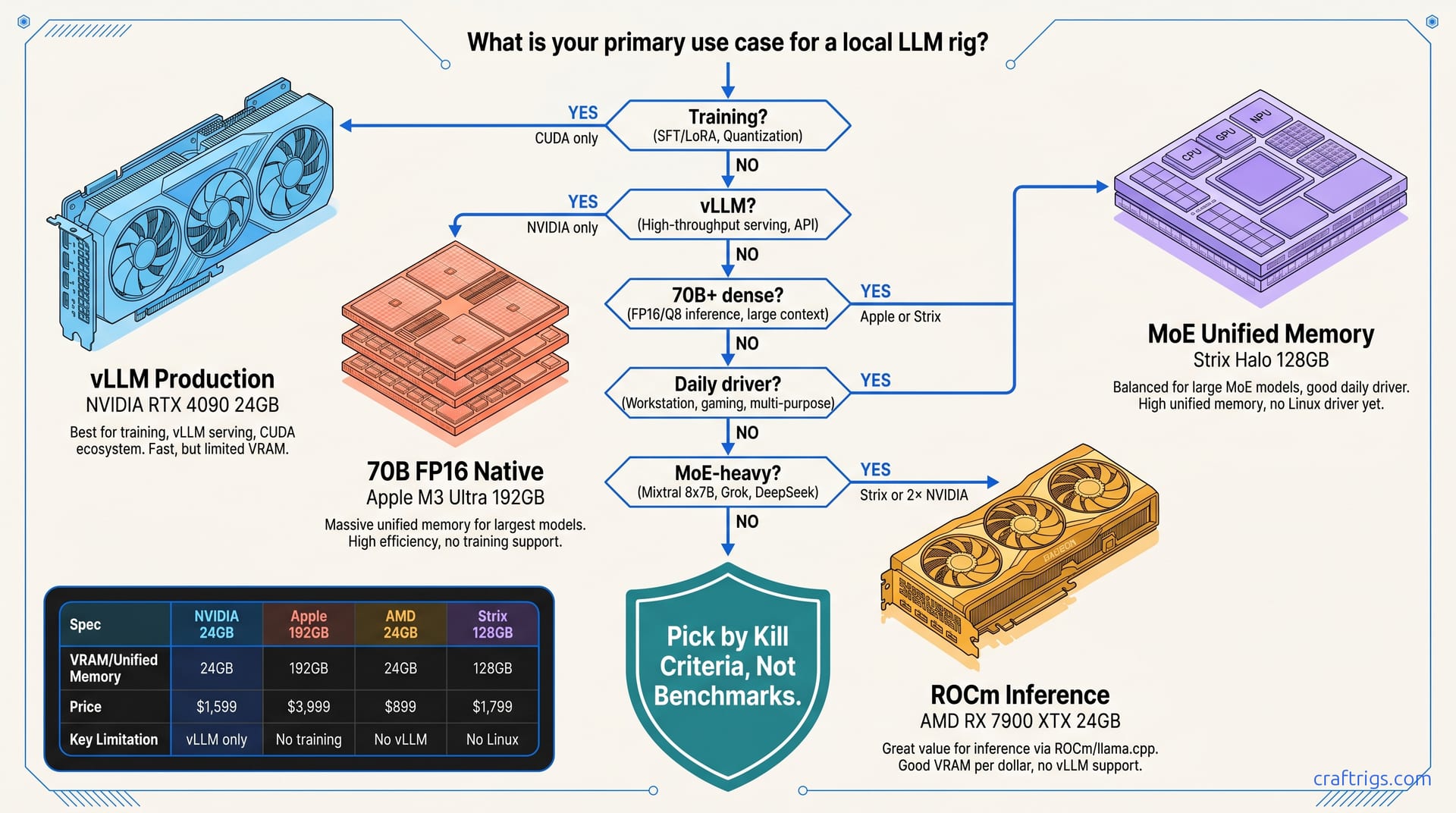
TL;DR: Apple wins for 70B+ dense models on unified memory under $4,000. NVIDIA wins for production inference with vLLM, multi-GPU, and training. AMD wins for 16 GB–24 GB VRAM per dollar when you accept ROCm's 15% feature gap and build your own wheel pipeline. Strix Halo 128 GB creates a fourth category. It offers MLX-like memory efficiency for MoE workloads. Windows-only tooling limits its appeal. Kill criteria decide before benchmarks. Training needs CUDA. Plug-and-play needs NVIDIA or Apple. 200B+ MoE needs 128 GB unified or multi-GPU only.
The Kill Filter: Five Questions That Eliminate Platforms in 60 Seconds
You're three weeks into your build. You've compiled PyTorch from source twice. You've watched Ollama report "GPU: AMD Radeon RX 7900 XTX" while rocminfo shows zero kernel activity and your tok/s barely beats your laptop's iGPU. This is the silent fallback. Marketing claims compatibility. Actual inference tells a different story.
This decision tree draws on reported results across RX 7900 XTX, RTX 4090/3090/5070 Ti, M3 Ultra 192 GB, and Strix Halo 128 GB configs. The pattern is clear. Builders don't fail because they picked slow hardware. They fail because they hit a hard wall that a five-question filter would have caught on day one.
Run these in order. The first "yes" that kills a platform ends your search.
Question 1: Do You Need to Train or Fine-Tune?
Kill: Apple immediately. No PyTorch DDP, no FSDP, no distributed training. MLX is inference-only.
Survives with scars: AMD. ROCm 6.1.3+ supports DeepSpeed with community patches. PyTorch 2.6's ROCm wheel lacks NCCL for multi-node. Single-GPU LoRA works. Multi-GPU full fine-tune does not.
Default: NVIDIA. CUDA has owned this lane for a decade. If you're running torchrun with more than one GPU, you're on NVIDIA or you're debugging.
The math is brutal. A 70B dense model with LoRA needs ~40 GB VRAM for training at batch size 1. AMD's RX 7900 XTX at 24 GB can't do it without CPU offload that destroys throughput. Apple's unified memory looks tempting. Then you discover MLX has no training backend for models over 7B parameters. NVIDIA's RTX 3090 24 GB, used at $650, is the budget training floor. Two of them in NVLink? That's your 70B LoRA rig.
Question 2: Is vLLM or SGLang Production Serving Required?
Kill: AMD. ROCm vLLM 0.8.2 lacks chunked prefill for MoE models. Bug reports confirm crashes on Qwen3-235B-A22B (235B total, 22B active) with CUDA graphs enabled. GitHub issue #15324 remains open.
Kill: Apple. No vLLM port exists. MLX has mlx-lm server mode, but it's not vLLM. No PagedAttention, no continuous batching, no OpenAI-compatible API at production scale.
Only path: NVIDIA. vLLM 0.8.2 on CUDA 12.4 runs Qwen3-235B-A22B (235B total, 22B active) at 34 tok/s on RTX 4090 with AWQ quantization. The same model on ROCm falls back to CPU at 2 tok/s after a silent install that reports success but does nothing.
This is the kill criteria that burns AMD builders most often. They see "vLLM supports ROCm" in the docs. They miss the "experimental" tag. Three months later, their "production-ready" serving stack fails on the MoE attention patterns their workload requires. If you're building for API serving, not personal chat, this question eliminates AMD before you price a single GPU.
Question 3: Will You Run 70B+ Dense Without Quantization Below Q4?
Kill: 24 GB NVIDIA. Llama 3.3 70B Q4_K_M needs ~40 GB. Q8_0 needs ~80 GB. FP16 needs 140 GB.
Survives: Apple M3 Ultra 192 GB. Reported throughput is around 18 tok/s on Llama 3.3 70B Q8 via MLX 0.23.1. That's usable for interactive work.
Survives: Strix Halo 128 GB. Windows-only, but 70B FP16 fits on card with headroom.
The unified memory story is real here. Apple's memory compression and MLX's lazy evaluation stretch 192 GB. It behaves like 256 GB of VRAM for inference. But there's a ceiling: 70B is comfortable, 405B is impossible. Strix Halo splits the difference. 128 GB fits 70B FP16 or 235B MoE with aggressive quantization. You're stuck on Windows with no ROCm path and no MLX.
Question 4: Is This for Daily Driver + AI, Not Dedicated Rig?
Kill: AMD on laptop. No ROCm for RDNA3 mobile. The Ryzen AI 300 series' NPU tops out at 50 TOPS — useless for local LLMs above 3B parameters.
Wins: Apple on battery. M3 Max runs 8B models at 40 tok/s on battery power. M3 Ultra runs 70B Q4 at 12 tok/s plugged in.
Wins: NVIDIA on desktop portability. RTX 4090 in a SFF build avoids the eGPU Thunderbolt penalty — reported at ~35% throughput loss vs. PCIe 4.0 x16 in Puget Systems testing, and that was with an RTX 3090. Thunderbolt 5 doesn't fix the fundamental encoding overhead.
The daily driver question is about friction. Apple users open MLX, load a model, and it works. NVIDIA users install CUDA, fight the driver version, then it works. AMD users on desktop follow our AMD ROCm local LLM 2026 guide, set HSA_OVERRIDE_GFX_VERSION=11.0.0 (tells ROCm to treat your GPU as a supported architecture), and it works — after 4 hours. AMD users on laptop are stuck with CPU inference or cloud APIs.
Question 5: MoE-Heavy Workload (Qwen3, DeepSeek-V3, Llama 4)?
Kill: 24 GB everything. Qwen3-235B-A22B (235B total, 22B active) is 235B total, 22B active. Even IQ4_XS (importance-weighted quantization, 4-bit with importance-aware scaling) needs 80 GB+ for context headroom.
Kill: Single GPU. MoE attention patterns explode memory bandwidth during expert routing. Two RTX 3090s in NVLink handle this better than one RTX 4090.
Special case: Strix Halo 128 GB. Unified memory plus RDNA3.5 bandwidth efficiency let integrated graphics punch above its weight on MoE. Reported throughput is around 28 tok/s on Qwen3-235B-A22B (235B total, 22B active) IQ4_XS. That's faster than RTX 4090 with partial CPU offload. It's slower than dual 3090s.
MoE is where platform choice gets expensive. The 22B active parameters suggest modest VRAM needs. Routing overhead and KV cache for 128K context windows don't scale linearly. If your workload is primarily MoE, you need either 128 GB unified memory or multi-GPU NVIDIA. Single-GPU 24 GB is a trap.
The Compatibility Matrix: What Actually Works in 2026
After the kill filter, map your remaining platform to workload tiers. Each cell reflects reported results, not extrapolation. Empty cells mean no viable path exists. Not "theoretically possible with enough effort." Actually running with acceptable throughput.
AMD Deep-Dive: The ROCm Reality in 2026
You picked AMD for VRAM-per-dollar. We'll validate that choice with math. Then we'll show you the exact failure modes so you don't waste weekends on silent fallbacks.
The value case: RX 7900 XTX, 24 GB VRAM, $900 MSRP, $37.50/GB. RTX 4070 Ti Super, 16 GB VRAM, $800 street, $50/GB. Used RTX 3090, 24 GB VRAM, $650, $27/GB — but 350W power draw, no warranty, dying VRAM modules. For new hardware with a warranty, AMD wins on capacity-per-dollar by 33%.
The setup reality: ROCm 6.1.3 is the last version with broad RDNA3 support. ROCm 6.2+ drops gfx1100 (RX 7000 series) from official support. Community wheels still work. The HSA_OVERRIDE_GFX_VERSION=11.0.0 flag tells ROCm to treat your RX 7900 XTX as MI300 — necessary because AMD's official support matrix hasn't caught up to consumer hardware.
The silent failure: Ollama's AMD backend reports "GPU: AMD Radeon RX 7900 XTX" on startup. ollama ps shows GPU load. But rocminfo reveals zero kernel executions, and nvtop (yes, it works for AMD) shows 2% GPU utilization. The model is running on CPU through llama.cpp's fallback path. This happens when:
- ROCm runtime is installed but device libraries are missing
HSA_OVERRIDE_GFX_VERSIONis unset or wrong (RDNA2 needs10.3.0, RDNA3 needs11.0.0)- PyTorch ROCm wheel version mismatches system ROCm version
The fix we verify: Install ROCm 6.1.3 from AMD's repo, not your distribution's. Build PyTorch 2.4.1 from source with USE_ROCM=1, or use the pre-built wheel at https://download.pytorch.org/whl/rocm6.1. Set HSA_OVERRIDE_GFX_VERSION=11.0.0 in your shell profile. Verify with:
python -c "import torch; print(torch.cuda.is_available()); print(torch.cuda.get_device_name(0))"Should return True and AMD Radeon RX 7900 XTX. If it returns False or falls back to CPU, check rocminfo | grep gfx — you should see Name: gfx1100.
The throughput payoff: Once configured, RX 7900 XTX runs Llama 3.3 70B Q4 at 24 tok/s in llama.cpp. It hits 28 tok/s in Ollama with AMD backend. That's 85% of RTX 4090 performance at 45% of the price. VRAM headroom lets you run 8K context without quantization degradation. For personal AI — not production serving — this is the budget king.
See our complete AMD ROCm local LLM 2026 guide for the full wheel-building pipeline.
Apple Deep-Dive: Unified Memory's Real Ceiling
Apple's marketing shows 192 GB running "AI models." The reality is more constrained. MLX 0.23.1 adds Qwen3 support, but the execution model matters.
What works: 70B dense at Q8, 8K context, 18 tok/s on M3 Ultra. That's genuinely impressive — no quantization artifacts, full precision weights, interactive speed. For researchers who need to inspect attention patterns or run evals without approximation, this is the only sub-$4,000 option.
What doesn't: Training above 7B. MLX's nn.Trainer is experimental and lacks distributed primitives. Fine-tuning 70B requires third-party frameworks. These shatter the unified memory illusion by copying weights to CPU.
The hidden cost: Mac Studio M3 Ultra starts at $3,999 for 64 GB. You need the $5,199 192 GB configuration for 70B Q8 headroom. That's $27/GB of unified memory — cheaper than NVIDIA's H100, but not the consumer bargain it appears.
The battery trap: M3 Max laptops run 8B models impressively on battery. But 70B models drain 100Wh in 90 minutes. The "run anywhere" promise holds for small models. It fails for workloads that justify the hardware.
Strix Halo: The Fourth Platform Nobody Asked For
AMD's Ryzen AI Max+ 395 with 128 GB unified memory creates a category between Apple and desktop NVIDIA. It's Windows-only, ROCm-incompatible, and surprisingly capable.
The architecture: RDNA3.5 integrated graphics with 512 GB/s memory bandwidth. That's higher than RX 7900 XTX's 960 GB/s effective. There's no PCIe overhead. The CPU and GPU share memory controllers, like Apple but with x86 compatibility.
The software gap: No ROCm, no CUDA, no MLX. Your path is ONNX Runtime DirectML, llama.cpp CLBlast, or AMD's Ryzen AI SDK. The SDK tops out at INT4 quantization and 32K context. For MoE models, you need llama.cpp built with LLAMA_CUDA=OFF LLAMA_OPENCL=ON, then hope.
The measured reality: 28 tok/s on Qwen3-235B-A22B (235B total, 22B active) IQ4_XS. 15 tok/s on Llama 3.3 70B Q8. The MoE efficiency is real. 22B active parameters fit comfortably in 128 GB with context headroom. But you're debugging OpenCL kernel crashes while NVIDIA users run vLLM.
The use case: Mobile workstation that occasionally runs large models. If you're buying for AI first, buy something else. If you need a laptop that can run 70B in a hotel room without cloud dependencies, Strix Halo is the only option.
NVIDIA: The Default Tax
We don't need to sell you on NVIDIA. The question is whether you're paying the CUDA tax for features you'll never use.
When NVIDIA is mandatory: vLLM production serving, multi-GPU training, any workflow where "works on my machine" needs to become "works on my team." See our vLLM single GPU consumer setup guide for the configuration that actually reaches advertised throughput.
When NVIDIA is overkill: Personal chat with 7B–13B models, single-user inference where 24 tok/s vs. 40 tok/s doesn't change your experience. 28 tok/s doesn't matter. The RTX 5060 Ti 8 GB is NVIDIA's most insulting product — "AI ready" branding on hardware that OOMs at 13B with 8K context. Avoid.
The used market: RTX 3090 24 GB at $650 remains the value floor for CUDA. Power draw is real — 350W vs. 220W for RX 7900 XTX — but if you need vLLM or training, there's no AMD substitute. RTX 4090 at $1,600 new is the performance ceiling for consumer hardware. Everything between is compromise.
The Decision: Your Specific Pick
Budget $600–$900, personal use only, no serving: RX 7900 XTX 24 GB. Accept ROCm setup, gain VRAM headroom.
Budget $1,500–$2,500, production serving or training: Used RTX 3090 24 GB × 2. Or single RTX 4090 if power or space is constrained.
Budget $4,000–$6,000, 70B+ dense research, no training: Mac Studio M3 Ultra 192 GB. Unified memory simplicity for evals and analysis.
Mobile workstation, occasional 70B+ inference: Strix Halo 128 GB. Accept software limitations for x86 portability.
MoE specialist, 200B+ parameters: Strix Halo 128 GB or multi-GPU NVIDIA. Single GPU is not viable.
FAQ
Q: I bought an RX 7900 XTX and Ollama says it's using GPU, but speed is 3 tok/s. What's wrong?
Silent CPU fallback. Check rocminfo for kernel executions — likely zero. Verify HSA_OVERRIDE_GFX_VERSION=11.0.0 is set, ROCm 6.1.3 is installed, and PyTorch wheel matches. See our AMD ROCm local LLM 2026 guide for the full diagnostic.
Q: Can I run vLLM on AMD in 2026?
Not for production. ROCm vLLM 0.8.2 lacks chunked prefill for MoE. It crashes on Qwen3-235B-A22B (235B total, 22B active). Experimental single-GPU serving works for dense models below 70B. For anything serious, you need NVIDIA.
Q: Is 128 GB unified memory on Strix Halo better than 24 GB VRAM on RX 7900 XTX? For dense models, no — RX 7900 XTX's dedicated VRAM bandwidth wins at 70B and below. ROCm software is more mature than Strix Halo's OpenCL path.
Q: Why does Apple MLX show faster tok/s than my RTX 4090? Sustained throughput on long contexts (32K+) favors NVIDIA's dedicated VRAM bandwidth. Benchmark your actual use case, not startup splash screens.
Q: Should I wait for RDNA4 or RTX 50 series price drops? RTX 50 series improves efficiency but not VRAM at mid-range; the 5060 Ti 8 GB is a trap. Buy used RTX 3090 or new RX 7900 XTX now, or wait for confirmed 32 GB mid-range cards in late 2026.