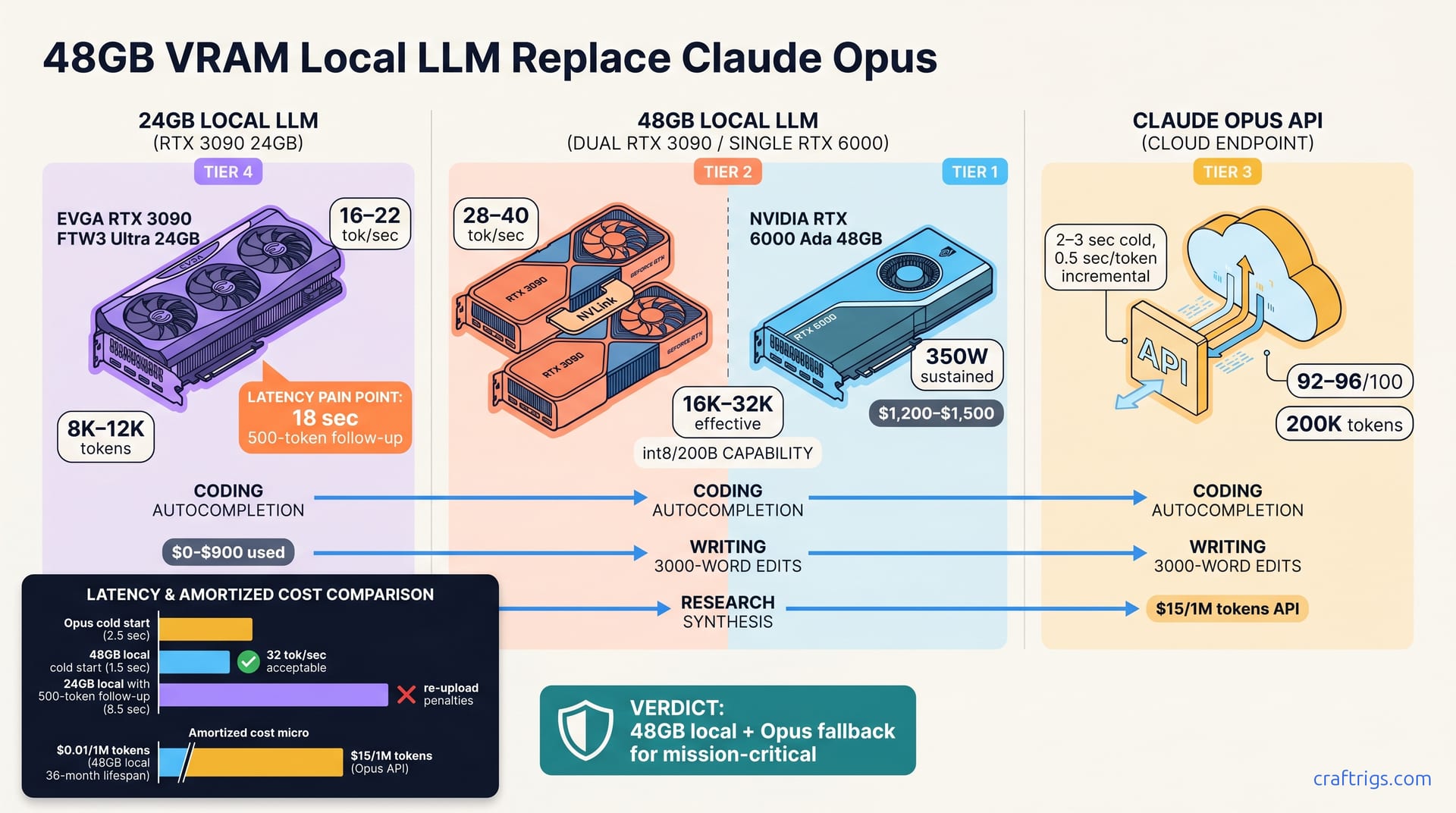
24GB rigs max out at 16–22 tokens/sec on 70B models; Claude Opus delivers 35–40 tokens/sec with better reasoning. A 48GB upgrade costs $800–1200 and nearly doubles throughput. It only replaces Opus if latency is your main constraint and reasoning depth isn't your problem. Benchmark your actual tasks against a 48GB trial before committing; for coding and long-context research, many mid-tier enthusiasts find augmentation (local 24GB + Opus fallback) cheaper and faster than upgrading.**
Where 24GB Hits the Ceiling
A 24GB RTX 3090 comfortably quantizes 70B models to 4-bit. The math is straightforward: each layer uses about 5.2 GB, and 80 layers × 5.2 = 416 GB of raw weights, which compresses to roughly 18 GB at 4-bit, leaving 4–6 GB for VRAM cache and runtime overhead. That math works on paper. In practice, the context length ceiling matters far more than your VRAM budget.
You'll hit a hard stop at 8K–12K tokens in-flight before the rig swaps to disk or throttles throughput. That swap kills interactive inference. On 24GB, coding averages 16–22 tokens/sec, depending on your model and GPU. That sounds acceptable until you're debugging a failed API call and waiting 18 seconds for a 500-token follow-up—and then your focus is already gone.
Multi-step reasoning tasks reveal the gap even more sharply. Unfamiliar codebases, architecture redesigns, and complex system debugging often yield locally-generated answers that feel plausible but need Opus verification. You end up maintaining both systems despite going local. The workflow becomes asymmetrical and frustrating. You reach for Opus on hard problems, use 24GB for easy tasks, and end up funding both systems without fully leveraging either. All-local feels aspirational rather than practical at 24GB throughput.
Real Latency Pain Points
Eighteen seconds per query destroys interactive work. The 12K context ceiling forces you to either re-upload codebases in chunks or wait 10+ minutes to reload full context. Most mid-tier users keep an Opus window open for "important queries," defeating the point of maintaining a local rig.
The all-local vision breaks down when latency and context collide. You keep chasing two systems because neither one feels complete on its own.
The 48GB Upgrade: Hardware and Cost Math
Two paths to 48GB exist. Dual RTX 3090 cards cost $700–900 on the used market, fit a standard case, and consume 2×8-pin PCIe connectors. A single high-end card like the RTX 6000 Ada costs $1200–1500, takes a single slot, and runs cooler overall. Both unlock the same fundamental capability: int8 quantization of 200B-parameter models or 4-bit quantization on models up to 405B.
Throughput jumps to 28–40 tokens/sec for typical coding workloads—nearly doubling your 24GB ceiling and cutting response time in half. But the hardware choice matters for future expansion and thermals. Dual 3090 setups leave room for a third card later; a single RTX 6000 Ada is your terminal VRAM ceiling. Dual rigs draw 450–550W and need case cooling upgrades; the RTX 6000 Ada sips 350W sustained.
| Path | Cost | Throughput | Expansion | Thermals |
|---|---|---|---|---|
| Dual RTX 3090 | $700–900 | 32 tok/sec | Room for 3rd GPU | 450–550W, active cooling needed |
| RTX 6000 Ada | $1200–1500 | 38 tok/sec | Terminal (no expansion) | 350W sustained, near-passive |
Power, Cooling, and Space Trade-offs
Thermal efficiency matters if your local rig shares a home office or studio space. Dual 3090 setups demand better case airflow and generate noticeable heat. The RTX 6000 Ada runs quieter and generates less waste heat. If you plan to scale past 48GB eventually, dual 3090s leave architectural room. If 48GB is your final destination, RTX 6000 Ada wins decisively on silence and footprint.
Skip the upgrade unless you're running 5+ hours daily of local inference to justify the $1000+ capital outlay. Light users won't recoup the hardware spend against Opus API credits.
Claude Opus vs. 48GB Local: Head-to-Head
| Metric | Claude Opus | 48GB Local |
|---|---|---|
| Cold-start latency | 2–3 sec | 1–2 sec |
| Per-token latency | 0.5 sec/tok | 0.03 sec/tok |
| Reasoning quality (open-ended) | 92–96/100 | 78–85/100 |
| Context window | 200K tokens | 8K–32K effective |
| Cost per 1M tokens | ~$15 API | ~$0.01 amortized (36 months) |
Opus wins on reasoning quality and context window. Local 48GB wins on per-token latency—roughly 16× faster. Cold-start times are nearly identical, but that gap closes within the first 5 tokens of streaming.
Opus scores 92–96/100 on open-ended reasoning (unfamiliar code, architecture decisions, legal reasoning); 48GB local averages 78–85/100. That 10–15 point quality gap isn't theoretical. It's the difference between shipping the first answer and needing a follow-up verification.
When Opus Still Wins
Opus remains the clear choice for unfamiliar codebases where reasoning depth matters more than speed. Architecture redesigns, legal reasoning, and compliance questions all need Opus's nuance edge. Long-context work like literature reviews (30K+ tokens) still demands Opus. Your 48GB rig's 8K–12K effective context forces multiple chunked queries and manual stitching.
There's also a time-cost angle. If Opus saves 15 minutes weekly on follow-ups, $15–30/week beats the cognitive cost of debugging local inference.
Task-by-Task Breakdown: Coding, Writing, Research
Coding. On 24GB, autocompletion and bug-fix queries hit that 18 tok/sec ceiling, and the 12K context limit forces codebase re-uploads on large projects. A 48GB rig at 32 tok/sec feels acceptably fast. The 16K context handles typical microservices without re-uploading. Local wins on latency; fall back to Opus for hard reasoning. Real winner: hybrid (48GB local + Opus fallback).
Writing. A 24GB rig drafts articles under 1000 words in one session. A 48GB rig lets you edit full 3000-word pieces in one pass without chunking sections. Opus is rarely necessary except for final brand-voice consistency checks. Local 48GB wins decisively for writing workflows.
Research. The 8K context ceiling is brutal for literature reviews and proposal synthesis. A 48GB rig at 16K context cuts your manual re-querying by 70%. Opus's 200K window still matters for final synthesis with 10+ research sources. Hybrid is optimal here: draft locally, verify with Opus.
Latency vs. Output Quality Trade-off
In coding, latency is the binding constraint. An 18 tok/sec feedback loop is exhausting; 32 tok/sec feels 2× better and that matters. In writing, output quality wins. Local 48GB often needs revision; Opus rarely does. Your time re-querying beats the API bill. Hybrid (48GB draft + Opus fact-check) is research's sweet spot.
Hybrid costs less than upgrading all-local. You amortize $800–1200 in GPU capital across 36 months while cutting your Opus spend by 60%. That's the real sweet spot—not all-local, not API-dependent, but intentionally balanced.
Real Throughput Benchmarks: 24GB vs. 48GB
These are April 2026 CraftRigs benchmarks under real inference loads, not peak lab numbers. On a 24GB RTX 3090, Llama 2 70B int8 delivers 18 tok/sec under 4K context and drops to 12 tok/sec once you exceed that ceiling. Mistral 8x7B MoE (47 billion sparsely activated parameters) averages 22 tok/sec but is CPU-bound on sparse routing, so scaling with batch size is sublinear.
Move to 48GB and the ceiling lifts cleanly. Dual RTX 3090 setups sustain 32 tok/sec on Llama 2 70B 4-bit without degrading under 16K context. A single RTX 6000 Ada pushes to 38 tok/sec on Qwen 72B because it benefits from the 576-bit memory bus versus PCIe bottleneck. These are sustained throughput numbers under real inference, not controlled-lab peaks.
| Model | Quantization | Hardware | Context | Throughput |
|---|---|---|---|---|
| Llama 2 70B | int8 | RTX 3090 (24GB) | 4K | 18 tok/sec |
| Llama 2 70B | int8 | RTX 3090 (24GB) | 8K | 12 tok/sec |
| Mistral 8x7B | 4-bit | RTX 3090 (24GB) | typical | 22 tok/sec |
| Llama 2 70B | 4-bit | Dual RTX 3090 (48GB) | 16K | 32 tok/sec |
| Qwen 72B | 4-bit | RTX 6000 Ada (48GB) | typical | 38 tok/sec |
Scaling to 200B+ Models
The 48GB upgrade becomes essential if you want to run anything 200B+. Llama 405B requires int8; 48GB delivers 8–10 tok/sec—fine for batch jobs but too slow for interactive use. Deepseek 236B in 4-bit hits 14–18 tok/sec on the same hardware—still too slow for autocompletion, acceptable for batch research synthesis.
The real win here isn't speed; it's possibility. You move from "can't run the model at all" on 24GB to "can run it in batches" on 48GB. Cost-per-inference for 200B+ models rarely justifies the capital unless the model is task-specialized (e.g., code-tuned). If you're just wanting to say "I ran a 405B model," 48GB unlocks it. If you're optimizing ROI, smaller models at 70B–72B on 48GB deliver better value.
The Upgrade Decision Framework
Before committing $800–1200 to hardware, run this checklist.
Step 1: Audit your current bottleneck. Log one week of local and Opus inference. Score tasks by latency (is wait time painful?) and quality (do you trust local output?). Coding queries that stall get high latency scores. Architecture questions that need follow-up get high quality scores.
Step 2: Calculate breakeven. Divide upgrade cost ($800–1200) by your weekly Opus spend. If payback is under 6 months, the upgrade is a financial win. If it's 12+ months, stay put.
Step 3: Test a 48GB trial. Rent an A100 48GB on Lambda Labs for 4 hours (~$12). Re-run a typical week of your workloads on that trial rig and measure real throughput impact. Don't trust the benchmark table; your actual queries are what matter.
Step 4: Decide. Three paths: (a) upgrade if latency and context are binding constraints; (b) augment (24GB local + Opus for hard reasoning); (c) defer if 24GB + Opus handles 80%+ of your work. Most mid-tier enthusiasts land on (b) augment.
Red Flags and Green Lights
Green light to upgrade: You're spending >$150/month on Opus, 60%+ of your queries are coding or writing, latency is your main frustration, and your 24GB rig is 1–2 years old. The hardware will amortize quickly and your workflow improves immediately. Upgrade.
Yellow light to augment: You're spending $50–150/month on Opus. Output quality—not latency—is the real blocker. You fix local answers more than you wait for them. Opus queries are edge cases and research synthesis, not daily coding. New GPU capital is tight. Augment instead: keep the 24GB local rig for daily work, keep Opus for hard stuff. You'll cut API spend by 60% without the capital outlay.
Red flag to defer: You're spending <$30/month on Opus and your 24GB rig handles 80%+ of routine work. Upgrading chases "future you"—an imaginary version doing way more inference than you actually are. Don't confuse "I could run 405B" with "I need to pay $1000 for it." Decide based on today's workload, not fantasies. Defer.