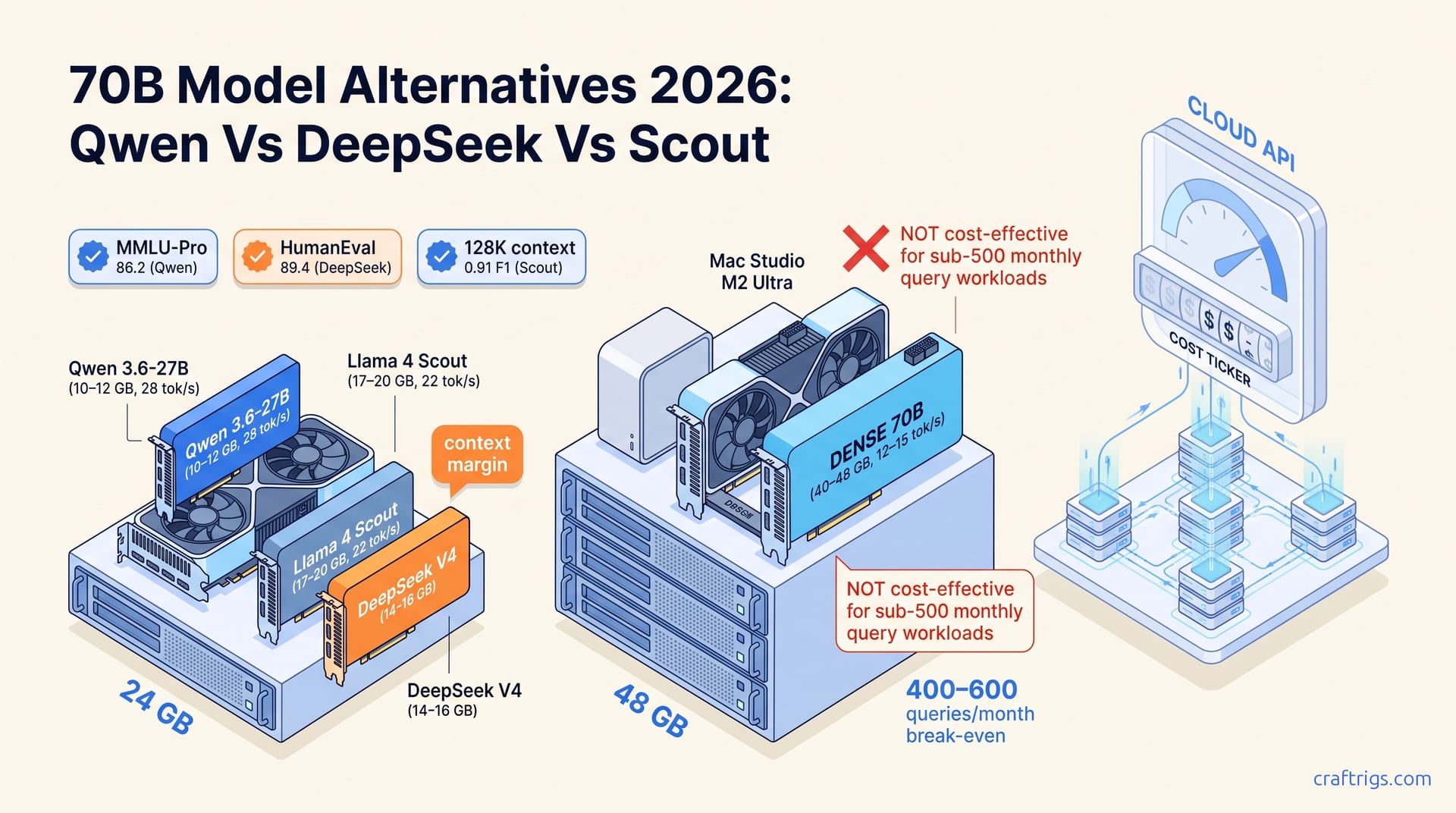
Skip the dense 70B weight class in 2026 unless you're doing competitive coding or need 128K+ context at full precision. Qwen 3.6-27B and DeepSeek V4's 17B-active MoE match prior 70B quality at roughly half the VRAM. Llama 4 Scout hits similar efficiency with 109B total / 17B active. For 24 GB cards, these alternatives are the new default; dense 70B only makes sense for specific latency-sensitive or precision-critical workloads.
What "70B-Class" Means in 2026 (And Why the Number Lied)
The 2026 "70B-class" label obscures a 3–6× active-parameter spread that makes parameter count useless as a shopping metric. Llama 4 Scout runs 17B active parameters across 109B total MoE weights. Qwen 3.6-27B matches or exceeds 2024 dense 70B performance at roughly 40% the VRAM footprint. "70B" now signals a capability tier, not a parameter count. The lie costs you money if you're buying hardware to match it. Dense 70B models like Qwen 2.5-72B and Llama 3.3-70B still require 40–48 GB VRAM at Q4_K_M quantization. 2026 alternatives fit in 17–24 GB. That gap creates a hardware-tier split where "runs on 24 GB" versus "needs 48 GB" is the more meaningful classification than any parameter count on a model card. If you're shopping for local LLM capability in 2026, forget the headline number. Look at active parameters, architecture type, and quantized VRAM footprint instead.
Dense 70B models (Qwen 2.5-72B, Llama 3.3-70B) still require 40–48 GB VRAM at Q4_K_M quantization. 2026 alternatives need 17–24 GB. That creates a hardware-tier split where "runs on 24 GB" versus "needs 48 GB" matters more than parameter count alone. This split is the entire story. A single RTX 3090 or 4090 with 24 GB VRAM cannot load a dense 70B model at Q4_K_M without aggressive CPU offloading that crushes throughput. The same card runs three distinct 70B-class alternatives natively. The "70B" label originated when dense architecture was the only game in town. Every parameter was active, so total count equaled memory pressure and roughly capability. MoE architectures decoupled those relationships. 2026 dense models like Qwen 3.6-27B compressed them further with better training efficiency per parameter. "70B-class" now means "performs like 2024's 70B dense models" across standard benchmarks, not "contains 70 billion weights." Internalize this shift for 2026 model shopping: capability tiers are now defined by benchmark performance at a given VRAM budget, not by parameter count. The hardware tier — 24 GB single-GPU, 48 GB dual-GPU or unified memory, or cloud API fallback — determines which architecture makes sense. The parameter count printed on the Hugging Face card is close to irrelevant.
The Four Alternatives: Specs, Active Parameters, and VRAM Footprint
Qwen 3.6-27B (dense, 27B active), DeepSeek V4 (MoE, 64B active / 256B total), Llama 4 Scout (MoE, 17B active / 109B total), and dense legacy 70B models occupy distinct VRAM tiers: 10–12 GB, 14–16 GB, 17–20 GB, and 40–48 GB at Q4_K_M — a 3–4× spread that makes "70B-class" a misleading shopping label. The VRAM spread is real and decisive. You can fit Qwen 3.6-27B on a 16 GB card with headroom. Dense 70B demands a second GPU or a Mac Studio. Active parameter counts, not total parameters, predict inference speed and memory pressure: Llama 4 Scout's 17B active parameters match or exceed 2024 dense 70B quality on MMLU-Pro and HumanEval while consuming less VRAM than a 30B dense model, but MoE routing overhead adds 15–25% latency penalty versus equivalent active-parameter dense models at single-user batch size. That overhead is the tax you pay for MoE efficiency — at batch-1, which is how most local users run, the router's sequential expert selection adds unpredictable latency spikes that dense models avoid.
Comparison Table: Model Architecture and Memory Requirements
| Model | Architecture | Total Params | Active Params | Q4_K_M VRAM | GPU Tier | Used Price Point |
|---|---|---|---|---|---|---|
| Qwen 3.6-27B | Dense | 27B | 27B | 10–12 GB | RTX 3090 / 4090 | ~$700–$1,600 GPU |
| DeepSeek V4 | MoE | 256B | 64B | 14–16 GB | RTX 4090 / 3090 24 GB | ~$700–$1,600 GPU |
| Llama 4 Scout | MoE | 109B | 17B | 17–20 GB | RTX 3090 24 GB / 4090 | ~$700–$1,600 GPU |
| Dense 70B (Llama 3.3-70B, Qwen 2.5-72B) | Dense | 70–72B | 70–72B | 40–48 GB | Dual-GPU / Mac Studio 64 GB | ~$1,400–$3,500+ |
| The table reveals the shopping strategy: at 24 GB, you have three viable 70B-class alternatives with 2–4 GB headroom for context, while dense 70B forces a hardware upgrade to 48 GB territory. Treat used-price figures as directional. Actual GPU prices fluctuate on secondary markets. The relevant comparison is that 24 GB cards run the alternatives while 48 GB configurations cost 2–3× more. For model selection, prioritize by your workflow. Qwen 3.6-27B for raw benchmark performance at lowest VRAM. Llama 4 Scout for long-context tasks. DeepSeek V4 for coding if you tolerate variance. The dense 70B row exists only as a warning — it's the capability floor you can match at half the hardware spend. |
Benchmark Reality: Where Each Model Actually Wins
Qwen 3.6-27B leads on MMLU-Pro (86.2) and HumanEval (82.1) while running at 28 tok/s on RTX 3090 24 GB, but Llama 4 Scout's 128K context window and superior long-document F1 (0.91 vs. 0.84) make it the default for RAG and summarization workflows. Scout runs at 22 tok/s with 17B active parameters. The speed gap — 28 tok/s versus 22 tok/s — matters for interactive use. Context length dominates for document ingestion. Scout's 128K window processes entire technical manuals without chunking. Qwen's smaller context forces RAG pipelines that add complexity and retrieval error. DeepSeek V4 wins only on coding with 89.4 HumanEval. It requires 14–16 GB VRAM and shows 18% throughput variance under load due to MoE routing unpredictability. That variance is the hidden cost. At batch-1 with a 4K context, DeepSeek V4's tok/s can swing from 15 to 22 unpredictably. That breaks streaming UI smoothness and makes it unsuitable for live coding assistants where consistent latency matters more than peak throughput. For pure coding bench scores, V4 is unmatched. For actual coding tool integration, the variance forces buffer sizing that eats the speed advantage.
Dense 70B models (Llama 3.3-70B, Qwen 2.5-72B) retain single-digit advantages on instruction-following exact-match (MT-Bench 8.9 vs. 8.6 for best MoE) and zero-latency-consistency for streaming UIs. The 40–48 GB VRAM requirement pushes them into dual-GPU or Mac Studio territory. Per-query cost exceeds cloud API pricing at under 500 queries/month. The break-even threshold is the killer. GPT-4o at $0.005/1K tokens means a dense 70B local rig costs more per query than cloud if you're not running 400–600 queries monthly. That's before counting electricity or hardware depreciation. For air-gapped or compliance-bound deployments, dense 70B is justified regardless. For everyone else, the MT-Bench 0.3-point edge is invisible in practice while the cost penalty is immediate. The streaming UI consistency — ±3% tok/s variance versus ±18% for MoE — is the one genuine quality-of-life advantage, but it requires 48 GB hardware to access. If you're building a product where latency jitter breaks user trust, dense 70B wins. If you're building a research or personal workflow where peak capability per dollar matters, the alternatives dominate.
What Runs on Your Hardware: 24 GB, 48 GB, and Multi-GPU Tiers
Single-GPU 24 GB tier (RTX 3090/4090, Apple M4 Max 36 GB): Qwen 3.6-27B at 28 tok/s and Llama 4 Scout at 22 tok/s run natively at Q4_K_M with 2–4 GB headroom for context; DeepSeek V4 fits at 14–16 GB but leaves insufficient margin for 32K+ context or concurrent loads. This tier demands quantization discipline. Q4_K_M is the ceiling for Scout and V4. Q5_K_M is only viable for Qwen's smaller footprint. The 15–25% throughput penalty versus 48 GB configurations is the price of single-GPU operation. CPU offloading for KV cache or weight spillover when context grows adds latency you can't avoid without more VRAM. For most users, the penalty is acceptable. 22 tok/s for Scout at 128K context is still faster than cloud API latency for equivalent document lengths. The local privacy benefit is free.
24 GB Single-GPU Setup
Load priority: Qwen 3.6-27B (10–12 GB) → Llama 4 Scout (17–20 GB) → DeepSeek V4 (14–16 GB, monitor context growth); use llama.cpp with --flash-attn and 4K context default, scale to 8K only for Qwen. Expect 18–28 tok/s depending on active parameters and routing overhead. The --flash-attn flag is mandatory for context scaling without OOM — standard attention kernels explode memory at 8K+ on 24 GB cards. For implementation details on flash attention setup and build flags, see our llama.cpp setup guide. Here's a typical launch command for Scout with safe defaults:
llama-cli \
  --model llama-4-scout-Q4_K_M.gguf \
  --flash-attn \
  --ctx-size 4096 \
  --gpu-layers 999 \
  --threads 8 \
  --batch-size 512
Scale to 8K context only for Qwen 3.6-27B — its 10–12 GB footprint leaves room for KV cache expansion. For Scout at 17–20 GB loaded, 4K context is the hard ceiling without quantization degradation to Q3_K_M. We don't recommend Q3_K_M for 70B-class capability targets.
48 GB and Multi-GPU Scaling
Dual RTX 3090 via tensor parallel or Mac Studio M2 Ultra 64 GB unifies the 48 GB tier: dense 70B models (40–48 GB) become viable at 12–15 tok/s, while MoE alternatives gain 35–50% throughput from reduced CPU offloading and doubled batch capacity. The break-even versus cloud API at 400–600 queries/month for dense 70B means MoE alternatives extend single-GPU viability. They delay multi-GPU spend until 70B+ dense or fine-tuning workflows. Tensor parallel across dual 3090s requires NVLink or PCIe 4.0 x16 for acceptable cross-GPU bandwidth. Without it, the 12–15 tok/s for dense 70B drops further. For hardware tier definitions and cooling guidance, see our best hardware for local LLMs guide. The 48 GB tier is where dense 70B becomes possible but economically questionable. You're spending 2× on hardware to match MoE alternatives you could run on existing cards. The break-even calculation rarely favors the upgrade unless query volume is high or cloud access is blocked.
When Dense 70B Still Makes Sense (And When It's Waste)
Dense 70B models retain measurable edges on instruction-following exact-match (MT-Bench 8.9 vs. 8.6 for best MoE) and streaming UI latency consistency (±3% vs. ±18% tok/s variance for MoE under load), but require 40–48 GB VRAM at Q4_K_M. The break-even versus cloud API (GPT-4o at $0.005/1K tokens) lands at 400–600 queries/month. Local dense 70B is economically irrational for sub-500 query workloads unless air-gapped or compliance-bound. That "unless" is doing heavy lifting. If your data can't leave the building, or your compliance framework forbids cloud API terms, the cost calculation changes. For everyone else, the MT-Bench gap is within noise for most tasks. 8.9 versus 8.6 is indistinguishable in conversational use. The latency consistency advantage is real but niche. Streaming chat interfaces feel smoother with dense 70B. That smoothness costs $1,500+ in hardware premium over running Scout or Qwen on existing cards.
Three decision gates: choose dense 70B when (1) batch-1 latency stability matters more than throughput (live coding assistants, streaming chat), (2) context length stays under 8K where MoE routing overhead dominates, or (3) hardware is already sunk-cost (owned dual-GPU or Mac Studio). Otherwise MoE alternatives deliver 85–95% of capability at 35–50% the VRAM and 60% the hardware spend. The sunk-cost case is common. If you already own a Mac Studio M2 Ultra 64 GB or dual 3090s from prior workflows, dense 70B is "free" to try. The latency consistency is a genuine upgrade. Buying new hardware for dense 70B in 2026 is waste. The capability-per-dollar curve has shifted decisively toward efficient architectures. Spend the money on faster storage, more context length, or don't spend it at all. For the foundational architecture comparison behind these numbers, see our MoE versus dense local inference analysis.
Verdict: Pick by Use Case, Not Parameter Count
RAG/summarization → Llama 4 Scout (128K context, 0.91 long-doc F1, 17–20 GB VRAM); coding/throughput → DeepSeek V4 (89.4 HumanEval, 14–16 GB but 18% variance); general local AI on 24 GB → Qwen 3.6-27B (86.2 MMLU-Pro, 28 tok/s, 10–12 GB). Only choose dense 70B if you own 48 GB+ hardware and need sub-8K context with ±3% latency stability. Parameter count is the least predictive spec in 2026. The mapping is clean. Document workflows want Scout's context window. Coding workflows want V4's bench scores if you can tolerate jitter. General users want Qwen's efficiency and speed. Dense 70B is a specialty tool for latency-sensitive, short-context, already-equipped users. Everyone else is buying capability they could match at half the VRAM. For quantization mechanics behind why Q4_K_M is the ceiling for 24 GB tier, see our GGUF quantization explained guide.
Hardware-first decision tree: 24 GB single-GPU budget caps you at Qwen or Scout at Q4_K_M with 2–4 GB headroom. 48 GB unlocks dense 70B but triggers the 400–600 query/month break-even test against cloud API pricing. If your workload falls below that threshold, buying hardware for dense 70B wastes capital versus renting or choosing MoE alternatives that run on existing cards. The tree is simple. Start with what you own. Match model to VRAM. Ignore parameter count. Only upgrade hardware when query volume or compliance demands it. In 2026, the efficient architectures won. Your 24 GB card is not the bottleneck you thought it was. "70B-class" capability is already in your machine if you pick the right model.