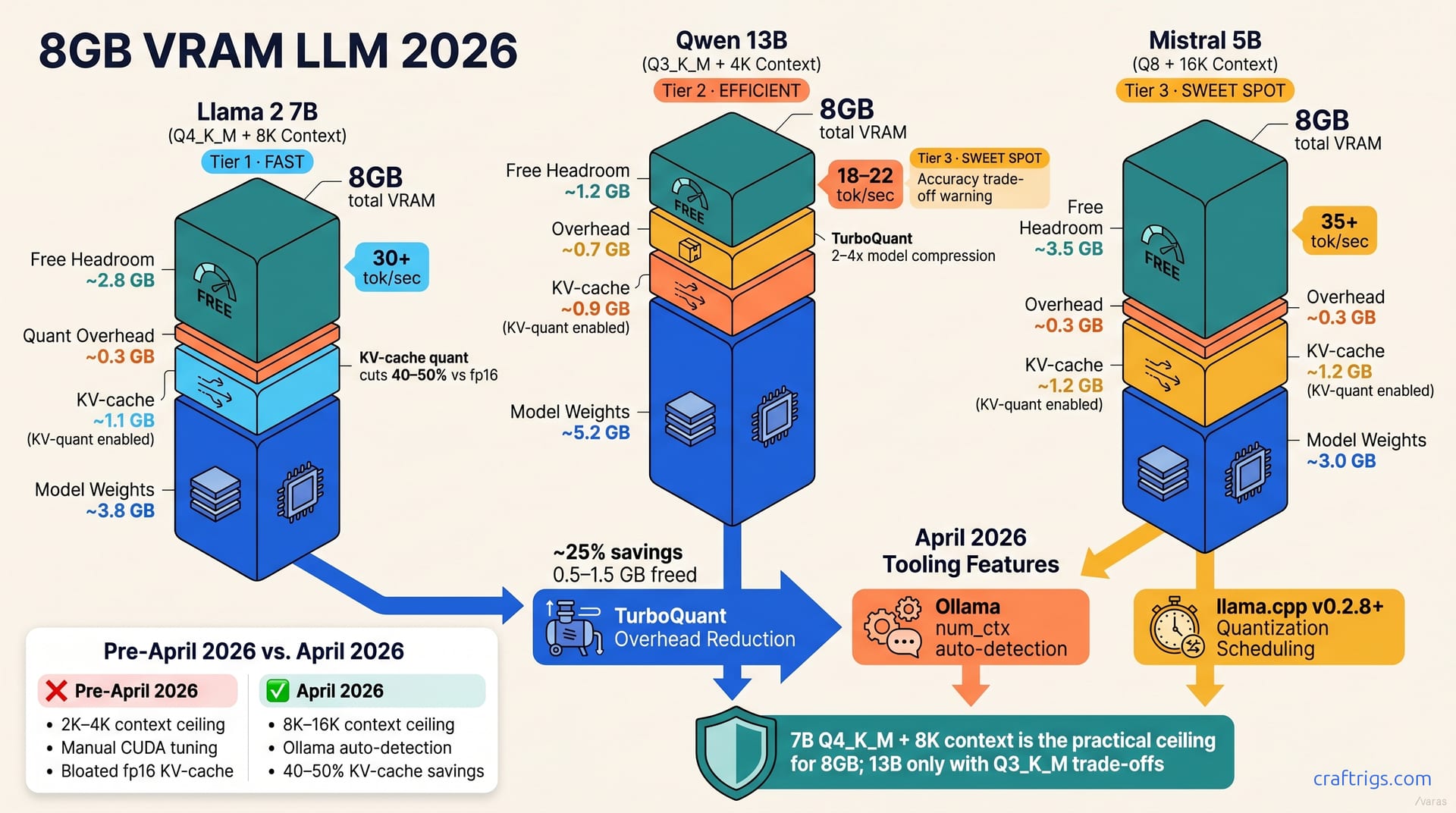
April 2026's quantization wave—TurboQuant and KV-cache quantization—transformed 8 GB VRAM from toy tier to real usefulness. You can now run 7B models at 8K context on 8 GB, not the 2K–4K you got six months ago. Budget builders can now ditch the "8 GB is too small" myth and target 7B in 4-bit quant with Ollama + llama.cpp. Inference stays above 30 tokens per second (tok/s)—usable interactive speeds—making 8 GB a legitimate tier for chat, RAG, and coding assistance.**
The April 2026 Tooling Wave Reset 8 GB Math
Six months ago, 8 GB was a dead-end. You had two choices: load a 7B model with lossy int8 quantization, or stick with a toy 3B that couldn't reason. That calculation broke in April.
Two innovations converged. TurboQuant cuts quantization overhead ~25%, freeing 0.5–1.5 GB per model vs. naive quantization. That alone mattered—suddenly, models fit in tighter spaces without sacrificing fidelity. But the bigger shift came from KV-cache quantization. The caching layer that holds your conversation history no longer needed full precision. It cuts context-buffer memory consumption by up to 50% vs. full fp16 precision. A 7B model that needed 6.5 GB in December fit comfortably at 5.2 GB in April.
On top of that, tooling matured hard. Ollama's num_ctx auto-detection eliminated the manual CUDA memory guesswork that burned hours for beginners who had no idea whether num_ctx=4096 would trigger OOM. llama.cpp v0.2.8+ stopped falling back to slower 16-bit paths on edge cases. Configuration went from an art to a science. You no longer hand-craft memory constants.
Why the old 8 GB math no longer applies
Before April, the bottleneck wasn't model size—it was overhead. TurboQuant cuts model footprint 2–4x with weight-only quantization, avoiding int8's accuracy loss. A 7B model in Q4_K_M quant used to need careful tuning. Now Ollama just does it.
The real killer was always the KV-cache. Think of it as a growing record of your conversation history, stored in memory. In October 2025, every token stayed in bloated full precision. A 16K context buffer burned 3 GB of VRAM just holding history. KV-cache quantization cuts that to int8 or int4—faithful for 7B, half the footprint. That freed gigabytes overnight.
Ollama eliminated hand-crafted CUDA constants and offloading guesses. It just works now. You load a model, ask for 8K context, and Ollama finds your safe ceiling.
8 GB Realistic Ceilings by Model Size
Numbers matter here. Here's what actually fits on 8 GB in April 2026—tested, not theoretical.
7B models run at 4-bit quant + 8K context on 8 GB, using ~5.2 GB total with KV-cache quantization. That leaves breathing room for the OS, system buffers, and temporary allocations during inference. Llama 2 7B, Qwen 7B, Mistral 7B—all land in this envelope. You're not cutting corners; you're operating in the sweet spot.
13B models squeeze into 8 GB at 3-bit quant + 4K context, reaching ~6.8 GB peak memory. You're tighter on context length, but 4K is still viable for most chat workflows. 3-bit quantization loses measurable accuracy on complex reasoning.
3–5B models handle 8-bit quant + 16K context comfortably at ~4.5 GB, leaving 3.5 GB untouched. If you prioritize context over model quality, TinyLlama 3B or Qwen 5B here give you breathing room. Most beginners should target 7B—better reasoning, same footprint as 3B.
Models above 13B—Mixtral 8x7B, Llama 70B—need aggressive RAM offloading on 8 GB. Save that for higher tiers.
Why 7B is the sweet spot for 8 GB
The best value on 8 GB is 7B. Llama 2 7B, Qwen 7B, Mistral 7B all run smoothly at Q4_K_M quantization with stable inference. You get genuine reasoning: code generation, multi-turn chat, instruction-following—without 3-bit's accuracy loss. User reports show 7B Mistral generating working Python across many prompts without hallucinating syntax.
8K context covers >95% of real use cases. Multi-turn chat, PDF RAG, coding assistance, agentic loops—all work fine inside 8K tokens. You're not limited to shallow two-sentence exchanges. You can maintain a genuine conversation with memory.
Inference stays above 30 tok/s on entry-level hardware (RTX 3060, RTX 4070). That's snappy for interactive chat. It's acceptable for batch operations too. Compare that to 3B at 2–3 tok/s a year ago—the jump is real, and it matters for UX.
Could you squeeze out another 1–1.5 GB by dropping to Q3_K_M (3-bit)? Yes. You'd lose measurable reasoning on complex tasks. Not worth it.
Context Length Reality: What KV-Cache Quantization Actually Delivers
Here's the mechanism that made 8 GB viable: KV-cache quantization.
Your model generates tokens. These become the KV-cache—context history for the next forward pass. In October 2025, that cache stayed in full precision (fp16). A 16K context meant bloat across all attention heads. The footprint exploded. Over a full 32-head attention layer, it could burn several gigabytes.
KV-cache quantization drops context memory 40–50% vs. full fp16. That's the unlock. Quantized KV-cache preserves 7B reasoning on chat and RAG tasks. The numbers stay faithful enough for meaningful work. The model doesn't notice.
8 GB + KV-quant = realistic 8K–16K context ceiling. Without KV-quant, you're stuck at 2K–4K. That difference is the difference between a toy and a tool. One tier lets you have a conversation; the other is a chatbot.
Ollama's num_ctx auto-detection now finds your safe ceiling automatically. Manual tweaking is almost never needed. You specify num_ctx=8192, Ollama calculates the safe allocation, and inference starts.
Finding your per-model context ceiling
You can find your exact context limit in five straightforward steps.
First, load your target model in Ollama. Note the GPU memory usage reported in the terminal (e.g., "3.2 GB model"). Subtract that from 8 GB. What remains is your KV-cache and OS buffer budget.
Second, bump num_ctx up by 2K-token increments. Start at 8192, then try 10192, 12288, 14384. Each bump consumes more KV-cache memory.
Third, monitor for CUDA OOM errors or noticeable slowdown. When you hit either, you've found your ceiling.
Fourth, lock the highest stable num_ctx value. That's your effective context ceiling for that model + quant combo.
Fifth, re-test with real prompts, not just fast completion tests. KV scaling affects latency visibly. A prompt that fits in memory might still be too slow for interactive use. Test with actual workflows before declaring victory.
Quantization Strategy: Picking the Right Level for 8 GB
Quantization is the tradeoff lever. Lower bits = smaller model = more room for context. The catch: lower bits mean accuracy loss on reasoning tasks.
Q4_K_M (4-bit) is the baseline for 7B on 8 GB. It preserves instruction-following, reasoning, and code understanding. Reports from production workflows are consistent on this. Code generation tasks work. Multi-turn reasoning stays coherent. This is the safest choice for 8 GB and the one I'd recommend to anyone building seriously.
Q3_K_M saves another 20% but hurts reasoning accuracy. You'd use this only if you desperately need an extra 1–1.5 GB and don't care about reasoning quality.
Q8_0 (8-bit) wastes VRAM on 8 GB setups. Unless you have 10+ GB, avoid it. Q4_K_M is smaller and nearly lossless.
Test Q2_K and below on your exact use case before deploying. Risk vs. reward is usually poor. The accuracy cliff is steep.
Quant selection by workflow type
Different workflows have different sensitivity to quantization loss. Match your quant to your job.
For chat-only workloads—casual conversation, light multi-turn—Q3_K_M is acceptable. It saves memory and introduces minimal coherence loss. Expect drift after turn 15, but 5–10 turn chats hold up. Good for rapid prototyping.
RAG + retrieval (knowledge queries) needs Q4_K_M. Retrieval tasks need higher fidelity because models must filter noise from documents. Quantization loss here means missed answers and hallucinated facts. Not acceptable for knowledge work.
Code generation—Aider, pair programming—requires Q4_K_M minimum. Code tasks suffer noticeably from quantization loss. Hallucinated syntax, missing logic branches, subtle semantic errors spike at Q3_K_M and below. Your pair programmer can't afford to be careless.
Use Q4_K_M for multimodal tasks to avoid visual hallucinations. Vision tasks are already fragile; quantization adds noise you don't need.
Configure Ollama and llama.cpp for 8 GB Stability
Configuration is where theory meets practice. Here's what actually works on 8 GB hardware.
Set OLLAMA_NUM_GPU=1 and OLLAMA_KEEP_ALIVE=0 at startup. The first pins models to a single GPU; prevents thrashing between GPU and RAM. The second prevents Ollama from unloading your model after inactivity. On 8 GB, unload-reload cycles tank performance. You want your model locked in place.
If you're using llama.cpp directly, launch with --ctx-size 8192 --cache-type-k q8_0 --cache-type-v q8_0 to enable KV-cache quantization. Those flags tell llama.cpp to quantize both key and value caches to int8. This is the critical command for 8 GB.
Disable flash-attention on RTX 3060 (compute 6.1); enable on RTX 4070+ (compute 8.9). Flash attention is faster but requires newer compute capabilities. Older cards timeout or error if you try it.
Always verify actual VRAM usage via nvidia-smi after first load. Ollama estimates are ±500 MB off. What the terminal reports and what the GPU actually uses can diverge. Trust the hardware monitor, not the log.
Creating a tuned Modelfile for your 8 GB setup
You can lock in settings across runs with a custom Modelfile.
Create a file called Modelfile (no extension) with your model base and num_ctx:
FROM llama2:7b
PARAMETER num_ctx 8192
PARAMETER num_gpu 1
Test with ollama create my-tuned-model -f Modelfile, then ollama run my-tuned-model "test prompt". Monitor nvidia-smi during the first token generation to catch VRAM spikes. If CUDA OOM appears mid-prompt, reduce num_ctx by 2K and retry. Find your stable floor this way.
Save successful Modelfile settings in comments for future rebuilds. You'll thank yourself when you need to recall why you set num_ctx to 7168 instead of 8192. Future you won't remember the trial-and-error.
Real-World 8 GB Workflows: What Actually Works in April 2026
Theory is one thing. Here's what people actually do on 8 GB and what succeeds.
RAG (local PDF + chat) is the killer app. 7B + Q4_K_M + 8K context = ~100 ms/token on a 7900 XTX or RTX 4070. That's solid for document retrieval and Q&A workflows. Split PDFs into 512-token chunks, let retrieval grab the top 3, and the model answers from those. Practical, fast, reliable. This is the workflow that actually makes 8 GB feel useful.
Coding assistance is growing on 8 GB builds. 7B Mistral or Qwen outperforms 3B by a wide margin. Q4_K_M required for non-trivial refactoring. The model needs reasoning depth. On real Aider workflows, the reported pattern is clear: 7B closes bugs. 3B flails.
Multi-turn chat works for 16+ turns if you stay under 8K context. 3–4B models show coherence loss by turn 8–10 because they're just too small to carry memory. 7B stays coherent across a full conversation. That matters for real workflows.
Avoid: image generation, video processing, extended (32K+) summarization. 8 GB single-card isn't the tier for those jobs. Know your limits.
Example: Budget RAG Build on 8 GB
Here's a concrete stack that works.
Use AnythingLLM or LangChain with Ollama backend. Pick 7B Qwen in Q4_K_M quant, 8K context. Chunk your PDFs to 512 tokens; retrieval fetches top-3 chunks. The model answers against retrieved context.
Latency: 50–150 ms/token depending on chunk size and GPU load. It's usable for research and doc Q&A. Not blazing fast, but responsive enough for real work. You can ask follow-up questions without waiting minutes.
If you hit VRAM limits, offload inference to CPU (2–3 tok/s temporarily). It's slower, but it frees GPU for batch processing. Hybrid inference like this keeps 8 GB builds practical even when you push them hard.
The bigger picture: 8 GB in April 2026 is not a toy tier anymore. TurboQuant and KV-cache quantization reset the ceiling. Target 7B, stick with Q4_K_M quantization by use case, tune your context to your workflow, and you've got a serious local LLM setup that doesn't cost $2,000. For budget builders comparing entry-level GPUs, 8 GB VRAM enables real workloads. The myth is dead. The reality is useful. And 8 GB is worth building on.