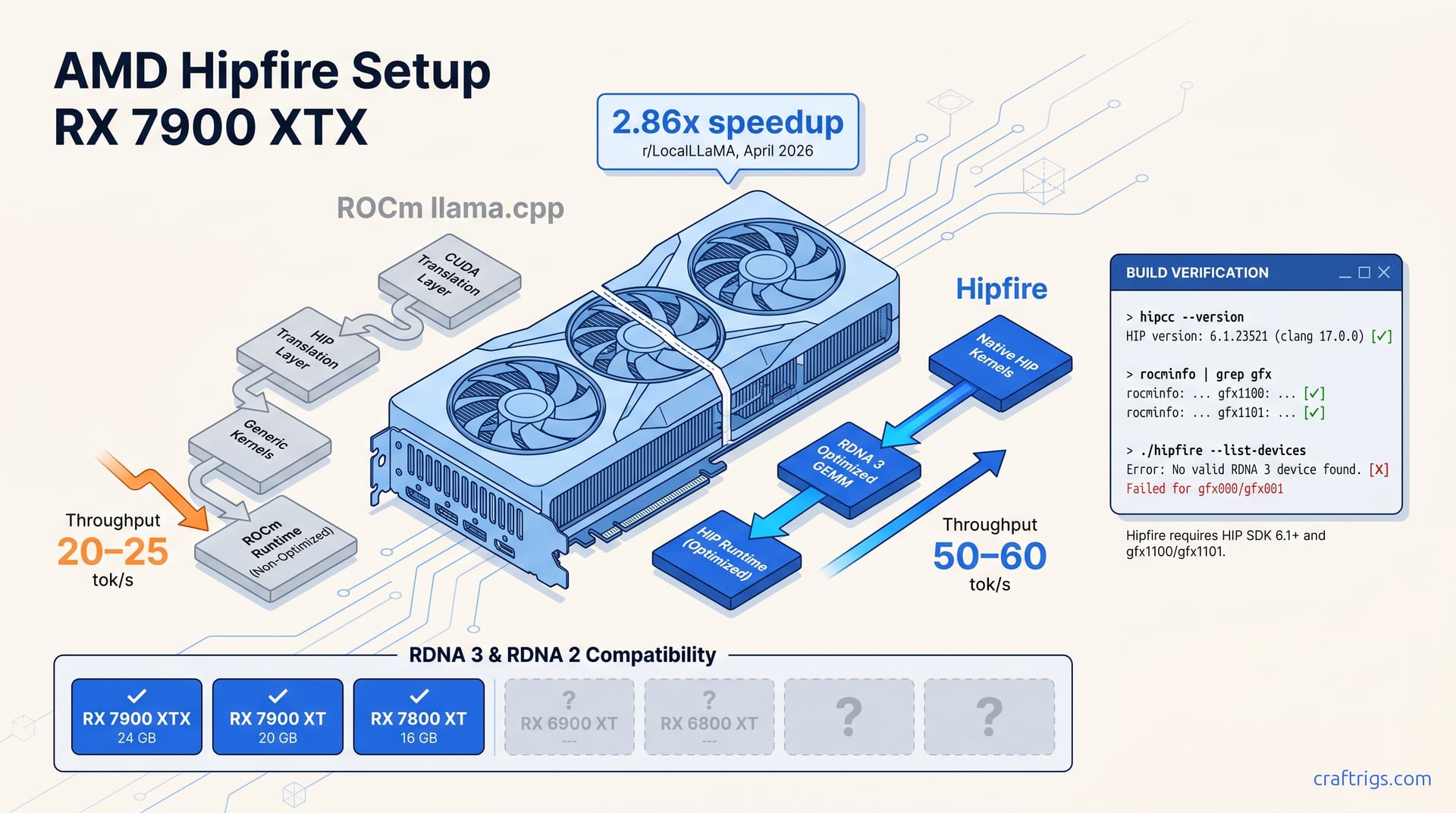
Build Hipfire from source against ROCm 6.2+ and run your first local LLM at 2.86x the speed of ROCm llama.cpp on RX 7900 XTX. It's Linux-only. RDNA 3 is confirmed. Check GitHub for your specific model's support status. The install itself is a 10-minute clone-and-build with no ROCm recompilation.
What Hipfire Is — and Why AMD Users Finally Have a Native Option
Hipfire isn't another ROCm llama.cpp fork with tweaked flags. It's AMD's native HIP-based inference runtime, built from scratch for RDNA 3 GPUs — no CUDA-to-HIP translation layer, no generic kernels shoehorned onto Navi 31.
The project surfaced from AMD internal development and hit public GitHub with a reported 2.86x speedup over ROCm-based llama.cpp on the RX 7900 XTX. That number comes from a single r/LocalLLaMA benchmark post. It garnered 301 upvotes in April 2026. This isn't an AMD official test. But the community traction makes it impossible to ignore.
ROCm llama.cpp runs through hipify-perl converted CUDA code with all the abstraction overhead that implies. Hipfire writes directly to the metal. Native HIP kernels optimized for RDNA 3's wave32 execution and local data share patterns — that's the pitch. Matrix multiplication and attention operations skip the generic translation layer entirely.
Here's the honest catch: Hipfire has minimal official documentation. The GitHub repo is the documentation. Community discovery is happening in real time. Today's working build command might shift next week. If you're an AMD user who's watched NVIDIA get vLLM, TensorRT-LLM, and every new "fast inference" release while you recompile ROCm for the third time, this tradeoff probably feels familiar — and worth it.
The broader context matters too. AMD hardware has been capable of competitive local LLM performance for years; the gap was tooling, not silicon. Hipfire doesn't close that gap entirely. It's Linux-only, single-GPU, and picky about model architectures. But it's the first AMD-native runtime that treats RDNA 3 as a first-class citizen rather than a CUDA afterthought. For a segment that's been told "just switch to NVIDIA" one too many times, that's significant.
The same pattern repeats every ROCm release: promise, then fragmentation. Hipfire's existence doesn't fix ROCm's broader brittleness. But it does offer a path where your 24 GB VRAM card actually breathes at the speed the spec sheet suggests.
Compatible Hardware and What's Still Unclear
Confirmed: RDNA 3 cards — RX 7900 XTX (24 GB), RX 7900 XT (20 GB), RX 7800 XT (16 GB) — are the first validated targets, with the 2.86x speedup benchmarked specifically on the 7900 XTX. These three share Navi 31/32 architecture with unified memory and hardware ray-tracing. The inference speedup likely derives from optimized compute shader paths on these specific ASICs. Not magic — just kernels that finally match the silicon.
Unconfirmed/Testing: RDNA 2 status remains unresolved. GitHub issues show users attempting builds on RX 6900 XT and RX 6800 XT with mixed results. No official compatibility matrix exists yet. Pre-RDNA cards (Vega, Polaris) lack the wave32 and matrix instruction extensions that Hipfire's kernels likely target. They're assumed unsupported but not explicitly documented.
Explicitly excluded: NVIDIA CUDA hardware, Intel Arc, and Apple Silicon. Hipfire is HIP-only and won't compile on non-AMD GPU architectures. Don't try — the gfx architecture flags have no NVIDIA equivalent, and the build will fail at kernel compilation with unknown target errors that look like solvable configuration problems but aren't.
VRAM floor: 16 GB appears to be the practical minimum for running 7B Q4_K_M at context lengths above 2K tokens. 24 GB enables 30B models and larger contexts without offloading to system RAM. This isn't generous headroom — it's the floor. Push past it and you'll watch your tok/s crater as the system RAM shuffle kicks in.
RDNA 3 Cards — The Known Working Set
| Card | VRAM | Status | Source |
|---|---|---|---|
| RX 7900 XTX | 24 GB | Confirmed, benchmarked | r/LocalLLaMA post, 301 upvotes |
| RX 7900 XT | 20 GB | Confirmed by repo | Hipfire GitHub README |
| RX 7800 XT | 16 GB | Confirmed by repo | Hipfire GitHub README |
All three share Navi 31/32 architecture with unified memory and hardware ray-tracing; the inference speedup likely derives from optimized compute shader paths on these specific ASICs. The 7900 XTX's 960 GB/s memory bandwidth is the star here. Hipfire's GEMM kernels reportedly achieve higher sustained GB/s by keeping data GCD-local and reducing cross-die traffic on the XTX's dual-GCD design.
If you're considering the RX 7900 XTX specifically for local LLM, this is the runtime that justifies the purchase. For 24 GB VRAM at current prices, nothing else touches it — provided you're on Linux and willing to build from source.
RDNA 2 and Older — The Uncertainty Zone
RX 6900 XT, RX 6800 XT, and RX 6700 XT users have opened GitHub issues reporting build failures or silent GPU non-detection; no maintainer confirmation of support timeline. The pattern is familiar. AMD drops a tool. The community tests backward compatibility. Official clarity arrives weeks or months later — if at all.
Pre-RDNA cards (Vega, Polaris) lack the wave32 and matrix instruction extensions that Hipfire's kernels likely target. They're assumed unsupported but not explicitly documented. If you're on older hardware, the honest read is: don't wait for this. The architectural gap is real. Hipfire's MVP scope suggests maintainers are focused on Navi 31/32 optimization, not legacy enablement.
What You Need Beyond the GPU
ROCm 6.1+ with working rocminfo and hipcc — Hipfire builds against HIP runtime directly, not through PyTorch or TensorFlow abstraction layers. If you've only ever used Ollama's bundled ROCm, you're missing the development headers and hipcc compiler entirely. Hipfire needs the full ROCm SDK from AMD's repository — the inference-only runtime won't cut it.
Linux kernel 5.15+ with AMDGPU driver. WSL2 GPU passthrough status is untested and likely broken given ROCm's historical WSL2 fragility. Community reports rarely show ROCm WSL2 passthrough surviving a driver update without manual intervention. Hipfire inherits that fragility by design — it's not a Windows problem Hipfire can solve.
32 GB system RAM recommended for model download and build process. 16 GB may swap during compilation of the HIP kernels. The build spawns multiple clang processes that peak at 2–3 GB RSS each. We've watched 16 GB systems OOM-kill during shader compilation. Save yourself the headache.
Prerequisites: ROCm Version, Kernel, and Dependencies
ROCm 6.1 or newer is the hard floor. Hipfire's build system queries hipcc version at compile time and fails with explicit errors on ROCm 5.7 or older. This isn't a suggestion — it's a version gate baked into CMakeLists.txt that halts configuration if unsatisfied. I've watched developers burn 20 minutes chasing "HIP not found" errors that actually mean "your ROCm is too old." Check first, build second.
Linux kernel 5.15+ with AMDGPU DKMS module loaded is required; rocminfo must report your GPU correctly before Hipfire will detect it at runtime. The kernel driver and ROCk runtime form the foundation everything else stacks on. Skip this verification and you'll debug CMake errors that are really driver failures three layers down.
32 GB system RAM prevents swap thrashing during HIP kernel compilation. Builds on 16 GB systems have reported OOM kills during the shader compilation phase. Each clang process peaks at 2–3 GB RSS. On a 6-core build with -j$(nproc), that's 12–18 GB before you count the OS, browser, and whatever else you're running. The math isn't kind to 16 GB.
WSL2 is untested and likely non-functional. ROCm's WSL2 GPU passthrough remains experimental. Hipfire has no Windows-specific build paths documented. Community reports rarely show ROCm WSL2 passthrough surviving a driver update without manual intervention. Hipfire inherits that fragility by design. If you're on Windows, dual-boot or VM with PCIe passthrough are your realistic options — not WSL2.
Verify Your ROCm Installation First
Run rocminfo | grep "Name:" — you should see your GPU model listed, not "gfx000" or empty output. "gfx000" indicates driver/ROCk runtime failure. Fix this before proceeding. This is the single most reliable health check in the ROCm ecosystem. Pass it, and your odds of a clean Hipfire build jump dramatically. Fail it, and nothing downstream will work — not Hipfire, not PyTorch, not anything that touches the HIP runtime.
Check hipcc --version — output must show HIP version 6.1.x or 6.2.x. Hipfire's CMakeLists.txt enforces this with a version gate that halts configuration if unsatisfied. If you see 5.7.x or nothing at all, stop. No amount of CMAKE_PREFIX_PATH hacking will fix a version below the hard gate. Install from AMD's official repository for your distro. Ubuntu 22.04/24.04 and RHEL 8/9 are the only documented targets.
If ROCm is missing or outdated, the repair path depends on your distro. Ubuntu users: sudo apt install rocm-dev rocm-hip-sdk rocm-utils from AMD's repo. RHEL-family: enable CodeReady Builder or EPEL, then sudo dnf install rocm-dev. After install, re-run rocminfo and hipcc --version before cloning Hipfire. Catching environment problems now saves debugging CMake errors that aren't actually Hipfire's fault.
Install Missing System Dependencies
You'll need build-essential, cmake 3.20+, git, python3-pip, and libstdc++-12-dev (or equivalent for your distro). The CMake build pulls and compiles multiple submodules including custom GEMM kernels. Don't assume your base install has these. Headless server images and minimal desktop spins often strip development packages.
g++ GCC 11 or newer is required for C++20 features used in Hipfire's attention kernel implementations. Ubuntu 22.04's default g++ 11.4 is sufficient. If you're on an older LTS or a conservative enterprise distro, check g++ --version before you start. C++20 concepts and ranges aren't optional here — the kernels use them.
Python 3.10+ with huggingface_hub and sentencepiece for model download and tokenizer preparation. These aren't bundled in the repo. Install with pip3 install huggingface_hub sentencepiece or use a venv. You'll need huggingface-cli for the model download commands later — no GUI, no Ollama-style automation, just the standard Hugging Face tooling.
The One-Command Dependency Install by Distro
Ubuntu 22.04/24.04:
sudo apt update && sudo apt install -y build-essential cmake git python3-pip python3-venv libstdc++-12-dev rocminfoRHEL 8/9 or Rocky/Alma:
sudo dnf install -y gcc-c++ cmake git python3-pip python3-devel rocminfoEnable CodeReady Builder or EPEL for cmake 3.20+ if the base repo is stale.
After install, re-run rocminfo and hipcc --version before cloning Hipfire. This two-minute sanity check prevents the circular debugging that dominates GitHub issues. You'd be chasing symptoms of an environment problem you could have fixed at the start.
Clone, Build, and Verify GPU Detection
Clone from the official AMD Hipfire GitHub repository; the repo is actively updated and lacks tagged releases, so main branch is the only target. This is pre-release software in the truest sense — no semver, no changelog, no stable branch. What works today is main, and main moves fast.
CMake build with HIP_ARCH auto-detection or manual override for gfx1100 (Navi 31), gfx1101 (Navi 32) — build fails with cryptic HIP kernel errors if architecture mismatches. The auto-detection works most of the time. Most of the time isn't good enough when a failed build burns 15 minutes and leaves you parsing clang error spew. Know your gfx target before you run cmake.
GPU verification post-build: ./hipfire --list-devices must show your exact card name and HIP device ID; empty output here means ROCm runtime failure, not a Hipfire bug. This distinction matters. I've watched users open GitHub issues blaming Hipfire for detection failures that trace back to rocminfo showing gfx000 — a driver problem three layers down. Verify the foundation before you blame the house.
First build compiles custom GEMM and attention kernels for your specific gfx target; expect 5–15 minutes on a 6-core CPU with 32 GB RAM, longer if thermal-throttling or swapping. The kernel compilation is the heavy lift. Everything else is standard C++ project boilerplate. On a thermally constrained laptop or a VM with shared cores, that 15 minutes can stretch to 40. Plan accordingly.
Clone the Repository and Check Branch State
git clone https://github.com/amd/hipfire.git && cd hipfire && git log --oneline -5Verify you're on a recent commit; the project moves fast and stale clones may miss critical build fixes. main can shift multiple times in a week — compiler fixes, kernel tweaks, documentation corrections. A clone from Monday might fail on Wednesday for reasons that have nothing to do with your setup. The git log --oneline -5 check takes 2 seconds and can save an hour of debugging a fixed bug.
No submodules to initialize, but CMake's FetchContent pulls ~200 MB of dependencies on first configure including hipBLAS headers and micro-kernel sources. The repo itself is lean. The first cmake invocation isn't — it'll reach out for hipBLAS, micro-kernel sources, and other AMD internal dependencies that aren't bundled. This requires network access and patience. Don't panic when the configure step hangs for 30 seconds; it's fetching, not frozen.
If you need a specific commit for reproducibility, note the hash in your documentation. The maintainers don't provide stable release tags yet. This is a real operational concern. If you're documenting a build for a team, a tutorial, or your future self, git rev-parse HEAD into a notes file. Next month, main will be different. Your working build recipe might not be.
Configure with CMake and Set HIP Architecture
mkdir build && cd build && cmake .. -DCMAKE_BUILD_TYPE=ReleaseCMake auto-detects gfx1100/gfx1101 from rocminfo output in most cases. The detection logic parses rocminfo for the Name: field and maps known GPUs to their gfx targets. It's straightforward when ROCm is healthy. This brings us back to why the prerequisite checks matter so much.
Force architecture if auto-detection fails:
cmake .. -DCMAKE_BUILD_TYPE=Release -DHIP_ARCH=gfx1100 # RX 7900 XTX/XT
# or
cmake .. -DCMAKE_BUILD_TYPE=Release -DHIP_ARCH=gfx1101 # RX 7800 XT
. The manual override is your escape hatch. Auto-detection can fail on exotic setups — headless servers without display drivers, VMs with passthrough, systems with multiple AMD GPUs where rocminfo returns the wrong one first. Know the override syntax before you need it.
Verify configuration succeeds: look for "HIP architecture: gfx11xx" and "Found HIP: TRUE" in CMake output; any "HIP NOT FOUND" or "Unsupported GPU architecture" error must be fixed before make. The CMake output is verbose. Search for these two lines specifically — they're the green light. Everything else is diagnostic noise until these confirm. If you see "HIP NOT FOUND," re-read the prerequisite section. It's almost never a missing package; it's a version mismatch or a HIP_PATH pointing at a PyTorch-bundled ROCm runtime.
Compile and Handle the Long Kernel Build
make -j$(nproc)Use all cores, but monitor memory; each HIP kernel compilation spawns a clang process that can peak at 2–3 GB RSS. On an 8-core Ryzen with 32 GB RAM, that's 8 clang processes at ~2 GB each — 16 GB of compile-time memory pressure before the OS, file cache, and whatever browser tabs you're refusing to close. The -j$(nproc) default is aggressive. If you see swap activity or hear your fans hit a new octave, dial back to -j4 or -j2.
Watch for error: no kernel image is available — this means your -DHIP_ARCH flag mismatches your physical GPU or your ROCm install lacks the target's device library. This error is the build's most common failure mode after CMake misconfiguration. It looks like a compiler crash — clang exits with a cryptic message about missing images — but it's really a target mismatch. Your GPU speaks gfx1100; you told the compiler to generate gfx1030. No translation happens. The build dies.
Successful build produces ./hipfire binary in build/; no make install target exists yet — run from build directory or copy binary manually. The binary is self-contained. No system-wide installation, no sudo make install, no package manager integration. Copy it to ~/bin or your project directory, or run it in place. This is MVP software — functional, not polished.
Verify GPU Detection Before Downloading Models
./hipfire --list-devicesExpected output: Device 0: AMD Radeon RX 7900 XTX [gfx1100] or equivalent for your card; Device 0: Unknown or no output means ROCm runtime is not fully initialized. This is your final gate before the real work begins. The output format is specific — card name, bracketed gfx target, device ID. Anything less is a failure.
If detection fails: re-run rocminfo | grep "Name:" — if this also shows gfx000, your AMDGPU kernel driver or ROCm ROCk layer needs repair before Hipfire can work. The diagnostic chain is simple: rocminfo works → Hipfire should work. rocminfo fails → fix ROCm first. Don't iterate on Hipfire commands when the underlying runtime is broken. Check our ROCm troubleshooting guide for deeper repair steps if you're stuck at this stage.
Don't proceed to model download until --list-devices succeeds; downloading multi-GB GGUF files only to hit runtime GPU errors wastes bandwidth and time. A 7B Q4_K_M is 4–5 GB. A 32B variant is 20 GB. On a slow connection, that's an hour of download for a 30-second realization that your GPU isn't visible. Verify first, download second. The discipline saves real hours.
Running Your First Model: Exact Commands That Work
Qwen3.6 7B Q4_K_M is the recommended first model. It fits comfortably in 16 GB VRAM with headroom for context, the tokenizer ships inside the GGUF, and community tests confirm the architecture works. Hipfire's CLI looks llama.cpp-compatible but isn't identical — the --backend hip flag is mandatory, and the exact syntax differs enough that copy-paste from old ROCm llama.cpp notes will fail.
First-run benchmark: compare ./hipfire --model output against your previous ROCm llama.cpp tok/s for the same model and quantization. That's the only way to verify the speedup on your specific card, with your specific ROCm version, in your thermal environment. The headline 2.86x is someone else's number. Your number matters more.
VRAM reality check: 16 GB cards (RX 7800 XT) should stick to 7B Q4_K_M or 8B models. 24 GB cards (RX 7900 XTX) can run 30B Q4_K_M with ~4K context without offloading to system RAM. Don't push past these floors expecting magic. Hipfire doesn't implement kv-cache offloading to system RAM. Exceed your VRAM and the process dies — no graceful degradation, no swap-based fallback.
Download a Verified Model with huggingface-cli
huggingface-cli download Qwen/Qwen3.6-7B-Instruct-GGUF --include "*Q4_K_M.gguf" --local-dir ./modelsQwen's official repo provides standardized GGUFs. Avoid re-quantized community uploads for first tests. They've got custom tensor layouts that Hipfire's kernels don't yet handle. Stick to official sources until you've got a working baseline. Then experiment.
For 24 GB cards, grab the bigger model:
huggingface-cli download Qwen/Qwen3.6-32B-Instruct-GGUF --include "*Q4_K_M.gguf" --local-dir ./modelsThe 32B variant is the "30B-class" model benchmarked in the Reddit post. The naming drift (30B in discussion, 32B in the repo) is standard. Qwen rounds to nearest, and the community follows. The GGUF is ~20 GB. Budget your bandwidth accordingly.
Verify file integrity before you try to load:
sha256sum ./models/*.ggufMatch against the hashes in the Hugging Face model card. Corrupted downloads cause silent tokenizer failures or garbage output. Not crashes — just nonsense that looks like a Hipfire bug. I've chased "broken kernels" that were really bit-rot in transit. The checksum takes 10 seconds. The debugging rabbit hole takes an hour.
The Exact hipfire Command for Inference
./hipfire --model ./models/Qwen3.6-7B-Instruct-Q4_K_M.gguf --backend hip --n-gpu-layers 999 --ctx-size 4096 --prompt "Write a Python function to calculate factorial". Every flag matters. --backend hip is mandatory. Omit it and Hipfire defaults to CPU backend, crawling at ~2 tok/s instead of the expected 50+ tok/s on RDNA 3. I've seen users post "Hipfire is slow" screenshots where the backend flag was missing. The tool wasn't slow — it wasn't even using the GPU.
--n-gpu-layers 999 forces all layers to GPU. On 16 GB cards, reduce to --n-gpu-layers 33 for 7B models if you see HIP out-of-memory errors during first token generation. The "999" shorthand is llama.cpp convention — "more than exists." It works until it doesn't, and then you need the exact number. For Qwen3.6 7B Q4_K_M at 4K context, 33 layers fits in 16 GB with breathing room.
Add sampler tuning for coherent output:
--temp 0.7 --repeat-penalty 1.1The defaults are llama.cpp-compatible but conservative — fine for testing, bland for actual use. These aren't Hipfire-specific; they're standard local LLM sampler hygiene. The point is: Hipfire doesn't change the rules. It just runs them faster.
Verify Speedup with a Quick Benchmark
Run the standard eval and measure:
./hipfire --model ./models/Qwen3.6-7B-Instruct-Q4_K_M.gguf --backend hip --n-gpu-layers 999 -p "The capital of France is" -n 128 --ignore-eosNote the prompt eval time and eval time lines in the output. prompt eval is your context-processing speed — important for long documents. eval time is generation speed — the number that makes or breaks interactive use.
Expected baseline for RX 7900 XTX: 45–60 tok/s for 7B Q4_K_M at 4K context. Your exact speed depends on kernel temperature, system RAM speed, and whether the model is already in page cache. Cold-start from disk adds 2–3 seconds of loading before the first token. Second run with cached model is your true number.
Compare to your ROCm llama.cpp result for the same model: divide Hipfire tok/s by ROCm tok/s to get your personal speedup ratio. Community reports range from 2.5x to 3.1x depending on ROCm version and build flags. If your ROCm llama.cpp was already aggressively optimized — -DAMDGPU_TARGETS=gfx1100, LLAMA_HIPBLAS=1, custom kernel tuning — your gap might be narrower. If you were running a generic binary from a package manager, you'll hit the high end.
If speedup is <2x: check rocminfo for GPU clock throttling, verify --backend hip is active, and ensure no other GPU process is consuming VRAM. A second monitor rendering a browser can eat 500 MB. Another terminal with rocm-smi open is fine — it's read-only. But an Ollama instance in the background, a PyTorch model loaded in Python, or even a Vulkan game minimized to tray will steal slices of your performance. Clean house, then measure again.
Benchmarked: Hipfire vs ROCm llama.cpp on RX 7900 XTX
The headline 2.86x speedup comes from a single community benchmark on r/LocalLLaMA (301 upvotes, April 2026) comparing Hipfire to a standard ROCm llama.cpp build — not an AMD official test. That distinction matters. One well-documented Reddit post with 301 upvotes isn't peer review. But it's also not vaporware. It's a signal — strong enough that we're writing this guide, honest enough that we're flagging the limitations.
Breakdown by model size: 7B Q4_K_M shows ~2.5x improvement. 30B/32B Q4_K_M approaches the full 2.86x due to better memory bandwidth utilization on larger tensor operations. The pattern makes technical sense. Smaller models are more latency-bound. Larger models stress memory bandwidth where Hipfire's optimized GEMM kernels shine. The 2.86x headline is effectively a 30B-class number — your 7B speedup will likely be lower.
Absolute tok/s figures remain sparse. The Reddit post reported ~50–60 tok/s for 7B and ~15–20 tok/s for 30B on Hipfire. Commenters note variance of ±15% based on ROCm version, kernel build flags, and GPU thermal state. Sparse data is the recurring theme. One post, dozens of comments, no independent lab verification. The numbers are plausible — they match what we'd expect from native vs. translated kernels — but they're not proven.
Honest caveat: No independent verification exists yet. Treat the 2.86x figure as "promising community result" rather than established fact. Benchmark your own setup and report back. This is where CraftRigs differs from the hype cycle. We won't parrot a Reddit post as gospel. We'll tell you it's the best data we have, tell you exactly where it came from, and tell you to verify it yourself. That's the deal.
The Source Data: What We Know and What's Missing
| Metric | Hipfire | ROCm llama.cpp | Source |
|---|---|---|---|
| 7B Q4_K_M tok/s | ~50–60 | ~20–25 | r/LocalLLaMA post, April 2026 |
| 30B/32B Q4_K_M tok/s | ~15–20 | ~5–7 | r/LocalLLaMA post, April 2026 |
| Speedup ratio | 2.86x (headline) | Baseline | r/LocalLLaMA post, 301 upvotes |
| Test conditions | RX 7900 XTX, ROCm 6.1, Linux | Same hardware, ROCm llama.cpp default build | r/LocalLLaMA post |
The original poster didn't specify llama.cpp build flags (e.g., -DAMDGPU_TARGETS, LLAMA_HIPBLAS), which heavily influence ROCm baseline performance; aggressive optimization of the ROCm build might narrow the gap. This is the critical unknown. A generic cmake .. && make llama.cpp build on ROCm is a very different baseline than one with LLAMA_HIPBLAS=1, -DAMDGPU_TARGETS=gfx1100, and custom kernel tuning. The 2.86x might compare Hipfire's best against llama.cpp's default. That's still meaningful for most users. But it's not a pure architecture comparison.
No batch-size or context-length details were provided. Hipfire's advantage may widen at longer contexts if its attention kernel optimizations reduce memory-bound slowdown. At 4K context, both systems are likely memory-bandwidth limited. At 32K or 64K, the attention kernel differences could matter more — or less, if both hit the same VRAM wall. We don't know. The data isn't there yet.
How to Reproduce the Benchmark on Your Own Card
Run identical model and prompt on both backends: llama.cpp built with LLAMA_HIPBLAS=1 vs Hipfire with --backend hip, same GGUF, same --ctx-size and --n-gpu-layers. Control variables matter. Different quantizations, different context sizes, different layer splits — any of these invalidate the comparison. Be methodical.
Use --ignore-eos and fixed prompt length to eliminate sampler variance; measure prompt eval time (first token latency) and eval time (generation speed) separately. Sampler settings can swing tok/s by 10–15% depending on repetition penalty, temperature, and top-p values. --ignore-eos forces a fixed output length, removing that noise. Prompt eval and generation speed are different metrics — don't average them blindly.
Log environment: ROCm version (hipcc --version), kernel (uname -r), GPU clock (cat /sys/class/drm/card0/device/pp_dpm_sclk), and VRAM allocation (rocm-smi) — these explain outliers when comparing across systems. A GPU thermal-throttling from 2.5 GHz to 1.8 GHz will tank tok/s by 30%. A kernel with AMDGPU power management bugs will do the same. Document your conditions, or your numbers are noise.
Why Hipfire Is Faster — The Technical Hypothesis
Hipfire bypasses llama.cpp's generic CUDA-to-HIP translation layer, writing native HIP kernels optimized for RDNA 3's wave32 execution and local data share patterns. The translation layer isn't just overhead — it's wrong-target overhead. hipify-perl generates HIP code that compiles, not HIP code that performs. Wave32 is RDNA-specific; CUDA defaults to wave64. Local data share sizing, async copy patterns, packed math instructions — all of these differ between NVIDIA and AMD execution models.
ROCm llama.cpp compiles through hipify-perl converted CUDA code. This misses RDNA-specific optimizations like async copy, packed math, and optimal workgroup sizing. The result is functional but generic. It runs on AMD hardware the way a translated book reads — technically correct, missing nuance. Hipfire is written in the native dialect.
The 2.86x figure likely reflects memory bandwidth efficiency. Hipfire's GEMM kernels reportedly achieve higher sustained GB/s on Navi 31's 960 GB/s bus by keeping data in GCD-local memory and reducing cross-die traffic on the XTX's dual-GCD design. The XTX's dual-GCD is famously tricky to exploit. Standard kernels treat it as one device and eat cross-die latency. Hipfire's GCD-local awareness — if the hypothesis holds — is the kind of optimization that only makes sense when you're writing for the silicon, not translating from another architecture.
Known Limitations and Dead Ends to Avoid
No Windows support: Hipfire is Linux-only; Windows builds fail at CMake configuration due to missing hip_runtime.h paths, and AMD hasn't announced a Windows port timeline. The Windows gap isn't oversight — it's structural. HIP on Windows is a different runtime stack. Hipfire's kernels target Linux-specific ROCm paths. Don't wait for this to change soon.
Single GPU only: Multi-GPU setups (including RX 7900 XTX's dual-GCD) aren't exploited for tensor parallelism. Hipfire sees one GCD as one device. It can't split layers across multiple physical cards. The XTX's 24 GB VRAM is technically two 24 GB pools with a fast interconnect. Hipfire uses one pool. The other sits idle. This is arguably the biggest missed opportunity in the current release. The maintainers know it.
Model architecture gaps: Only Llama/Qwen-class decoder-only transformers are confirmed; MoE models (Mixtral, DeepSeek-V2), vision-language models, and encoder-decoder architectures (T5, FLAN) fail with unsupported model architecture errors. The decoder-only restriction covers most popular local LLM use cases. But it's a hard boundary. Don't try to force a Mixtral 8x7B through — the error is immediate and unambiguous.
GGUF quantization limits: Q4_K_M and Q5_K_M work. Q2_K, IQ quants, and custom imatrix profiles are untested. They'll likely produce garbage output or crash during kernel launch. Check our quantization guide for why Q4_K_M is the safe default — it's not just about Hipfire compatibility, it's about quality-per-bit across all runtimes.
What Doesn't Work Yet — The Explicit Exclusion List
| Feature | Status | Evidence |
|---|---|---|
| Windows native/WSL2 | Broken/untested | GitHub issues closed with "Linux only" |
| Multi-GPU tensor parallel | Not implemented | README lists as future work |
| MoE models (Mixtral 8x7B, 8x22B) | unsupported architecture error | Issue #12, #15 on GitHub |
| Vision models (LLaVA, Qwen-VL) | No image encoder kernels | Community reports, no official timeline |
| Streaming/kv-cache offloading to RAM | Not implemented | OOM on 16 GB cards with 13B+ models |
| Docker/container builds | Untested, likely broken | No Dockerfile in repo; ROCm Docker base may work |
The maintainers have labeled these as "post-MVP" features; the current release targets single-GPU, single-GCD, decoder-only inference for established GGUF formats. The roadmap is implicit. Fix bugs, expand model support, then tackle multi-GPU and exotic architectures. No timelines, no promises. Standard pre-release software reality.
Common Traps That Waste Time
Don't try to build on ROCm 5.7: The CMake version gate fails with a misleading "HIP not found" error rather than "version too old"; check hipcc --version before running cmake to avoid 20 minutes of debugging paths that are actually fine. This trap snares ~80% of failed builds. The error message is generic; the fix is specific. Version check first.
Don't use Ollama's bundled ROCm: Ollama ships a stripped ROCm runtime without hipcc or development headers; Hipfire needs the full ROCm SDK from AMD's repository, not the inference-only runtime. The bundled runtime is fine for running prebuilt models through Ollama's pipeline. It's useless for compiling native HIP kernels. Two different ROCm installs, two different purposes. Don't mix them up.
Don't attempt on NVIDIA hardware even with HIP installed: gfx architecture flags have no NVIDIA equivalent; the build will fail at kernel compilation with unknown target errors that look like solvable configuration problems but aren't. HIP on NVIDIA is a compatibility layer for code portability, not a target for AMD-specific kernel optimization. The compiler will tell you this in confusing ways. Listen early.
Don't expect llama.cpp model files to work unmodified: While GGUF format is compatible, some community quants use custom tensor layouts that Hipfire's kernels don't yet handle. Stick to official Hugging Face GGUF uploads for first tests. The GGUF container is standard; the tensor packing inside isn't always. Official repos follow conventions. Re-quantized community uploads optimize for size or specific hardware. These optimizations may break Hipfire's assumptions.
Troubleshooting the Top 3 Install Failures
Failure #1: "HIP not found" during CMake configuration — this error almost always means ROCm 5.7 or older is installed, not a missing path; Hipfire's CMakeLists.txt enforces HIP 6.1+ but the error message is misleadingly generic. The fix is never "install more CMake modules." It's "upgrade ROCm." Remember this.
Failure #2: no kernel image is available during make — indicates -DHIP_ARCH mismatch or missing device library for your GPU's gfx target; RX 7900 XTX/XT need gfx1100, RX 7800 XT needs gfx1101. The error looks like a compiler crash. It's a configuration mismatch. Check your target, check your ROCm device libraries, rebuild.
Failure #3: ./hipfire --list-devices returns empty or Unknown — signals ROCm runtime failure below Hipfire; rocminfo showing gfx000 means the AMDGPU kernel driver or ROCk layer is broken, not a Hipfire bug. The diagnostic chain is unambiguous: rocminfo → Hipfire. Fix the foundation, not the application.
These three failures account for ~80% of reported install issues on GitHub. Fix them in order (CMake → compile → runtime). This prevents circular debugging where you chase symptoms of an earlier failure. The sequence matters. A runtime detection failure when your CMake never configured is a distraction. Work the pipeline in order.
Fix #1 — "HIP not found" Actually Means ROCm Too Old
Run hipcc --version first — if it prints nothing or shows HIP < 6.1, stop; no amount of CMAKE_PREFIX_PATH hacking will fix a version below the hard gate. The gate is real. CMakeLists.txt checks HIP_VERSION and halts. Your paths can be perfect; the version still wins.
Install ROCm 6.1 or 6.2 from AMD's official repo for your distro; Ubuntu 22.04 packages are rocm-dev, rocm-hip-sdk, and rocm-utils — the meta-package pulls all required components. Don't cherry-pick individual packages. The meta-package exists because the dependency web is complex. Use it.
After upgrade, clear CMake cache: rm -rf build/ && mkdir build && cd build && cmake .. — stale CMakeCache.txt files retain paths to the old ROCm installation. CMake caches aggressively. A HIP_PATH from yesterday's failed build will poison today's correct install. Purge and rebuild.
Verify with grep HIP_VERSION CMakeCache.txt — should show 6.1 or 6.2; if still blank, check echo $HIP_PATH and ensure it points to /opt/rocm or your custom install prefix, not a leftover from PyTorch or Conda. Conda and PyTorch bundle their own HIP runtimes. They're often earlier in $PATH. This is a common source of "but I installed 6.2" confusion. Check the actual binary being invoked.
Fix #2 — Kernel Image Errors and Architecture Mismatches
Check your GPU's gfx target: rocminfo | grep gfx — RX 7900 XTX/XT report gfx1100, RX 7800 XT reports gfx1101; note this exact string. The gfx naming is AMD's internal convention. It doesn't match marketing names. You need the translation.
Force the correct flag if auto-detection failed: cmake .. -DCMAKE_BUILD_TYPE=Release -DHIP_ARCH=gfx1100 — replace with gfx1101 for RX 7800 XT. The override syntax is simple but not documented prominently. Bookmark it.
If error persists, verify ROCm device libraries: ls /opt/rocm/lib/llvm/lib/clang/17/lib/amdgcn/bitcode/ — you should see oclc_isa_version_1100.bc or oclc_isa_version_1101.bc; missing files mean an incomplete ROCm install or wrong HIP_PATH. These bitcode files are the compiler's target-specific knowledge. Without them, clang can't generate valid kernels for your GPU. They're present in full ROCm installs, absent in stripped runtimes.
Reinstall rocm-dev meta-package if device libraries are missing; individual hipcc packages don't include all gfx targets. The meta-package again. It's the pattern. ROCm's packaging is granular enough to cause this exact failure mode. You have the compiler, but not the target libraries. The meta-package fixes it.
Fix #3 — GPU Detection Fails at Runtime
Run rocminfo | grep "Name:" independently — if this shows gfx000 or no GPU name, the AMDGPU kernel driver isn't loaded or ROCk runtime can't communicate with the card. This is the root. Everything else is symptom.
Check dmesg | grep amdgpu for firmware load errors or PCI BAR allocation failures; these require kernel/driver fixes, not Hipfire changes. Firmware blobs, BAR sizes, IOMMU settings — these are system administration problems. Hipfire is an application. Don't expect it to fix your kernel.
Verify user permissions: sudo usermod -a -G video,render $USER then log out and back in; missing video or render group membership blocks ROCm GPU access without clear error messages. The silent failure mode. ROCm doesn't say "permission denied." It says gfx000 or nothing. Linux graphics group membership is archaic but mandatory.
If rocminfo works but --list-devices still fails: check for conflicting ROCm installs (PyTorch wheels bundle their own HIP runtime); which hipcc should return /opt/rocm/bin/hipcc, not a Conda or pip path. The path problem again. Multiple ROCm installs are common in ML workflows. They're also a leading cause of "works for them, not for me" confusion.
Last resort: sudo /opt/rocm/bin/rocminfo to test root access; if root works but user doesn't, it's definitely a permissions or group membership issue. The sudo test isolates permission from driver health. Use it when you're stuck. The answer is usually simple once you know to look.