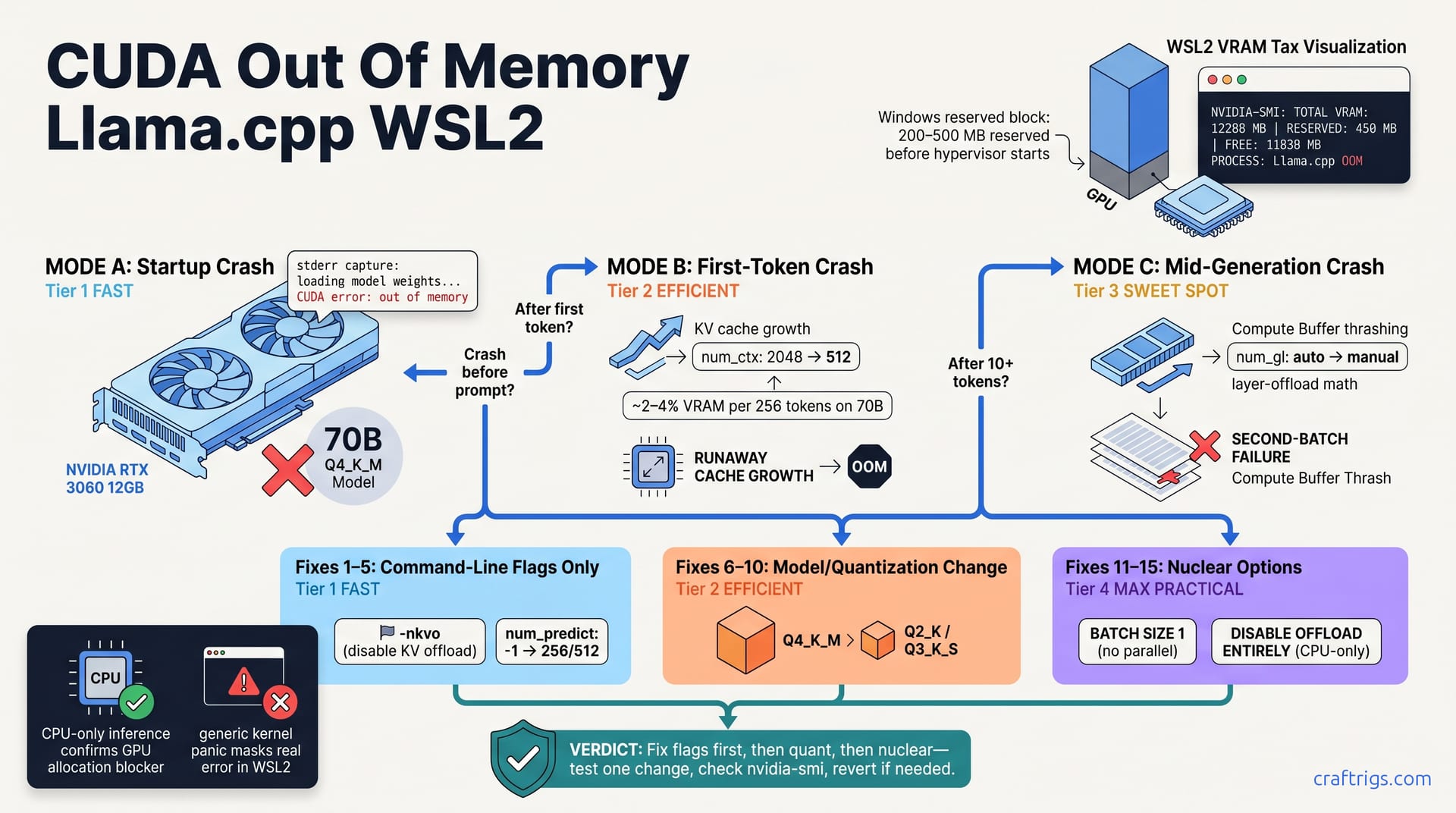
CUDA out of memory in llama.cpp on WSL2 is almost never VRAM shortage. It's usually misconfigured num_ctx, uncapped KV cache, or over-aggressive GPU layer offload. This guide walks the diagnostic tree to pinpoint your failure mode (startup crash vs. first-token explosion vs. This guide delivers 15 ranked, reversible fixes—command-line flags first, nuclear options last. We cover the KV cache formula, GPU layer offload math for 70B models on 12 GB cards, and the invisible Windows reserved-VRAM tax that WSL2 hides from nvidia-smi—so you go from crash to running inference in under 10 minutes.**
What CUDA Out of Memory Actually Means in llama.cpp
When llama.cpp crashes with "CUDA out of memory," most people assume the GPU is full. It's not. CUDA OOM means a single allocation request failed, not that your GPU has no space left. Your card has gigabytes free, but fragmentation prevents contiguous allocation.
Three pools compete for that space. Model weights are static and loaded once. KV cache grows with every token generated. Temporary compute buffers appear during matrix operations on the current batch. One of these pools exceeds the free contiguous space, and the GPU rejects the allocation. llama.cpp reports "failed to allocate X bytes" but never says which pool failed or why. You reverse-engineer it from when the crash happens.
WSL2 hides a critical detail: Windows reserves 200–500 MB of GPU VRAM before the hypervisor starts. That reserved pool is invisible inside WSL2 via nvidia-smi. You're working with less VRAM than nvidia-smi reports.
The Three Failure Modes
Mode A is a startup crash right after "loading model weights." The GPU can't hold the full quantized model on-device, even though the file size suggests it should fit.
Mode B happens after the first token is generated. num_predict and num_ctx interact to create runaway KV cache growth. The allocation balloons beyond the model's weight footprint.
Mode C occurs mid-generation, after 10+ tokens on a second batch. Temporary buffers or layer-offload math was too aggressive for your VRAM pool. The GPU runs out mid-inference.
Each mode has a distinct fix path. Shrinking num_ctx (a Mode B fix) won't solve Mode C. Testing the wrong fix wastes hours. That's why pinpointing your failure mode first saves everything.
The Diagnostic Tree: Identify Your Failure Mode
Run your exact llama.cpp command in isolation and capture stderr. Note when it crashes: before any prompt, after your first input, or midway through a response.
Open a second terminal and run nvidia-smi to see total, reserved, and free VRAM. The reserved field is the Windows tax—claimed before WSL2 boots. If your driver is too old to report "reserved," assume Windows claimed 250–300 MB.
When the crash hits, search stderr for "failed to allocate" plus a byte count. Divide that by your model's parameter count times bytes-per-quantization. This reverse calculation tells you roughly which layer exceeded headroom. A segfault or kernel panic without "failed to allocate"? WSL2 is masking the real error. Check dmesg on the Windows host.
Diagnostic Questions
Does the crash happen on startup, before any prompt? Mode A. The GPU can't hold the full model weights on-device.
Does it crash immediately after generating the first token? Mode B. KV cache blowup or num_predict runaway.
Does it crash after 10+ tokens in a batch, on a second inference run? Mode C. Temporary buffer thrash or cross-batch layer-offload math was too aggressive.
Can you run the same model with CPU-only inference? If that works, the GPU allocation is the blocker, not model file corruption. You've confirmed it's a tuning problem.
The Fix List: 15 Adjustments Ranked by Simplicity
All fixes are reversible. Change one flag, re-run, check nvidia-smi, revert if needed. Fixes 1–5 use command-line flags only (no recompile, no model swap). Fixes 6–10 require changing your model or quantization tier—test flags first. Fixes 11–15 are nuclear—reduce batch size to 1, disable offload, or shrink your model.
Fixes 1–5: Command-Line Flags (No Model Change)
Fix 1: Drop num_ctx to your actual needs. The default num_ctx in many builds is 2048. It's not your input length—it's the maximum cache allocated upfront, even if your prompt is 100 tokens. Many users set num_ctx=32768 "just in case" and blow OOM on the first run. Drop it to your actual prompt token count, max 512. Every 256-token increase costs ~2–4% of VRAM on a 70B model.
Fix 2: Disable KV offload with -nkvo. WSL2's PCIe bridge adds 5–10% latency per offload. It isn't worth the VRAM savings on a 12 GB card. The round-trip cost kills throughput and rarely saves enough to prevent OOM.
Fix 3: Reduce num_predict to 256 or 512. This controls output tokens per run. KV cache grows one token per output token. With unlimited num_predict (default -1), cache grows unbounded until it runs out. Cap it explicitly: --predict 256.
Fix 4: Add --mlock --numa if you're on a multi-socket CPU. This locks model weights to NUMA-local memory and frees GPU allocation overhead.
Fixes 6–10: Model and Quantization Adjustments
Fix 6: Swap from Q4 to Q3 quantization. Q4 is 4-bit, Q3 is 3-bit. On the same model, Q3 saves ~25% VRAM with negligible quality loss on modern quantizers.
Fix 7: Downsize the model. Move from 70B to 34B, or 7B to 3B. Check file size to confirm quantization tier. Smaller models consume less VRAM but are less capable.
Fix 8: Set batch size to 1 explicitly. --batch-size 1 prevents parallel multi-token cache inflation. Some builds default to batch-size 8, multiplying KV cache usage by that factor.
Some llama.cpp builds leak VRAM in the allocation pool. Download a fresh build from the official repo and re-test.
Tuning num_ctx and KV Cache for WSL2
KV cache grows as O(n²) with context. A 70B model on Q4 with num_ctx=2048 consumes ~18 GB of VRAM just for cache. That leaves little room for compute. This is the single biggest OOM trigger for budget builders using 12 GB cards.
num_ctx is not your input prompt length. It's the maximum cache allocated upfront. If you set num_ctx=2048 but send 100 tokens, the GPU reserves space for 2048 tokens of KV cache. WSL2 VRAM fragmentation blocks large allocations even with sufficient free space. Smaller num_ctx (512–1024) reduces fragmentation risk dramatically.
Test empirically:
llama-cli -m model.gguf --ctx-size 512 -n 128 --prompt "test" 2>&1 | grep -i "CUDA"If no CUDA error, increment ctx-size by 256 and re-run. Keep going until you see OOM. That's your stable upper bound. Lock it in as your num_ctx flag.
The KV Cache Formula and Budget Math
Cache footprint (bytes) ≈ (2 × num_ctx × hidden_dim × 2 bytes) × num_layers.
Q3 vs Q4 doesn't shrink KV cache—it's always float16 in llama.cpp. But smaller model files free GPU VRAM for that cache. Each batch token adds ~200 KB to cache on a 70B model. If running batch-size > 1, multiply the formula by batch size.
WSL2 fragmentation limits reliable allocation to 80% of reported free VRAM. If nvidia-smi says 8 GB free, budget for 6.4 GB maximum. Anything larger risks fragmentation-induced OOM even if it should mathematically fit.
GPU Layer Offload Math and the num_gl Setting
num_gl (number of GPU layers offloaded) controls the GPU/CPU split. Higher num_gl means faster inference but higher VRAM consumption per layer. On a 12 GB RTX 3060 in Q4 quant, safely offload 20–25 layers of a 70B model. Each layer occupies roughly 500 MB–1 GB depending on hidden dimension and quantization.
llama.cpp's auto-offload estimate is often wrong on WSL2 due to Windows reserved VRAM. On auto-detect crash, set num_gl to half the layers, then increment by 5 until stable. Validate with:
llama-cli -m model.gguf -ngl 20 --prompt "test" 2>&1 | tailWatch nvidia-smi in a second terminal in real-time. Does VRAM stay within your budget (6–7 GB on a 12 GB card)? If yes, increment num_gl by 5. If VRAM spikes past budget, revert and lock in the last stable value.
Layer Offload Gotchas on WSL2
WSL2's PCIe bridge adds 5–10% latency per GPU-CPU data transfer. Mixed offload (some layers on GPU, some on CPU) doesn't save VRAM linearly because KV cache still lives on GPU. You're not gaining VRAM savings proportional to layers moved to CPU. If you offload > 90% of layers to GPU, inference speed depends entirely on GPU. Any compute-layer OOM crashes with no CPU fallback.
Offload overhead is highest on WSL2. On native Windows CUDA, the same offload setting runs 15–20% faster per token.
Windows Reserved VRAM and Other WSL2 Pitfalls
Windows reserves 200–500 MB of GPU VRAM before WSL2 hypervisor initialization. This reserved pool is invisible inside WSL2. You're always working with less VRAM than reported.
Multiple llama.cpp instances or shared GPU use (browser, Discord, gaming) worsen WSL2's per-process fragmentation. Every concurrent process reduces your available contiguous allocation pool. If you're hitting OOM and have Chrome open with hardware acceleration, kill it first.
Updating nvidia drivers on the Windows host can shift how much VRAM Windows reserves. Newer drivers typically reserve less. If you've recently upgraded, rebuild llama.cpp to pick up new CUDA driver info. Running llama.cpp inside Docker on WSL2 costs another 100–200 MB of VRAM. Prefer the native WSL2 binary for tight budgets.
Checking True Available VRAM on WSL2
Inside your WSL2 terminal:
nvidia-smi --query-gpu=memory.total,memory.reserved,memory.free --format=csv,noheaderIf "reserved" is missing (older drivers), assume Windows reserved 250–300 MB. Subtract that from total.
Cross-check from Windows PowerShell:
nvidia-smiCompare "free" before and after launching WSL2. That difference is the Windows tax.
Your real available budget:
(total VRAM) − (Windows reserved) − (5% fragmentation margin)If nvidia-smi shows 12 GB total and 300 MB reserved, your actual budget is roughly 10.5 GB. Plan conservatively. Test incrementally, log stable settings, break crash loops. This is tuning, not hardware failure—and tuning is fixable in minutes.
For deeper context on KV cache fundamentals, see KV cache quantization. For benchmarks on the RTX 3060 and comparable cards, check GPU benchmarks for local LLM.