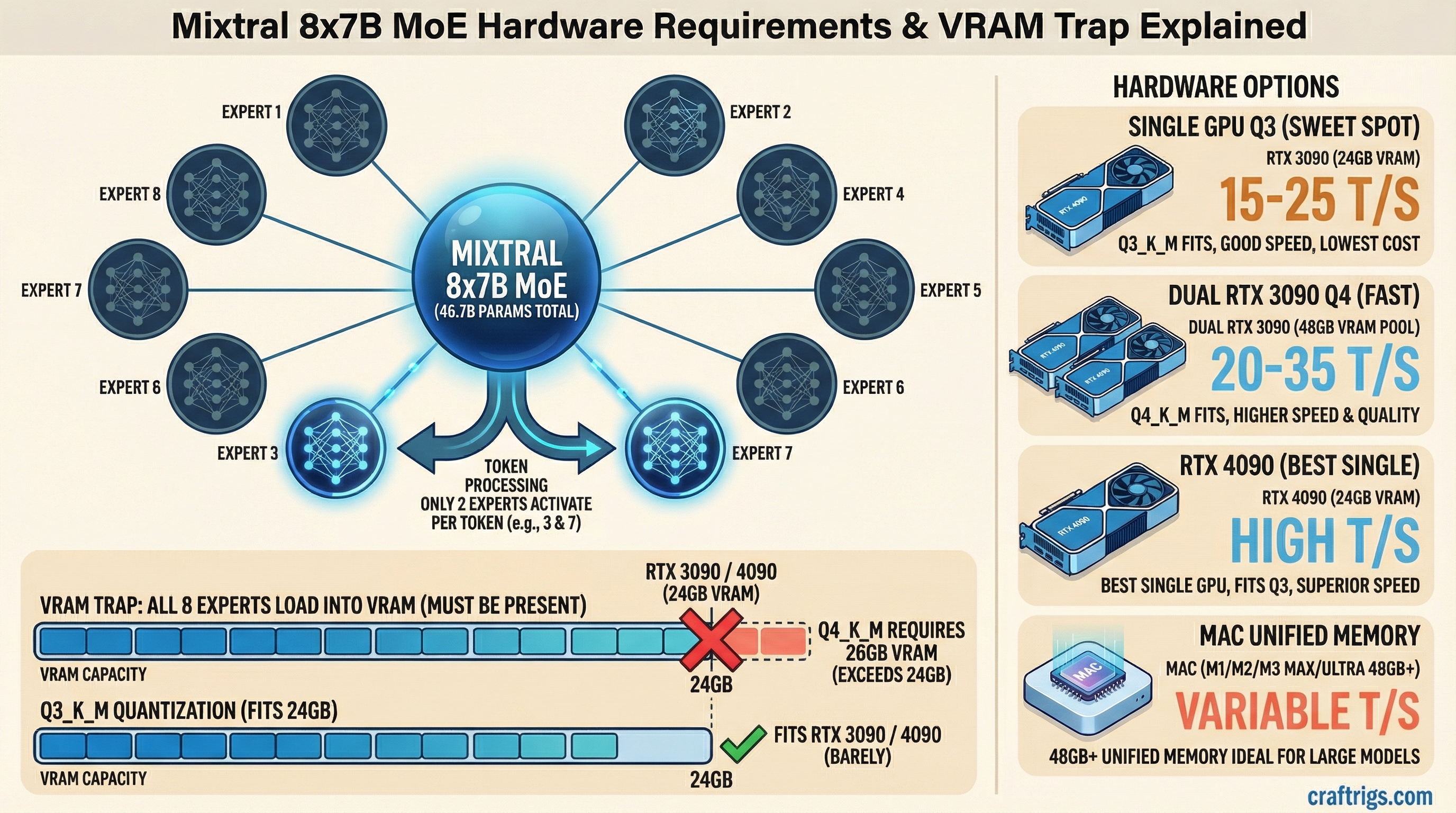
TL;DR: Mixtral 8x7B uses a Mixture of Experts architecture that needs ~26GB of VRAM at Q4 quantization. Your cheapest path in: a single RTX 3090 (24GB) running a Q3 quant, or two 16GB GPUs. The best experience: an RTX 4090 or a Mac with 48GB+ unified memory.
What Makes Mixtral Different: The MoE Problem
Mixtral 8x7B is a Mixture of Experts (MoE) model. Instead of one massive neural network, it has 8 smaller "expert" networks with 7 billion parameters each. During inference, only 2 experts activate per token — so it runs like a ~13B model in terms of speed, but the entire model still has to sit in memory.
This is the catch that trips people up. The name says "8x7B" but you don't need 56GB of VRAM. The actual parameter count is roughly 46.7B because the experts share some layers. But you still need enough memory to hold all 46.7B parameters, even though only a fraction runs at any given time.
Think of it like a restaurant kitchen with 8 chefs. Only 2 cook your order, but all 8 need a station set up and ready to go.
Actual VRAM Requirements
Here's what Mixtral 8x7B needs at each quantization level (as of March 2026 benchmarks):
- FP16 (full precision): ~93GB — not practical on consumer hardware
- Q8_0: ~49GB — dual RTX 3090/4090 territory
- Q6_K: ~38GB — tight fit on 2x 24GB cards
- Q5_K_M: ~33GB — comfortable on 2x 24GB cards
- Q4_K_M: ~26GB — the sweet spot for most people
- Q3_K_M: ~22GB — fits on a single 24GB card with tight margins
- Q2_K: ~18GB — fits on a single 24GB card, but quality drops noticeably
The Q4_K_M quant is where you want to be. Below that, you start losing the quality advantages that make Mixtral worth running in the first place — its coding ability and multilingual performance take a hit at Q3 and below.
Q4 VRAM Requirement: The Fast Answer
If you're searching specifically for Q4 — here it is:
Mixtral 8x7B at Q4_K_M requires ~26GB of VRAM.
That puts it just over a single 24GB card. You have two options:
- Run Q3_K_M (~22GB) on a single RTX 3090/4090 — small quality trade-off, fits with headroom
- Use two GPUs totaling 32GB+ (e.g., 2x RTX 4060 Ti 16GB) to run Q4_K_M cleanly
If someone recommends a 24GB card for Q4 Mixtral, they're either talking about Q3 or running the model at the absolute limit with no context room. The Q4 → single 24GB path works on paper but leaves ~0GB for KV cache. Use Q3_K_M if you're on a single 24GB card.
Recommended GPU Configs by Budget
Budget: Single 24GB GPU ($400-$900)
Best pick: RTX 3090 (24GB) — around $700-800 used as of March 2026.
You'll run Q3_K_M comfortably. That leaves ~2GB of headroom for context and KV cache. Expect around 15-20 tokens per second through llama.cpp. Not blazing, but usable for chat and coding assistance.
The RTX 4090 ($1,800+) gets you the same VRAM but significantly faster inference — roughly 25-35 t/s at Q3. Worth it if you're using Mixtral as a daily driver.
For the full GPU comparison, check our best GPUs for local LLMs breakdown.
Mid-range: Dual 16GB GPUs ($600-$1,200)
Best pick: 2x RTX 4060 Ti 16GB or 2x RTX 3060 12GB + CPU offload.
Two 16GB cards give you 32GB total, which fits Q4_K_M with room to breathe. The downside: you need a motherboard with two x8 or x16 PCIe slots, and your power supply needs to handle both cards. Budget around 650W minimum.
Splitting a model across two GPUs adds some overhead. Expect 10-20% slower than if the model fit on a single card. Still, 2x RTX 4060 Ti 16GB at Q4_K_M gives you ~20 t/s — solid for daily use.
If you're going dual-GPU, our $3,000 dual-GPU LLM rig guide covers the full build.
Optimal: 48GB+ Unified Memory (Mac)
Best pick: Mac Mini M4 Pro with 48GB ($1,800) or MacBook Pro M4 Max with 48GB ($3,200+).
Apple Silicon's unified memory architecture handles MoE models surprisingly well. 48GB fits Mixtral 8x7B at Q4_K_M with plenty of room for context. You'll get ~15-20 t/s on the M4 Pro and ~25 t/s on the M4 Max thanks to higher memory bandwidth.
The Mac path is quieter, more power-efficient, and doesn't require fiddling with multi-GPU configs. The trade-off is raw speed — a 4090 at Q3 still beats the M4 Pro at Q4. But if you want Q4+ quality in a single device, Mac wins.
See our M4 Max vs RTX 4090 comparison for detailed benchmarks.
Running Mixtral 8x7B on CPU Only (256GB RAM Path)
No GPU? This is the path people ask about when they see "256GB RAM" builds — usually high-end workstation or server hardware with large RAM capacity but no discrete GPU.
Minimum for full CPU inference: ~26GB of RAM at Q4_K_M. That sounds low, but there's a catch: you need enough headroom for the OS, KV cache, and context. In practice, 64GB RAM is the floor where it's usable, and 128-256GB is where it gets comfortable at longer context lengths.
What to expect on CPU-only at Q4_K_M:
- Consumer desktop (Ryzen 9800X3D, DDR5-6000, 64GB): ~3-5 tokens/sec
- Workstation (Threadripper PRO, DDR5, 256GB): ~2-4 tokens/sec (more RAM channels help bandwidth)
- Server (dual Xeon, 256-512GB ECC): ~1-3 tokens/sec
The ceiling on CPU inference is memory bandwidth, not cores. More RAM channels (4-channel, 8-channel) give you more tokens per second. A Threadripper PRO with 8-channel DDR5 will outperform a gaming CPU with 2-channel DDR5 even if the gaming chip has higher single-core speed.
When the 256GB RAM path makes sense:
- You have an existing workstation or server with large RAM and want to run Mixtral without buying a GPU
- You're running long-context tasks where VRAM-limited GPUs would swap anyway
- You need the full Q4+ quality and can tolerate slow inference (batch processing, overnight jobs)
When it doesn't make sense:
- Interactive use — 3-5 t/s is noticeable in conversation
- You could buy a used RTX 3090 for $700 and get 6-10x the speed
For CPU inference, run llama.cpp with -t set to your physical core count (not logical/HT). Enable --mmap to avoid loading the full model into RAM on startup. If you're on a dual-socket system, pin the process to one NUMA node with numactl to avoid cross-socket memory penalties.
The CPU Offload Fallback
Don't have enough VRAM? llama.cpp and Ollama let you offload some model layers to system RAM. Here's the speed hit:
- All layers on GPU: 20-35 t/s (depending on card)
- 75% GPU, 25% CPU: ~12-18 t/s
- 50/50 split: ~6-10 t/s
- 25% GPU, 75% CPU: ~3-5 t/s
- Full CPU: ~1-2 t/s
The drop-off is steep. Every layer moved to system RAM hits a bandwidth wall — DDR5 at best gives you 80 GB/s vs. 1,000 GB/s on an RTX 4090. That's why partial offloading to a fast CPU with DDR5 is tolerable, but full CPU inference is painfully slow.
If you're going the offload route, 64GB of system RAM (DDR5-5600 or faster) is the minimum to keep things reasonable. See our RAM guide for local LLMs for the details.
Is Mixtral 8x7B Still Worth Running?
Honest take: Mixtral 8x7B was groundbreaking when it launched, but in early 2026, models like Qwen 2.5 32B and Mistral Small 3.1 24B deliver comparable or better quality while fitting on a single 24GB card at Q4. They're denser, simpler to run, and don't need the MoE memory overhead.
Run Mixtral 8x7B if you specifically need its multilingual strengths or its particular coding style. Otherwise, a dense 32B model gives you less hassle for similar results.
For a broader view of what hardware matches what models, check the ultimate local LLM hardware guide.
Bottom Line
- Minimum viable: RTX 3090 at Q3_K_M — works but tight
- Recommended: 2x 16GB GPUs or Mac with 48GB at Q4_K_M
- Optimal: RTX 4090 at Q3 or Mac M4 Max 48GB at Q4
- Don't bother: Single 16GB or less — too much offloading, too slow
Mixtral 8x7B is a demanding model. If you have the hardware, it rewards you. If you're buying hardware specifically for it, consider whether a dense 32B model would serve you just as well for less cost.
Mixtral 8x7B Memory Architecture
graph LR
    A["Mixtral 8x7B MoE"] --> B["8 Expert Networks"]
    B --> C["2 Active per Token"]
    C --> D["~13B Params Active"]
    A --> E["Full Model = 46.7B params"]
    E --> F["VRAM Needed: 24GB+"]
    D --> G["Compute = 13B effective"]
    F --> H["RTX 3090 / 4090"]
    G --> I["Speed of 13B model"]
    style A fill:#1A1A2E,color:#fff
    style F fill:#EF4444,color:#fff
    style H fill:#F5A623,color:#000