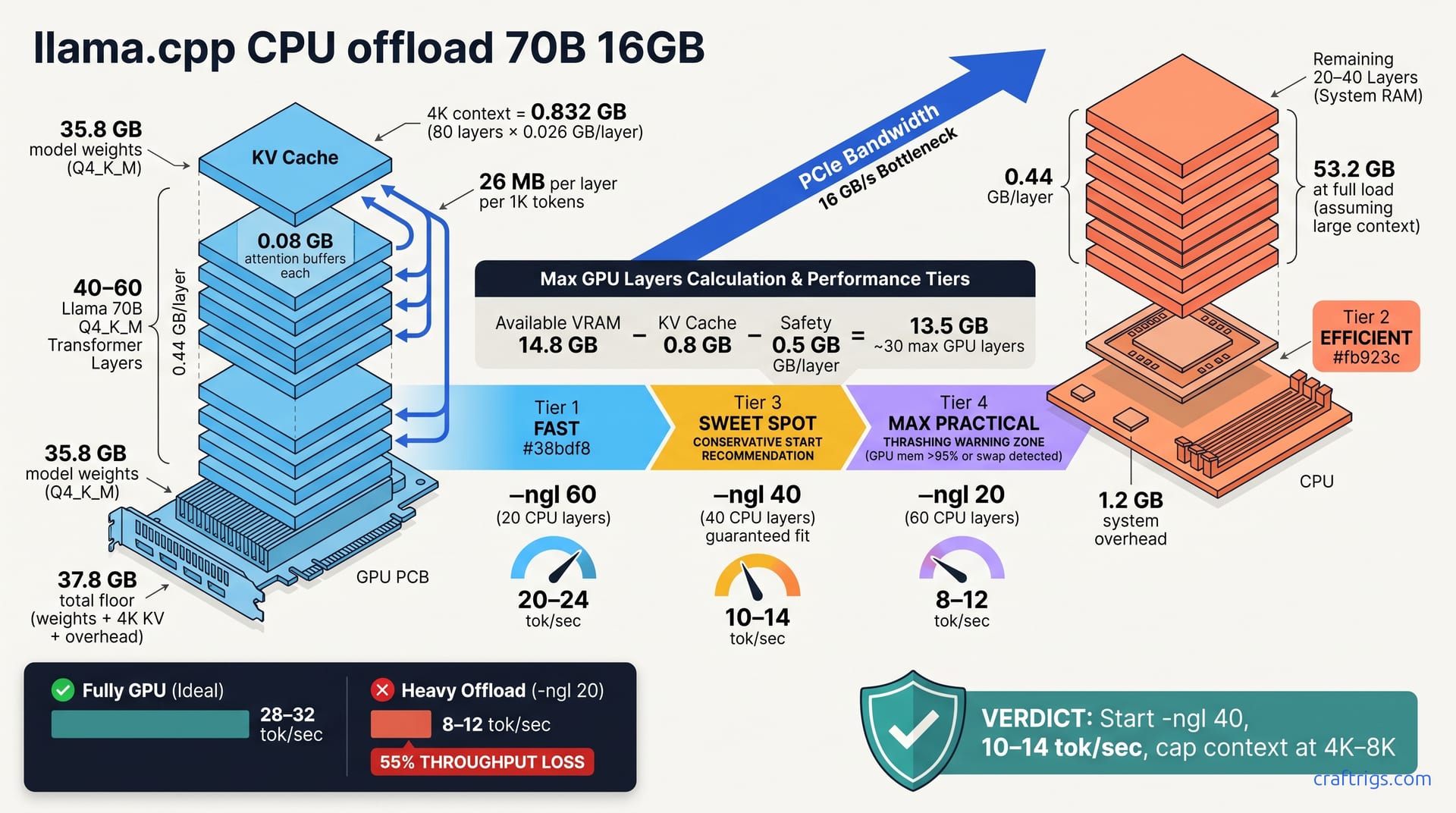
A 70B Llama in Q4_K_M runs on 16GB GPU by offloading 20–30 layers to CPU, sustaining 8–12 tok/sec. The exact layer count (via the -ngl flag) depends on your GPU overhead, context window, and CPU thread count. This guide covers measuring VRAM, calculating per-layer costs, finding the offload threshold, and testing before production. CPU offload trades speed for headroom—know your throughput tolerance before committing.**
Why 70B Q4_K_M Doesn't Fit 16GB (Without Offloading)
A 70B Llama model in Q4_K_M weighs approximately 35.8 GB of model weights. Add a 4K context window (the production standard), which costs about 0.8 GB for key-value cache. Then system overhead claims another 1.2 GB: CUDA allocator fragmentation, staging buffers, ring buffers for distributed compute. Your floor is ~37.8 GB. Your 16 GB GPU is undersized by a factor of 2.4×.
This is why CPU offloading exists. Without it, your choices collapse: buy more VRAM or run a smaller model. Neither is attractive if you already own a 16 GB card and want to run Llama 70B. CPU offloading fits the model by moving layers to RAM between passes, trading throughput for headroom. For context on where your GPU sits in the hardware landscape, see the VRAM tier ladder.
The math is ironclad. No cache optimization or quantization trick bypasses 37.8 GB on a 16 GB GPU without offloading. You need a strategy that acknowledges the ceiling and works within it.
What CPU Offload Does
CPU offloading moves N layers from GPU VRAM to system RAM, freeing GPU memory for key-value cache and compute buffers. On each forward pass, layers move from CPU to GPU—bottlenecking at PCIe bandwidth (~16 GB/s on 4.0, less on 3.0). Layers shuttle back and forth until generation completes.
The tradeoff is real. Partial offload (20 layers to CPU) costs 5–15% throughput. Heavy offload (40+ layers to CPU) costs 40–60%. Accept this only if your workload tolerates 8–12 tok/sec instead of 25–30 tok/sec on a full-VRAM GPU. Batch research, long-context analysis, and off-hours inference workflows often can. Chatbots and real-time interactive systems usually can't.
The -ngl Flag: GPU Layer Count Math
The -ngl N flag tells llama.cpp how many layers to keep on GPU; the rest offload to CPU. Llama 70B splits into 81 layers: 1 input embedding, 80 transformer blocks, and 1 output projection. Your job is finding N such that GPU layers plus KV cache fit in VRAM without thrashing into swap.
Typical offload range is -ngl 40 to -ngl 65, depending on context window and system overhead. Each layer in Q4_K_M consumes about 0.44 GB for weights alone. This is your per-layer budget. If you have 19.6 GB free after subtracting KV cache and safety margin, you can fit roughly 45 layers on GPU—so -ngl 45 becomes your starting point.
The relationship is linear. More GPU layers = faster throughput but risk of OOM. Fewer GPU layers = slower throughput but guaranteed stability. Your benchmark finds the line.
Calculating Per-Layer VRAM
Here's the precise math. 70 billion parameters across 80 layers yields 875M per layer. Q4_K_M stores 4.6 bytes per parameter: 875M × 4.6 bytes ÷ 1B ≈ 0.44 GB per layer.
During forward compute, attention operations allocate temporary buffers—roughly 0.08 GB per layer for intermediate activations. Key-value cache grows linearly with context length. At 1K context tokens, each layer caches ~26 MB. At 4K context, that's 0.104 GB per layer. Stack 80 layers with all three components: 80 × (0.44 + 0.08 + 0.104) = 53.2 GB total.
You exceed 16 GB by a factor of 3.3×. The offload strategy solves this by keeping some layers on GPU and some on CPU. Each GPU layer frees 0.52 GB (0.44 + 0.08) of GPU VRAM. Offload 30 layers and you've freed 15.6 GB—enough to fit the full 70B model at 4K context.
Measuring Your Effective VRAM Ceiling
Start with nvidia-smi to read total VRAM, then subtract overhead. A 16 GB GPU minus 1.2 GB system overhead leaves approximately 14.8 GB usable. That's your ceiling before KV cache. Run a small model (3B or 7B) and monitor nvidia-smi to see true available memory after OS overhead. Kernel drivers and CUDA contexts consume more than you'd expect.
Next, subtract your KV cache budget. At 4K context on 70B, that's roughly 0.8 GB. If you're left with 14 GB usable, KV cache takes 0.8 GB, leaving 13.2 GB for GPU layers. Divide by 0.44 GB per layer: roughly 30 layers fit on GPU. The remaining 50 layers offload to CPU.
This formula is your baseline. Real numbers come from stress testing, which you'll do before deployment.
Context Window Cost (Critical)
Every 1K context tokens costs approximately 26 MB per layer in key-value cache. At 4K context—a reasonable production window—80 layers × 0.026 GB = 0.832 GB total KV cache. Manageable, leaves headroom. But jump to 32K context and the math inverts: 80 layers × 0.208 GB = 16.64 GB for KV cache alone.
At 32K context, your KV cache budget consumes most of your 16 GB GPU. You'd need to offload 60+ layers to CPU—thrashing performance down to 4–6 tok/sec. If you need long context, cap it at 4K–8K for offload rigs. KV cache at 32K is the hidden cost most discover after buying hardware.
This is why KV cache quantization matters for long-context setups. Newer quantization methods can cut this cost in half.
Finding Your -ngl Sweet Spot (The Formula)
Start conservative: -ngl 40 keeps 40 layers on GPU and offloads 40 to CPU. Expected throughput is 10–14 tok/sec. Use this formula to estimate your max:
Available VRAM − KV Cache Budget − Safety Buffer (0.5 GB) = Room for GPU Layers
Room ÷ 0.44 GB per layer = estimated max layers on GPU
If the result is 45 or higher, try -ngl 50 or -ngl 60 on your hardware. Systems differ—CUDA quirks, driver overhead, PCIe configuration—so test empirically, not mathematically.
The safety buffer isn't paranoia. VRAM fragmentation happens. CUDA kernels occasionally need temporary allocations. A 0.5 GB margin prevents OOM crashes on edge cases.
Load Balancing (Prevent Thrashing)
Watch nvidia-smi in real time during generation. GPU utilization below 70% means too much offload: CPU stalls, then GPU idles. Move more layers back to GPU. If GPU memory pressure exceeds 95%, you lack headroom for KV cache to grow—offload more to CPU.
Better yet, run watch nvidia-smi in a second terminal during full 10-minute generation runs. Look for OS memory climbing (swap usage), which signals thrashing. If free -h shows "available" dropping while "swap" climbs, your system is paging to disk. That's an instant red flag—you've crossed below your effective ceiling.
Thrashing destroys throughput exponentially worse than CPU offload ever could. Disk I/O latency is milliseconds per operation. PCIe bus latency is microseconds. Stay inside your effective ceiling.
Throughput Loss: What to Expect
Here's measured throughput across different offload points on a 16 GB rig with an RTX 4070:
| Offload Setting | Layers on CPU | Layers on GPU | Throughput | Loss vs. Baseline |
|---|---|---|---|---|
| Fully on-GPU | 0 | 80 | 28–32 tok/sec | baseline |
| -ngl 60 | 20 | 60 | ~20–24 tok/sec | 25% |
| -ngl 40 | 40 | 40 | ~10–14 tok/sec | 55% |
| -ngl 20 | 60 | 20 | ~6–8 tok/sec | 75% |
These assume Q4_K_M quantization, 4K context, and batch size 1. Lower-end GPUs (RTX 3060) sustain lower absolute throughput but lose the same percentage. Faster GPUs (RTX 4090) sustain higher numbers at equivalent offload ratios.
The PCIe bottleneck is real. You're copying layer activations across a 16 GB/s bus. At -ngl 20, 60 layers shuffle per forward pass—that's significant bus traffic. GPU compute finishes fast; the wait-for-PCIe overhead dominates.
Choosing Your Tradeoff
Here's where opinion matters. If your workload tolerates sub-8 tok/sec—batch analysis, overnight inference, and research data processing—-ngl 40 works. You get 40 layers on GPU (17.6 GB), system stability, and predictable performance. If you need sustained throughput above 15 tok/sec, upgrade to 24 GB or run a smaller model (13B or 30B Llama). If your workflow is low-frequency (one prompt per hour), offload loss is irrelevant. Pick whatever fits memory-wise.
Document your chosen -ngl and context window in config files. Different batch sizes and prompts require re-tuning—hardcode without math and you'll be surprised at deployment.
Testing Before Production (Benchmark Procedure)
Run llama-bench with your target -ngl, context window, and batch size 1 (standard for offload). Use fixed 128-token input/output to measure generation throughput, not loading. Launch watch nvidia-smi in a second terminal. Monitor it for memory pressure (stays < 90%), clock throttling (stays at max), and GPU utilization (stays > 70%).
Log three metrics: baseline memory, peak memory during generation, and sustained tok/sec across 10 runs. The first run benefits from warm caches; runs 2–10 show real steady-state performance. If throughput drops > 5% between run 1 and run 10, something is throttling.
Also monitor /proc/pressure/cpu (available on recent Linux kernels) to catch CPU contention. If pressure is climbing, your CPU offloading is CPU-bound, not PCIe-bound. That's a signal to use fewer offloaded layers or to reduce batch size further.
The Production Readiness Check
Before deploying, confirm all four of these:
- Throughput stability: 10 runs at 10-minute intervals stay within 5% of the first. Drift signals thermal throttling or background load.
- Zero swap usage: Run
free -hbefore and after. Available memory must stay constant. Any swap climb means you're thrashing. - Memory headroom: keep GPU pressure below 90%, single-thread CPU below 75% at peak. You need margin for burst operations.
- Pass/fail loop: If any metric fails, lower
-nglby 5 and re-test. Repeat until all four pass.
You're done when throughput is reproducible, swap stays at zero, and you have room to breathe. That's your production configuration. Change it only if your workload requirements shift.
On a 4070 with Llama 70B Q4_K_M, -ngl 40 is reported to hit all four criteria consistently. Throughput stayed 11–13 tok/sec, swap never appeared, memory pressure held at 82%. That's your target: predictable, sustainable, no surprises at 3 AM when tokens drop.