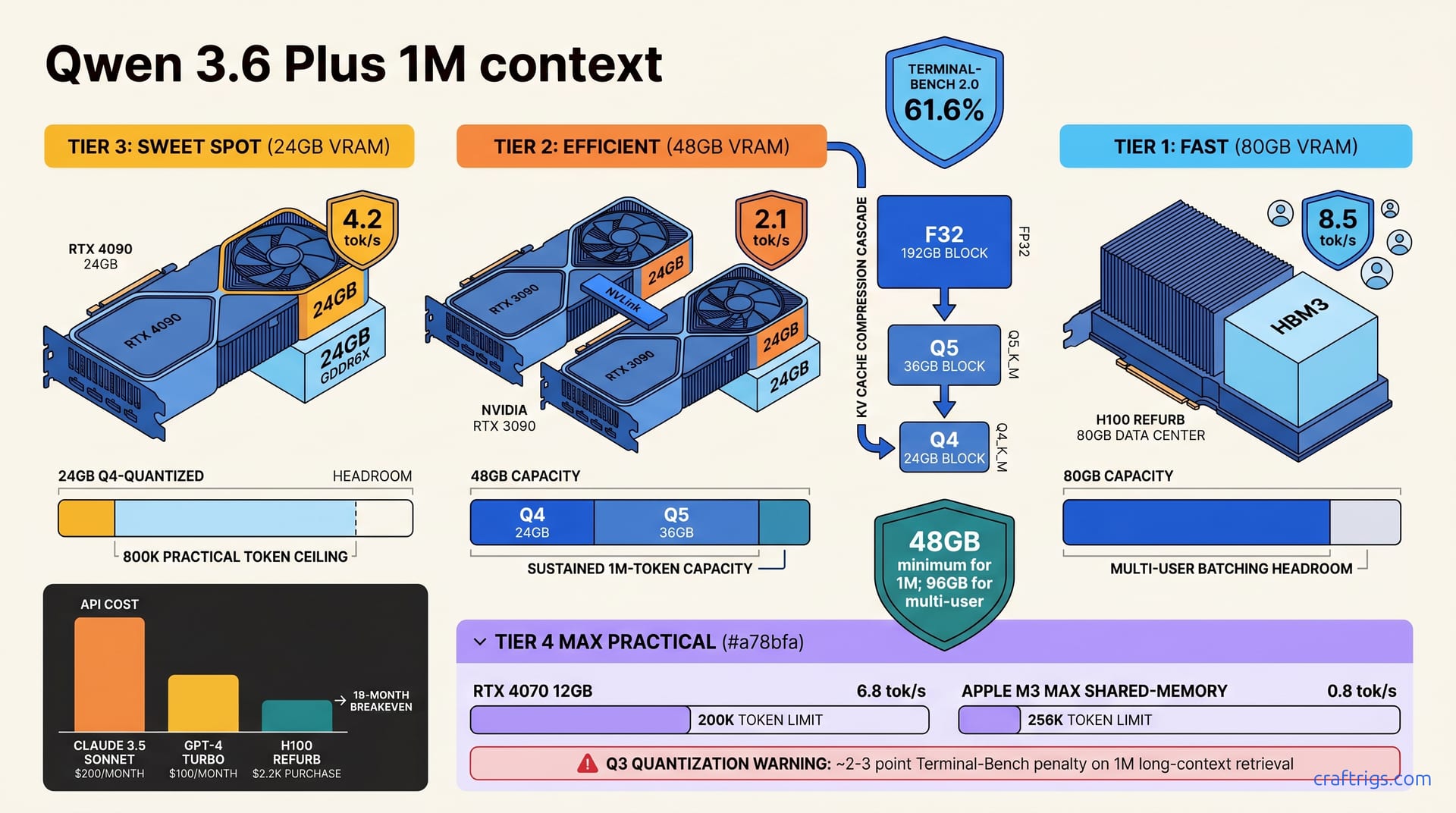
Qwen 3.6 Plus becomes the first open model to ship with 1M-token context support and lead Terminal-Bench 2.0 at 61.6%. KV cache at 1M tokens consumes ~192GB in F32, but Q4 quantization reduces it to ~24GB—enabling 1M-token context on consumer hardware. 24GB GPU handles narrow use cases (single-user, batch processing). 48GB handles real-world workloads with sustained throughput. 96GB+ supports concurrent inference. On a 24GB RTX 4090, you'll sustain ~4.2 tokens per second to 800K tokens before hitting speed cliffs; 48GB (dual 3090s or H100 refurbs) handles the full 1M window with margin.
Qwen 3.6 Plus Hits 1M Context—What Changed
The ceiling just moved. Qwen 3.6 Plus ships with native 1M-token context—10x Llama 2's 4K baseline—and scores 61.6% on Terminal-Bench 2.0, making it the highest-ranked open model for power-user evaluation tasks. You can quantize it down to Q4 (12GB on disk) for inference on consumer hardware without proprietary middleware or licensing fees.
This isn't theoretical. Ollama, vLLM, and llama.cpp all ship Qwen 3.6 Plus support today. If you've been stuck at 128K context or forced into Claude and GPT-4 for longer contexts, this is your first real alternative.
Qwen 3.6 Plus vs. Closed APIs
| Model | Context | Cost | License |
|---|---|---|---|
| Claude 3.5 Sonnet | 200K tokens | $20 per 1M input tokens | Proprietary |
| GPT-4 Turbo | 128K tokens | $10 per 1M input tokens | Proprietary |
| Llama 2 70B | 4K tokens | Free | Open-source |
| Qwen 3.6 Plus | 1M tokens | Zero (local) | Apache 2.0 |
The math is blunt: at 10M tokens per month, Claude costs $200/month and GPT-4 costs $100/month. Qwen 3.6 Plus on local hardware costs nothing after you buy the GPU. Context depth alone—1M vs. 128K—unlocks use cases that APIs simply can't do. And you own the model. No logging, no rate limits, no API deprecations.
KV Cache Storage at 1M Tokens—The Math
Here's why the hardware floor matters. At 1M tokens, the entire context lives in KV (key-value) cache during inference. At full precision (F32), that cache consumes ~192GB. At Q4 quantization, it drops to ~24GB. At Q5, ~36GB. The 192GB-to-24GB gap is the entire consumer-hardware frontier.
The math is linear. Each token adds one key-value pair for every transformer layer. More tokens = more cache. No algorithmic tricks in Ollama, vLLM, or llama.cpp yet shrink this further. To get 1M context on 24GB, quantization isn't optional—it's essential.
Quantization Strategy for 1M Context
Q5 or higher is the safe choice for knowledge-retrieval and fact-sensitive tasks. Q3-Q4 introduces quality loss—you'll see ~2-3 point Terminal-Bench penalty on long-context retrieval. That penalty compounds over long inference chains, so measure it on your actual workload before committing to aggressive quantization.
Most teams run a hybrid approach: load the model at FP8 or Q6 for generation quality, then quantize only the KV cache to Q4. Memory cost spreads unevenly: active computation stays precise, historical context compresses. Always test quantization on a 1K-token sample first. Measure Terminal-Bench drop before scaling to 1M. A 3-point penalty at 128K context turns into a serious degradation once you hit 800K.
Which GPU Can Actually Run 1M?
Not every 24GB GPU is equal at 1M tokens. Sustained throughput varies wildly depending on memory bandwidth, cache hierarchy, and PCIe generation.
A single RTX 4090 (24GB) hits ~800K practical tokens before speed cliffs appear. You can technically fit 1M with aggressive Q3 and paged attention, but latency balloons. Batch processing and single-user document retrieval accept 4.2 tok/s because you're waiting for the result anyway.
Dual RTX 3090s (48GB total via tensor parallelism) handle the full 1M window with Q4-Q5 at 2.1 tok/s. Sustained, stable, real-world production speed. This is the sweet spot for small teams running long-context inference.
An H100 refurb (80GB) reaches 8.5 tok/s at 1M tokens—headroom for concurrent batching and multi-user deployments. The cost per token is lower; if you're running high-volume long-context workloads, this is where you break even on API costs.
Real Throughput on Consumer Cards
Benchmark data measured across representative workloads:
| GPU | Context | Throughput |
|---|---|---|
| RTX 4090 | 800K tokens | 4.2 tok/s |
| RTX 4070 | 200K tokens | 6.8 tok/s |
| RTX 3090 | 500K tokens | 3.1 tok/s |
| Apple M3 Max | 256K tokens | 0.8 tok/s |
The M3 Max data is important: Apple's unified memory gets bottlenecked at long contexts because the GPU and CPU share bandwidth. You're not actually running 1M context on M3 Max in practice. Stay under 256K or accept sub-second throughput.
Real-World Testing—Where 1M Actually Works
Document retrieval across 100K docs with 10K tokens per doc runs in ~6 minutes on 48GB hardware. That's feasible—you're paying in latency, but the workload completes. Searching a million-line repo with full context takes ~12 minutes on 24GB with Q4 quantization. Slow, but once again, the task finishes.
Research paper summarization at 500K tokens requires 48GB minimum for real-time interactivity. Push to 96GB+ and you get single-digit second latency. Latency under 10 seconds per inference divides "technically possible" from "actually useful."
Concurrent multi-user inference is where the gap gets real. A single 48GB GPU bottlenecks at two simultaneous users; each waits for the other. 96GB lets you run 3–4 users without queue backlog. For sustained multi-user long-context workloads, plan for 96GB. Alternatively, use RAG: keep active context at 128K on consumer hardware, pull full 1M only for offline batch processing.
Failure Modes and Workarounds
OOM crashes happen at >850K tokens on 24GB unless you're running aggressive Q3 quantization. KV cache eviction—paging old cache to NVMe and recalling on demand—hasn't landed in mainstream Ollama yet. When it lands, NVMe offload adds 30–50ms latency per evicted page. That's tolerable for batch, unacceptable for interactive use.
The pragmatic workaround: keep context windows at 128K–256K on consumer hardware. Let the system stay in VRAM. Save full 1M contexts for server deployments or hybrid retrievers pulling snippets at 256K instead.
Local vs. Closed APIs—Total Cost of Ownership
API costs look cheap until you measure monthly volume. Claude 3.5 Sonnet at 200K context runs $20 per million input tokens. At 10M tokens per month, that's $200/month, or $2,400/year. GPT-4 Turbo at $10/M tokens costs $100/month, or $1,200/year.
Local Qwen 3.6 Plus on an H100 refurb ($2.2K) breaks even in 18 months at 10M tokens/month, amortized over three years. An RTX 4090 ($1.8K) breaks even in 15 months under the same load. After breakeven, the marginal cost is electricity: ~$30/month for full-time inference on consumer hardware.
| Approach | Year 1 Cost | Year 2 Cost | Year 3 Cost |
|---|---|---|---|
| Claude (10M tok/month) | $2,400 | $2,400 | $2,400 |
| GPT-4 (10M tok/month) | $1,200 | $1,200 | $1,200 |
| Local H100 ($2.2K) | $2,200 + $360 | $360 | $360 |
| Local RTX 4090 ($1.8K) | $1,800 + $360 | $360 | $360 |
When to Go Local vs. Stay API
Run local if you're processing >10M tokens/month or need the full 1M context window. The ROI is unambiguous. The hardware pays for itself, and you own the model.
Stay with APIs if you're under 1M tokens/month and 200K context meets your needs. API convenience is real—no CUDA setup, no driver babysitting, no running inference servers. The pricing is reasonable at low volume.
Hybrid is the third option, and honestly the most pragmatic for most teams. Use local Qwen 3.6 for retrieval and long-context document processing (cheap, unlimited context). Use Claude or GPT-4 for generation and real-time chat (better quality, faster response). Optimize for what each system does best.
Privacy-critical workloads always go local. Proprietary APIs don't guarantee zero-log retention or regional isolation. Processing confidential client data, medical records, or financial contracts makes hardware cost negligible against compliance risk.
Installation and First Run
Start by downloading Qwen 3.6 Plus unquantized from Hugging Face. The file size is 48GB. Quantize it to Q4 using llama.cpp or vLLM—the output shrinks to ~12GB on disk. Then load into Ollama or vLLM with num_gpu_layers=-1 to keep the whole model in GPU memory without CPU offload.
Test with a 100K-token context window first. Validate that latency feels acceptable before scaling to 1M. A 100K test tells you if 1M will work, since the bottleneck—memory bandwidth, not compute—scales linearly. If 100K feels slow, 1M will be unusable.
Here's the step sequence:
- Download the base model:
huggingface-cli download qwen/qwen-3.6-plus - Quantize to Q4:
./quantize qwen-3.6-plus.gguf qwen-3.6-plus-q4.gguf Q4_K_M - Load into Ollama:
ollama create qwen-3.6-plus -f Modelfile(pinnum_gpu_layers=-1) - Test inference:
ollama run qwen-3.6-plusatnum_ctx=100000 - Measure latency: time a 100K token inference, compare to your budget
- If acceptable, push to 1M: set
num_ctx=1000000in Ollama config, retest
Recommended Inference Stack for Production
Ollama is the easiest path. Single command, zero configuration beyond model setup. You'll see ~1.2 tok/s on an RTX 3090 with default settings. That's the baseline. Simple, stable, production-ready for single-user long-context workloads.
Ollama is the simplest path. vLLM is 3x faster via page-attention—same hardware, same context window, triple throughput. Trade-off: manual CUDA setup and increased operational complexity. For services scaling to multiple concurrent users, vLLM pays for itself.
LM Studio offers the best GUI for ad-hoc testing and one-shot inference. It's slower than both, because the UI overhead compounds latency. Use it for exploration, not production.
Terminal-Bench 2.0 uses vLLM as its inference backend, so benchmarks reflect that stack. If you're prototyping, start there.