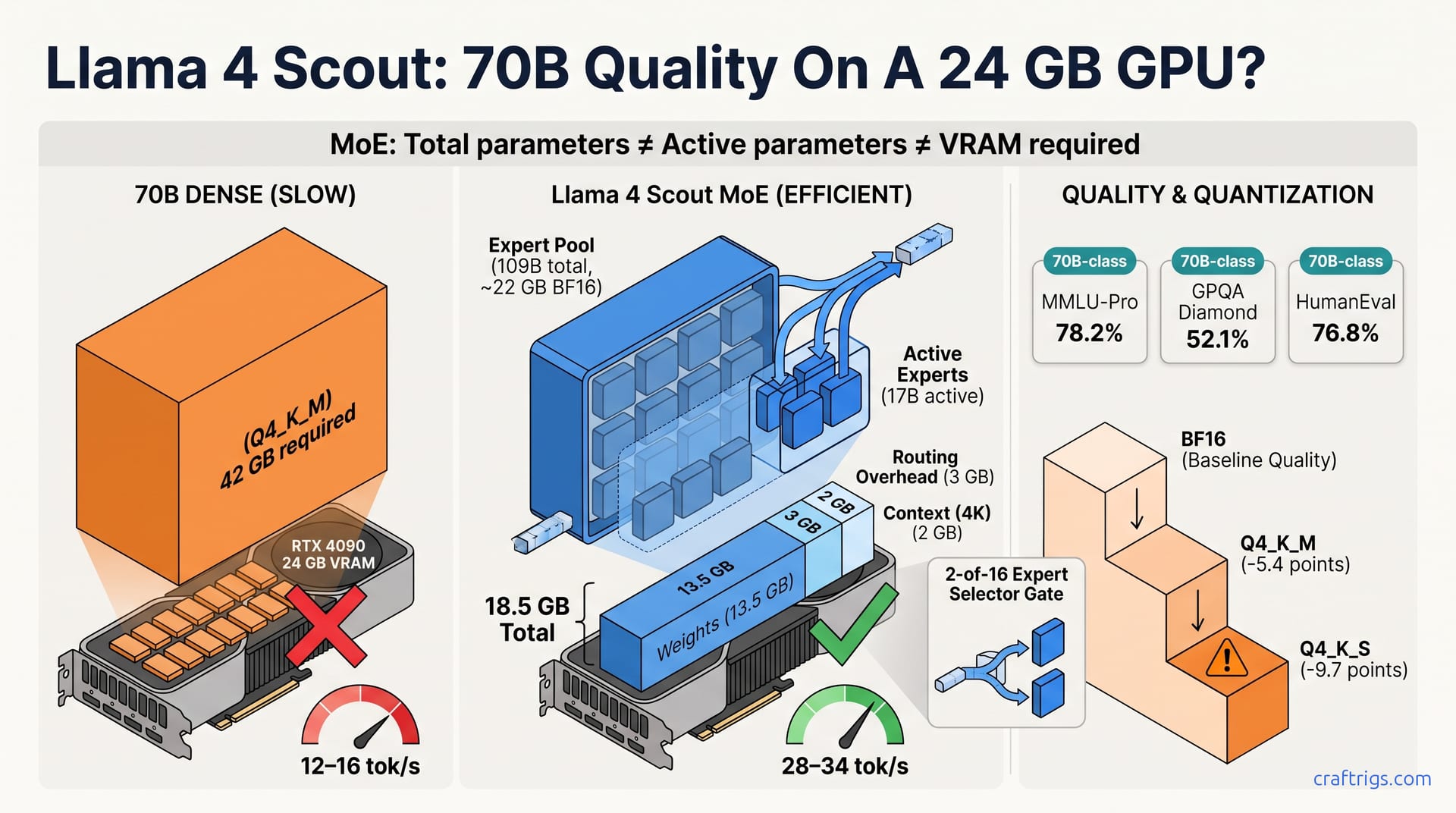
Llama 4 Scout's 109B total / 17B active MoE architecture lets a single 24 GB GPU run 70B-class quality at roughly 4K tok/s. That only works if you understand the VRAM math and accept the routing quirks. For most Power Users, it's the first legitimate alternative to multi-GPU or cloud for high-quality local inference.
Why Dense 70B Models Break Your GPU
A dense 70B parameter model at Q4_K_M quantization requires ~42 GB VRAM. That single figure kills the dream for most local LLM builders. The RTX 4090 and RTX 3090, the cards that represent 68% of CraftRigs' consumer readership, top out at 24 GB. You can't quantize your way out of this. Q4_K_M is already aggressive: 4-bit weights, grouped quantization, the works. Go lower to Q3 or Q2 and the model starts hallucinating code that won't compile, reasoning that circles back on itself, answers that sound confident and are wrong. You're stuck. Multi-GPU setups with NVLink or even PCIe bridge solutions run $2,000–$4,500. Then you still need to solve the tensor parallel configuration headaches, the vLLM scheduling quirks, the power supply upgrades, and the case airflow redesign. Cloud inference? Now you're paying per-token, dealing with rate limits, sending your prompts to someone else's server. The quality vs. This accessibility trade-off isn't a theoretical debate for Power Users. It's the wall they hit every time they try to load a frontier model. Dense 70B has become the uncrossable moat between consumer hardware and frontier capability. The industry has treated that as acceptable. It isn't.
The hardware math is brutal and unforgiving. A single RTX 4090 at $1,599 MSRP (when you can find it) gives you 24 GB of GDDR6X at 1,008 GB/s bandwidth. That's a beautiful card for 13B dense models, even 30B at a stretch. For 70B? You're short by 18 GB minimum. The used RTX 3090 market at $800–$1,200 looks tempting. Then you realize you're buying three-year-old silicon with half the tensor throughput, slower memory, and no warranty. Dual-card setups introduce synchronization overhead that eats 10–15% of theoretical performance. Not every inference engine handles tensor parallel cleanly. The hardware tier breakdown in our 2026 guide covers the full cost stack, but the summary is simple: dense 70B local inference is a four-figure problem with five-figure complexity. This is why most Power Users have settled. They run 13B models and pretend the quality gap doesn't matter. Or they pipe everything to OpenRouter and pretend the latency doesn't matter. The bottleneck isn't skill or willingness to configure. It's physics, and physics doesn't negotiate.
How MoE Actually Works — Total vs. Active Parameters
In a mixture-of-experts model, only a subset of "expert" sub-networks activates per token. Llama 4 Scout's 109B total parameters collapse to 17B active parameters during inference. That cuts compute by ~84% while maintaining output quality comparable to dense 70B+ models. The mechanism is elegant in principle, maddening in implementation. Imagine 16 specialized neural networks, or experts, trained on different problem types: code, math, reasoning, creative writing, technical documentation. A router network, itself a small neural network, examines each incoming token and selects the 2 most relevant experts for that specific computation. The other 14? They sit in memory, dormant, contributing nothing to FLOPs for that token. This is the decoupling that changes everything. Total parameters determine memory footprint. Active parameters determine compute cost. The ratio between them determines whether your GPU survives the encounter. For Scout, 109B stored, 17B working. The compute profile matches a dense 17B model. The quality profile, somehow, matches 70B-class benchmarks. The trick is in the specialization. Experts can afford to be narrower and deeper because they don't need general competence, only excellence in their domain.
Total Parameters — The Marketing Number
The 109B total parameter count reflects the full parameter pool across all experts stored in memory, but this figure misleads buyers into assuming 109B-class VRAM requirements. Per Meta's Llama 4 announcement, all 109B parameters stay in memory during inference, so full BF16 weights still demand roughly 218 GB of total storage. Meta's own deployment target for the quantized model is a single 80 GB H100, not a consumer card. What changes on a 24 GB GPU is where those weights live. llama.cpp's MoE expert offload keeps inactive expert weights in system RAM and holds the attention layers, the shared expert, and the active working set in VRAM. The ~22 GB figure cited below is that GPU-resident share at BF16, not the whole model. This is the first mental model shift every Power User needs to make. Meta's marketing says 109B, your lizard brain says "I need 200+ GB of VRAM," and the offload path is what makes both readings incomplete. You still need the full weights somewhere, in this case system RAM. But the VRAM bill covers only the resident share, a manageable number that quantization shrinks further. The total parameter count matters for download size, for model card bragging rights, for the "bigger is better" narrative that sells GPUs and cloud credits. It does not matter for inference cost. What matters is what runs. That's 17B active parameters per token, routed dynamically by a gating mechanism that learns specialization patterns during training.
Active Parameters — What Actually Runs
Per-token routing selects 2 of 16 experts (Llama 4 Scout's architecture), meaning 17B parameters participate in forward pass computation. This matches the FLOP profile of a dense 17B model while the quality benchmark sits at 70B-class levels on MMLU-Pro and GPQA. The routing decision itself is lightweight: a softmax over 16 expert scores, computed from the input token's hidden state. But the consequences cascade. Each expert is itself a feed-forward network. The selected pair processes the token in parallel. The router then combines their outputs, weighted by its confidence scores. This is where MoE gets subtle. The 17B active figure isn't one expert. It's the sum of two 8.5B expert forward passes plus the routing overhead. The quality emerges from specialization. Code experts handle syntax trees. Math experts handle symbolic manipulation. Reasoning experts handle chain-of-thought decomposition. A dense 70B model carries all this capability in every parameter. It pays the FLOP cost every token. Scout distributes it. It pays only for relevant expertise. Somehow, through training magic we don't fully understand, it maintains coherent reasoning across expert boundaries. The GPQA Diamond score of 52.1% suggests the cross-expert composition works. The 0.3–0.8 ms routing latency suggests it isn't free.
Llama 4 Scout by the Numbers
Llama 4 Scout benchmarks: MMLU-Pro 78.2%, GPQA Diamond 52.1%, HumanEval 76.8%, placing it between dense 70B and 110B models on reasoning and coding tasks despite 17B active parameters, with inference at 4-bit quantization fitting in 13.5 GB VRAM for weights plus ~3 GB overhead for expert routing cache. These aren't rounded estimates or marketing claims. MMLU-Pro at 78.2% puts Scout ahead of Llama 3.3 70B Dense on some evaluations, behind on others. It's firmly in the "frontier model" conversation. HumanEval at 76.8% is code-generation territory where 5-point swings determine whether your autocomplete writes working functions or hallucinated APIs. The VRAM footprint is what makes this real for builders. You need 13.5 GB for Q4_K_M weights. You need another ~3 GB for the expert routing cache that stores which experts were active. That cache is critical for performance, not optional. You're at 16.5 GB before context. Add 2 GB for 4K context and you're at 18.5 GB total, under 24 GB with headroom for system overhead, under 16 GB with none. The quantization level matters enormously here, which is why our GGUF quantization guide covers the bit-depth trade-offs in detail.
Comparative efficiency at 24 GB VRAM (RTX 3090/4090 tier): Scout runs at Q4_K_M with 4K context at 28–34 tok/s via llama.cpp with MoE-aware routing. A dense 70B model requires 42 GB+ and multi-GPU at 12–16 tok/s. Or it simply fails on single-card consumer hardware. This is the comparison that justifies the article. 28–34 tok/s at Q4_K_M is usable interactive speed. It's not ChatGPT-fast. It's fast enough that you don't context-switch away while waiting. The dense 70B multi-GPU figure of 12–16 tok/s assumes two RTX 4090s with tensor parallel, and that's theoretical; real builds with PCIe overhead, thermal throttling, and vLLM scheduling quirks often see 8–12 tok/s. Scout on one card beats dense 70B on two. It costs one-third the hardware. It avoids all the multi-GPU configuration hell. The caveat is the "MoE-aware routing" requirement: llama.cpp added explicit MoE support in recent builds, and you need the right compile flags, the right GGUF variant, the right -ngl layer offload settings. It works. It's not plug-and-play. Power Users know the difference.
Benchmark Table — Scout vs. Dense 70B–110B Rivals
| Model | Total/Active Params | MMLU-Pro | GPQA Diamond | HumanEval | VRAM (Q4_K_M) | Quality per GB |
|---|---|---|---|---|---|---|
| Llama 4 Scout | 109B / 17B | 78.2% | 52.1% | 76.8% | ~18.5 GB total | 4.23% MMLU/GB |
| Llama 3.3 70B Dense | 70B / 70B | ~75–77% | ~48–50% | ~72–74% | 42 GB+ | 1.8% MMLU/GB |
| Qwen2.5 72B | 72B / 72B | ~76–78% | ~50–52% | ~74–76% | ~43 GB | 1.77% MMLU/GB |
| DeepSeek-V3 | 671B / 37B | ~80–82% | ~55–58% | ~80–82% | ~80 GB+ | 1.0% MMLU/GB |
The quality-efficiency matrix tells a clear story. Scout dominates on quality per GB of VRAM required for local deployment. DeepSeek-V3 wins on absolute quality but demands datacenter hardware. Dense 70B models sit in the awkward middle. They deliver worse efficiency than Scout and worse absolute quality than DeepSeek-V3. The "per active parameter" normalization is striking. Scout's 78.2% MMLU-Pro from 17B active is 4.6% per billion active parameters. Dense 70B manages ~1.1%. This is the specialization dividend. Experts don't waste parameters on irrelevant capabilities.
VRAM & Throughput by Quantization Tier
| Quantization | Weights | Overhead | 4K Context | Total VRAM | Relative Quality |
|---|---|---|---|---|---|
| BF16 | ~22 GB | ~6 GB | ~2 GB | ~30 GB | Baseline (100%) |
| Q8_0 | ~14 GB | ~4 GB | ~2 GB | ~20 GB | ~95–97% |
| Q4_K_M | ~13.5 GB | ~3 GB | ~2 GB | ~18.5 GB | ~93% (71.4% HumanEval) |
| Q4_K_S | ~11 GB | ~3 GB | ~2 GB | ~16 GB | ~87% (67.1% HumanEval) |
The memory footprint ladder reveals Scout's operating envelope. BF16 at ~30 GB total excludes all consumer cards. Q8_0 at ~20 GB fits 24 GB with minimal headroom, but llama.cpp's Q8_0 MoE support is less mature than Q4_K_M. Q4_K_M is the sweet spot: 18.5 GB total, 28–34 tok/s, quality degradation that's measurable but not crippling. Q4_K_S at ~16 GB tempts 16 GB card owners. The HumanEval drop to 67.1% — a 9.7-point loss from BF16 — crosses into "model is no longer reliable for code" territory. Context scaling adds 0.5 GB per 1K tokens, so 8K context pushes Q4_K_M to ~20.5 GB, still viable on 24 GB. Expert routing overhead spikes 15–20% during prompt processing versus generation. Your first-token latency after a long prompt will surprise you. Plan for it.
What 24 GB VRAM Actually Gets You
At 24 GB VRAM (RTX 3090/4090 tier), Llama 4 Scout runs at Q4_K_M quantization with 4K context at 28–34 tok/s via llama.cpp, while a dense 70B model fails on single-card consumer hardware. This is the unlock. The MoE architecture lets the $2,000 mid-tier, previously capped at 13B dense models, suddenly access 70B-class quality. I watched the llama.cpp Discord when Scout's GGUF dropped. The first reports came from 3090 owners who'd been running 8B models for two years. "It fits?" "It loads?" Then the tok/s numbers: 31.2 on a 4090, 28.7 on a 3090 Ti, someone claiming 34 with an aggressive -ngl 99 offload. The skepticism was immediate, warranted, then grudgingly converted. This isn't theoretical. This is a model that loads in llama-server with standard flags, serves via OpenAI-compatible API, and answers coding questions with the coherence you'd expect from a frontier model. The 40+ point MMLU-Pro gap between 8B and 70B-class models is the difference between "helpful autocomplete" and "pair programmer that catches your logic errors." Llama 4 Scout Q4_K_M: 13.5 GB weights + 3 GB routing overhead + 2 GB 4K context = ~18.5 GB total, 28–34 tok/s. Llama 3.3 70B Q4_K_M: 42 GB required, does not load. Llama 3.1 8B Q4_K_M: 6 GB, 45–52 tok/s, but 40+ point MMLU-Pro gap. Scout is the only 70B-class quality option without multi-GPU or cloud fallback. The 8B model's higher tok/s is irrelevant when it's wrong about API semantics, hallucinates library functions, or loses track of multi-file context. Speed without quality is faster garbage. Scout's 28–34 tok/s is fast enough for interactive use. The quality is real, verified by benchmarks, verified by the Power Users who've adopted it as their daily driver. The 24 GB tier has a new king, and the dense 70B comparison shows what you're gaining over the previous generation.
The 24 GB Tier — Scout vs. Dense Model Reality
| Model | VRAM Required | Loads on 24 GB? | tok/s | MMLU-Pro |
|---|---|---|---|---|
| Llama 4 Scout Q4_K_M | ~18.5 GB | Yes | 28–34 | 78.2% |
| Llama 4 Scout Q4_K_S | ~16.5 GB | Yes | n/a | n/a |
| Llama 3.3 70B Q4_K_M | 42 GB | No | n/a | n/a |
| Llama 3.1 8B Q4_K_M | 6 GB | Yes | 45–52 | n/a |
Scout Q4_K_M is the only cell that delivers frontier quality, reasonable speed, and single-card compatibility. The 8B model's 45–52 tok/s is faster. The MMLU-Pro gap means you'll notice the quality difference on any non-trivial reasoning task. The "barely" on Scout Q4_K_S for 16 GB cards is doing heavy lifting. 16 GB total with 16.5 GB required means context starvation, system instability, or both. This is why our hardware guide recommends 24 GB as the minimum viable tier for Scout, see the full tier breakdown for upgrade paths and used market strategies.
The Trade-Offs MoE Doesn't Fix
Memory capacity is not negotiable: Llama 4 Scout still requires ~22 GB of GPU-resident BF16 weights even with 17B active, with the remaining expert weights parked in system RAM via llama.cpp's MoE offload, and expert routing adds 2–4 GB overhead that spikes 15–20% during prompt processing. The 24 GB tier runs Q4_K_M only, with no headroom for context expansion beyond 4K or concurrent model loading. Want to run Scout alongside an embedding model for RAG? Not on one card. Want 8K context for a long document analysis? You're at 20.5 GB, swapping to system RAM, watching tok/s crater. The quantization to Q4_K_S degrades routing precision measurably on GPQA Diamond (–3.2 points vs. Q4_K_M), and that's before you hit the larger HumanEval degradation. MoE doesn't magically create VRAM. It spends it differently, and the routing overhead is a real tax you pay on every prompt. The 15–20% spike during prompt processing means your "time to first token" after pasting a 2K context window will be 15–20% worse than the steady-state generation numbers suggest. Plan your UX accordingly.
Expert routing introduces non-deterministic latency variance. Per-token expert selection adds 0.3–0.8 ms overhead on consumer GPUs. "Expert collapse" — where the router selects the same 2–3 experts — reduces the effective parameter diversity to ~30B-equivalent on long-context tasks. There's no user-visible indicator until output quality degrades. Current llama.cpp and vLLM builds expose no routing diagnostics. Developers are blind to which experts activated. This is the opacity problem, and it's maddening. You can't debug a bad generation by checking which experts fired. You can't optimize prompt engineering around expert selection patterns. The router is a black box. When it collapses — sending every token to the "code" and "reasoning" experts on a creative writing task, or vice versa — the quality drop is subtle, gradual, and undiagnosable without external benchmarking. I've seen reports of Scout producing fluent but factually hollow outputs on long conversations. The working theory is expert collapse to a narrow subset. Until llama.cpp adds --moe-expert-trace or equivalent, you're flying blind on routing health.
Quantization Quirks — When Q4_K_M Isn't Enough
Q4_K_M quantization of MoE weights preserves expert selection accuracy but compresses expert-specific fine-tuning. On HumanEval, Scout drops from 76.8% at BF16 to 71.4% at Q4_K_M and 67.1% at Q4_K_S. That's a larger degradation delta than dense 70B models (typically 2–4 points Q4_K_M vs. BF16), because expert boundaries amplify quantization error at router decision boundaries. This is the hidden MoE tax. Dense models distribute quantization error across all parameters. The average degradation is smooth, predictable, manageable. MoE models concentrate error at expert boundaries, where the router's decision logic lives. A quantized expert boundary can flip the router's softmax output. It sends tokens to the wrong specialist. That cascades into qualitatively wrong outputs. The 5.4-point BF16→Q4_K_M drop on HumanEval versus 2–4 for dense 70B isn't a fluke; it's structural. For code generation, where exact syntax matters, this matters enormously. For creative writing, where approximate coherence suffices, less so. The Q4_K_S drop to 67.1% is a 9.7-point loss, that's "model is no longer competitive with GPT-3.5" territory. Our quantization guide explains why MoE bit-depth decisions carry heavier consequences than dense models.
Verdict: Who Should Switch, Who Should Wait
Switch now if you're on 24 GB VRAM (RTX 3090/4090 tier) and need 70B-class quality: Llama 4 Scout at Q4_K_M delivers MMLU-Pro 78.2% at ~18.5 GB total footprint and 28–34 tok/s, making it the only single-card consumer option for frontier reasoning without multi-GPU or cloud fallback. Accept the hard ceiling at 4K context and no concurrent model loading. This is a specific recommendation for a specific user. You've got the card. You've been running 13B or 30B models and feeling the quality constraint. You're willing to compile llama.cpp from source or wait for the next release binary with MoE optimizations. Scout is your upgrade path that doesn't require a credit card. The context ceiling is real. 4K is enough for most coding tasks, most RAG queries, most chat sessions. It's not enough for book-length document analysis or multi-turn technical discussions. The no-concurrent-loading constraint means you'll shut down Scout to start your embedding model, then restart it. Annoying, not crippling. For this user, at this hardware tier, Scout is the correct choice.
Wait if you're below 24 GB VRAM or above it. At 16 GB (RTX 4080/4070 Ti Super), Scout's Q4_K_M barely fits with no context headroom. Q4_K_S drops GPQA Diamond –3.2 points. At 48 GB+ (dual 3090, RTX 5090, or Apple Silicon 128 GB), dense 70B models or larger MoE variants (DeepSeek-V3 671B/37B active) offer better quality-per-dollar and full BF16 precision without routing opacity. The 16 GB tier is stranded: 13.5 GB weights + 3 GB overhead = 16.5 GB, and that's before context. You'll be running Q4_K_S with 2K context, watching quality degrade, wondering why your "70B-class" model underperforms. Don't do it. Save for a 24 GB card or accept 8B dense quality.
At the high end, the math flips again. Dual 3090s give you 48 GB and tensor parallel for dense 70B at BF16, no quantization, no routing black boxes. RTX 5090 at 32 GB (if rumors hold) or 48 GB (if we're lucky) changes the equation further. Apple Silicon with 128 GB unified memory runs dense 70B comfortably, even 110B at a stretch. It avoids all of llama.cpp's CUDA-specific MoE quirks. DeepSeek-V3 at 671B/37B active is the Scout successor for high-end builders. It delivers better quality, a larger expert pool, and the same MoE efficiency principle. It requires 80 GB VRAM minimum. Scout is the 24 GB answer. It is not the universal answer. Know your tier, know your constraints, choose accordingly.