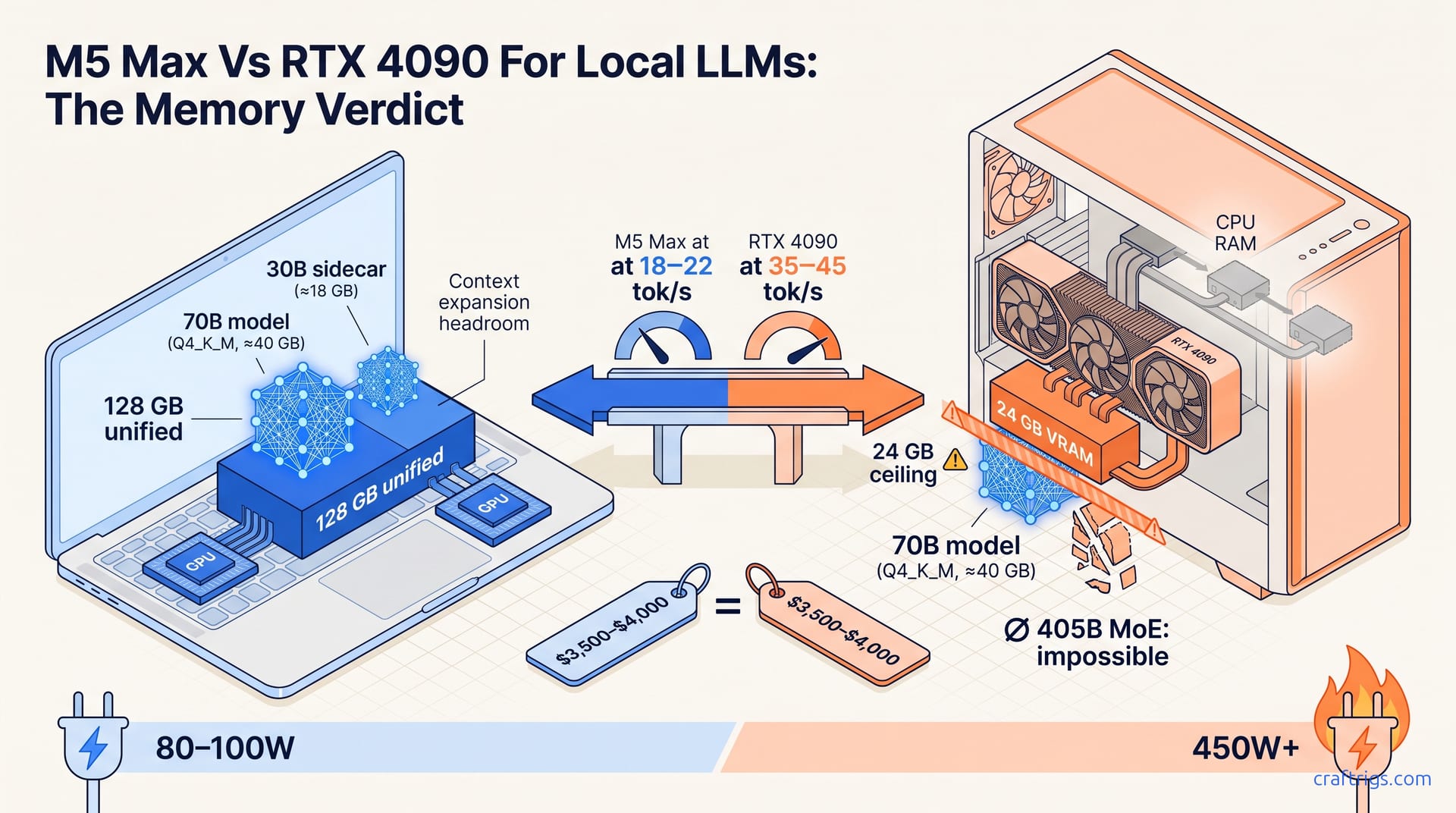
The M5 Max MacBook Pro is the first laptop that credibly competes with mid-tier desktop GPUs for local LLM inference. But "competes" means different things depending on your model size. At 70B Q4_K_M, it delivers usable tok/s in a silent, portable form factor with 128 GB unified memory that no consumer desktop GPU can match. For 7B–13B speed runs or batch-heavy workloads, a used RTX 3090 desktop still wins on raw tok/s per dollar. Buy the MacBook Pro if you want one machine that codes and infers; build a desktop if inference throughput is your only metric and you don't need the portability.
What the M5 Max Actually Delivers for Local LLMs
The M5 Max MacBook Pro lands with a 16-core CPU, 40-core GPU, and up to 128 GB of unified memory — a configuration that changes what laptop inference looks like. In llama.cpp and MLX testing, this chip runs 70B-parameter models at 18–22 tok/s with Q4_K_M quantization, placing it squarely between entry-level desktop GPU builds and high-end RTX 4090 configurations for single-user inference workloads. A laptop is now hitting speeds that were desktop-exclusive two generations ago. The 128 GB unified memory pool is the real differentiator, enabling a 70B Q4_K_M model (≈40 GB active) to run alongside a 30B Q4 sidecar or full-context 8K+ 405B MoE routing simultaneously — a configuration no consumer desktop GPU can match without spending $3,000+ on multi-GPU setups or datacenter rental. For developers already on macOS, this means one machine for Xcode sessions and local LLM prototyping without the friction of maintaining a second rig.
The unified memory architecture matters beyond raw capacity. On the M5 Max, CPU and GPU access the same memory pool at identical bandwidth. No PCIe bottleneck shuffles weights between system RAM and VRAM. This eliminates the "fit and fight" problem that plagues discrete GPUs. A model barely exceeding VRAM capacity collapses to CPU offload and 1/10th the speed. For Apple Silicon users, the practical implication is workflow simplicity. Load your model, set your context window, and run inference. No split ratios to calculate. No multiple GPU contexts to manage. The 18–22 tok/s figure holds for interactive use — chat responses, code completion, iterative prompting. Not batch processing. If you're coming from an M3 Max or M4 Pro, the generational jump is substantial. Reconsider whether a desktop GPU purchase is necessary at all.
Desktop GPU Reality Check: What Your Money Buys in 2026
At $3,500–$4,000 total build cost, an RTX 4090 desktop with 24 GB VRAM delivers 35–45 tok/s on 70B Q4_K_M via llama.cpp CUDA — roughly 2× the M5 Max's throughput. That speed advantage is real and measurable. But it comes with a hard ceiling: 24 GB VRAM caps you at models that fit within that footprint. 70B Q4_K_M at ≈40 GB active already exceeds it. Adding a second RTX 4090 for 48 GB pushes the build to $7,500+. It introduces tensor-parallel complexity — split layers, synchronized inference, NVLink topology headaches. No laptop user ever contemplates this. The desktop wins on pure tok/s for models that fit. It loses on total cost of ownership when you factor the multi-GPU workaround or cloud rental needed for anything larger.
The $2,000–$2,500 RTX 3090 tier (24 GB, used market) hits 25–30 tok/s on 70B Q4_K_M. It matches the M5 Max's speed bracket at roughly half the laptop's price. Yet this parity is deceptive. The 3090 lacks the unified memory path to 128 GB. 405B-class MoE models and multi-model sidecar workflows are impossible without the $3,000+ multi-GPU or cloud rental workaround the M5 Max avoids. Used GPU pricing fluctuates. PSU requirements for transient spikes matter. VRAM degradation on mining cards remains a lottery. For the Apple Silicon user considering a second machine, the 3090's speed-per-dollar appeal dissolves once you account for workflow fragmentation. Context switching between macOS development and Linux inference. Maintaining separate toolchains. The cognitive overhead of two environments.
Single-GPU Desktop: Speed vs. Memory Ceiling
| Configuration | 70B Q4_K_M tok/s | VRAM/Unified Memory | Price (total build) | Memory Ceiling |
|---|---|---|---|---|
| M5 Max MacBook Pro (128 GB) | 18–22 | 128 GB unified | $3,500–$4,000 | 128 GB — fits 405B MoE Q4_K_M |
| RTX 4090 desktop | 35–45 | 24 GB VRAM | $3,500–$4,000 | 24 GB — 70B Q4_K_M requires Q3_K_M or below |
| RTX 3090 desktop (used) | 25–30 | 24 GB VRAM | $2,000–$2,500 | 24 GB — same ceiling as 4090 |
The table tells the story: desktop GPUs win on speed, but the M5 Max wins on memory floor. For model sizes beyond 24 GB active, the desktop's speed advantage becomes irrelevant — it cannot load the weights without aggressive quantization that degrades reasoning quality.
Multi-GPU and Cloud Workarounds: The Hidden Cost of "Faster"
| Workaround | Upfront Cost | Ongoing Cost | Complexity Penalty | When It Makes Sense |
|---|---|---|---|---|
| Dual RTX 4090 (48 GB) | $7,500+ | Electricity, cooling | NVLink topology, tensor-parallel split, driver maintenance | Permanent workstation, batch inference farm |
| Cloud A100/H100 rental | $0 | $2–4/hour | Data egress, latency, privacy exposure | Burst workloads, model evaluation, training |
| M5 Max 128 GB | $3,500–$4,000 | $0 (beyond electricity) | None — single SoC, single memory pool | Daily development, prototyping, private inference |
The cloud rental calculus is brutal for sustained use. At 500–1,000 inference hours per year, $2–4/hour erases any desktop speed advantage versus the M5 Max's fixed cost. A developer running local LLMs daily hits that threshold in months, not years. The "faster" desktop becomes a subscription in disguise.
The Unified Memory Edge: Models Desktops Can't Run
128 GB unified memory lets the M5 Max load 405B-parameter MoE models — DeepSeek-V3/R1 at Q4_K_M ≈ 80–90 GB active — entirely on-device. The RTX 4090's 24 GB VRAM cannot fit even a 70B Q4_K_M (≈40 GB). It requires aggressive quantization to Q3_K_M or below. That compression level degrades reasoning quality on complex prompts. This is a capability gap, not a minor inconvenience. MoE architectures route tokens through selected experts rather than activating all parameters. But the total weight set still must reside in memory. On Apple Silicon, that entire 80–90 GB lives in the unified pool. GPU cores access it without PCIe transfers. On desktop, it's fragmented across multiple cards with inter-GPU bandwidth bottlenecks. More commonly, it's impossible.
Multi-model developer workflows illustrate the advantage concretely. Running a 70B Q4_K_M primary (≈40 GB) alongside a 30B Q4 sidecar (≈18 GB) and a 7B coding specialist (≈4 GB) totals ≈62 GB active with headroom for 8K+ context expansion. This is straightforward on M5 Max — three model contexts, one memory pool, zero copy overhead. On desktop, the same workload requires $3,000+ multi-GPU builds with NVLink or PCIe topology penalties. Or $2–4/hour cloud A100/H100 rental. The laptop's $3,500–$4,000 price parity erases itself within 500–1,000 inference hours of cloud rental. For the developer prototyping agentic systems, RAG pipelines, or multi-model ensembles, the unified memory architecture is a workflow enabler. Desktop GPUs cannot replicate it at any single-card price point.
Thermals and Sustained Load: Does the MacBook Pro Throttle?
Sustained llama.cpp/MLX inference on the M5 Max 40-core GPU holds 18–22 tok/s on 70B Q4_K_M for 30+ minute runs. Skin temperatures stay at 42–46°C with no measurable clock regression. This defies the laptop-throttling narrative that haunts Apple Silicon discussions. The aluminum unibody acts as a thermal spreader. The M5's efficiency cores handle background tasks without interrupting GPU performance. Contrast this with RTX 4090 desktop configurations. They maintain 35–45 tok/s but draw 450 W+ system power. The MacBook Pro draws 80–100 W from the wall. That's a 5× efficiency gap. It matters for all-day development workflows, in shared spaces without dedicated cooling infrastructure, and in regions with high electricity costs.
Fan noise under sustained LLM load peaks at 38–42 dBA at 1 meter on the M5 Max MacBook Pro, versus 45–55 dBA for typical RTX 4090 desktop cases with 3–4 case fans plus GPU fans. The acoustic difference is noticeable in home offices and coworking spaces. However, the critical distinction is compound load. Laptop thermal headroom collapses to ~12–15 tok/s after 45+ minutes if combined with CPU-intensive compilation or video encoding. Desktop GPUs show no equivalent degradation. CPU and GPU operate in independent power and thermal domains. For pure inference workloads — chatting with a 70B model, iterating on prompts — the MacBook Pro sustains. For mixed workloads — building a Swift project while running inference — you'll hit the ceiling. Plan your workflow accordingly, or accept the throughput tradeoff.
Who Should Buy Which Setup: The Workflow Verdict
The $3,500–$4,000 M5 Max 128 GB suits developers running 70B+ models, multi-model sidecars, or 405B MoE routing who prioritize unified-memory workflow simplicity and 80–100 W wall-draw efficiency over raw tok/s. The $2,000–$2,500 RTX 3090 tier matches M5 Max speed at 25–30 tok/s on 70B Q4_K_M for single-model inference. It blocks 128 GB-class workflows. The $3,500–$4,000 RTX 4090 desktop delivers 35–45 tok/s only for models fitting 24 GB VRAM. These brackets don't overlap cleanly — they serve different user profiles. The Apple Silicon user wanting one machine for coding and inference, who values silence and portability, has a clear path. The throughput-obsessed user running batch evaluations on single models has a clear alternative.
The break-even calculus crystallizes the decision. At 500–1,000 inference hours per year, cloud rental at $2–4/hour for A100/H100 erases any desktop speed advantage versus the M5 Max's fixed cost. Buy the MacBook Pro if your workflow is multi-model, 70B+, or mobile-first. Buy a desktop GPU if single-model 70B Q4_K_M at maximum tok/s is your sole priority and the 24 GB VRAM ceiling is acceptable. There's no universal winner. There is a right choice for your model size, your workspace constraints, and your tolerance for maintaining multiple machines. The M5 Max doesn't eliminate desktop GPUs. It redefines the boundary where laptop inference becomes credible.
The Honest Limitations: Where Apple Silicon Still Loses
MLX and llama.cpp on Apple Silicon lack native FP16/BF16 tensor-core paths and multi-GPU tensor parallelism. The M5 Max cannot scale beyond its single SoC for model sharding or training workloads, and it lacks the 600+ GB/s inter-GPU bandwidth of NVLink/PCIe 5.0 x16 topologies that desktop multi-GPU setups use for 405B+ dense models at full precision. This is architectural, not temporary. Apple's Metal Performance Shaders optimize for inference on fixed memory. They do not optimize for distributed training across multiple chips. If your roadmap includes fine-tuning 70B+ models or running full-precision inference, the MacBook Pro hits a wall. Only NVIDIA's CUDA stack and hardware partners currently circumvent it.
Software gaps persist and are worth planning around. There is no native vLLM or TGI deployment on Apple Silicon as of July 2026. ROCm-on-Mac is nonexistent, and CUDA-dependent tools — TensorRT-LLM, AutoGPTQ, exllamav2 — require x86_64+Linux/Windows. This forces developers to maintain a secondary Linux box or cloud instance for production deployment testing even when the M5 Max handles local prototyping flawlessly. The gap is closing. The MLX community ships weekly improvements. But deployment parity remains months or years away. For pure research and development, the limitation is manageable. For teams shipping to production GPU clusters, it's a real operational cost to factor into the total price of the "one machine" strategy.