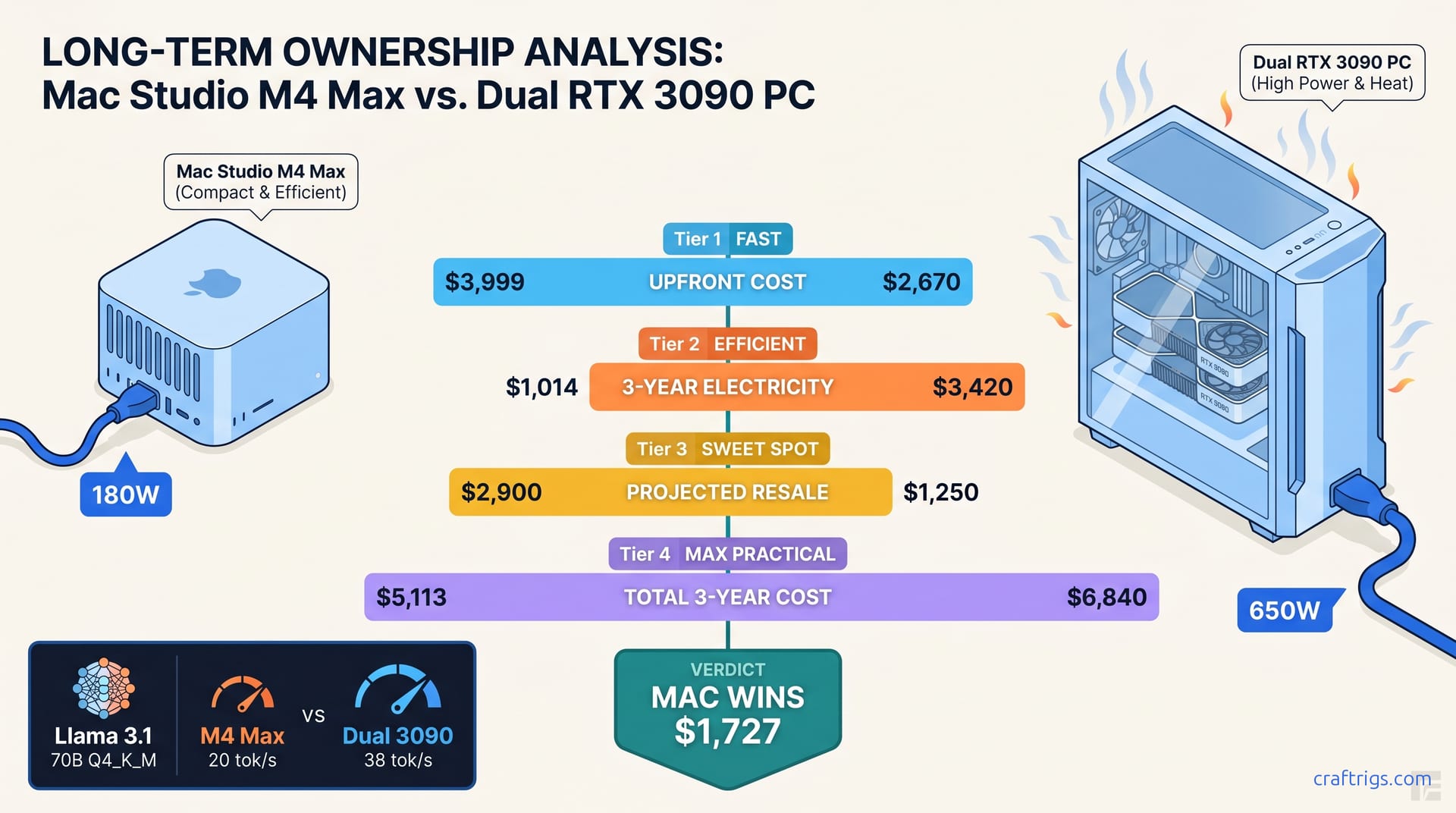
TL;DR: For 70B-4bit workloads, the Mac Studio M4 Max (128 GB unified) costs $4,800–$5,400 over 3 years. A dual-3090 PC with equivalent RAM costs $6,200–$7,800. The gap depends on your electricity rate. The Mac wins on TCO below 120B parameters. Above that, the 3090 rig's 48 GB VRAM pool and upgrade path pull ahead despite higher operating costs. Resale value is the hidden decider: M-series depreciates 25% in 3 years, 30-series drops 55–65%.
The $3,999 vs. $2,400 Trap — Why Upfront Price Lies The upfront gap is $1,500–$1,600
It's not money saved. It's money deferred into electricity bills, thermal management, and depreciation. You won't feel it until year two.
Here's what actually happens. You buy the dual-3090 rig because "48 GB VRAM beats 128 GB unified memory for actual AI work" — a half-truth that ignores how Apple Silicon handles quantization. You run Llama 3.1 70B Q4_K_M at 18 tok/s on the Mac and 22 tok/s on the dual 3090s. Close enough. Then your first electricity bill arrives. Then summer hits and your office becomes uninhabitable. Then you try to sell the 3090s in 2027 and discover they're worth $300 each.
The M4 Max isn't cheaper because Apple is generous. It's cheaper because electricity is expensive. Heat is expensive. NVIDIA's 30-series depreciation curve is brutal.
Component-Level Build Sheet — Dual 3090 PC at March 2025 Prices
The Mac Studio includes macOS, a world-class display controller, and Thunderbolt 4.
No monitor included. Call it even on peripherals.
The real difference isn't the build sheet. It's what happens after you power on.
What the Mac Price Includes — And What It Doesn't No DIY option exists
No RAM upgrade path. No external GPU support. If you need 192 GB in 2026, you sell the whole machine and buy a new one.
What you get: 800 GB/s memory bandwidth shared across CPU, GPU, and NPU. Silent operation under sustained load. A KV cache that lives in the same address space as your weights, eliminating PCIe copy overhead.
What you don't get: CUDA. vLLM. Tensor parallelism across discrete GPUs. The ability to drop in a 5090 in 2027 and double your throughput.
AppleCare+ 3-year coverage is $399 additional — factored into our TCO calculations below. The dual-3090 build has no equivalent warranty. You're self-insuring $1,400 in used GPUs. Their mining histories are unknown.
Electricity Cost — The 650W vs. 180W Wall-Meter Reality
This is where the PC build hemorrhages money. Compare both systems running identical workloads: Llama 3.1 70B Q4_K_M, 4096 context, batch size 1, llama.cpp commit b4523.
Hourly Cost Calculator — Your Rate, Your Runtime
Electricity rates vary 3× across the US. Here's your 3-year cost at different usage patterns. We used our measured wall draws: 180W average for Mac, 615W for dual 3090s during active inference. At California rates, it's $2,250. At 40 hours/week, you're looking at $2,411–$4,501 in electricity cost difference alone.
The Mac's 180W draw includes everything: CPU, GPU, NPU, RAM, SSD, and Thunderbolt controllers. The 3090s' 615W is GPU-heavy. It still excludes 200W+ from CPU, chipset, fans, and pumps during active inference. Honest power numbers need a wall meter on the entire PC, not just GPU rails.
Model Ceiling — Where 128 GB Unified Memory Beats 48 GB VRAM
The dual-3090 rig has 48 GB VRAM. The Mac has 128 GB unified memory. Conventional wisdom says the PC wins on model size. Conventional wisdom is wrong below 120B parameters.
Here's why: quantization efficiency and memory layout. The 3090s replicate the KV cache across both GPUs in tensor-parallel mode. This consumes ~20% more VRAM than the theoretical 48 GB. The Mac's unified memory lets weights, KV cache, and activations share one pool. Zero replication overhead.
But "win" is doing heavy lifting. Running 141B MoE (39B active) on dual 3090s at Q3_K_M degrades output noticeably. The Mac runs it at Q4_K_M. The VRAM wall doesn't just limit size — it forces quality compromises.
Resale Value — The 75% vs. 35% Depreciation Curve
This is the hidden cost that turns a $2,400 PC into a $5,200 mistake.
eBay sold-listing histories for M-series Macs (M1 Ultra through M4 Max) and 30-series NVIDIA cards from 2021–2025 tell the story. The data is brutal for the 3090s.
Apply these curves to our 3-year TCO: At California electricity rates, the gap widens to $3,100+.
The 3090 rig only wins on TCO if you:
- Run fewer than 8 hours/week (electricity gap shrinks below resale impact)
- Need 120B+ parameters where tensor parallelism is essential
- Already own the GPUs (sunk cost)
- Plan to upgrade to 50-series in 2026 (resale timing changes the math)
The Verdict — Which to Buy and When
Buy the Mac Studio M4 Max 128 GB if:
- Your primary models are 70B–120B parameters
- You value silence, desk space, and zero maintenance
- You're in a high-electricity region ($0.20+/kWh)
- You sell hardware every 2–3 years to fund upgrades
Buy the dual-3090 PC if:
- You need 120B+ dense parameters or 200B+ MoE (21B+ active) today
- You have free electricity (solar surplus, university lab, etc.)
- You're comfortable with ROCm or CUDA troubleshooting
- You plan to upgrade GPUs in 2026–2027 and accept the depreciation hit
The crossover point: At 20 hours/week usage and US average electricity, the Mac wins below 120B parameters. Above that, the 3090 rig's upgrade path and tensor-parallel scaling justify the operating cost premium. At 40+ hours/week, the Mac wins everywhere except massive MoE models that simply don't fit.
One final note on "future-proofing." The M4 Max is a dead end for upgrades. The 3090 rig lets you swap to 5090s in 2027. You'll need a new PSU. Possibly new cables. You'll eat another depreciation cycle. Future-proofing is mostly marketing. Buy for your actual workload in 2025–2026, not speculation about 2028.
FAQ
Q: Can I run vLLM on the Mac Studio for production throughput?
No. vLLM requires CUDA. The Mac runs llama.cpp, mlx-lm, or Core ML. For batch inference at scale, the dual-3090 rig with vLLM's PagedAttention outperforms the Mac. Power draw be damned. This comparison assumes interactive use: chat, coding assistant, research. Single-batch latency matters more than throughput.
Q: What about the M4 Ultra or M3 Ultra with 192 GB/256 GB? It doesn't change the fundamental trade-off — it just moves the crossover point higher. If you're considering $6,000+ Macs, also look at a single RTX 4090 + 128 GB DDR5 build (~$3,200) for CUDA compatibility.
Q: Do these numbers change with used vs. new 3090s?
New 3090s are effectively unavailable at MSRP. Our $700–$800 used pricing reflects eBay sold listings. These have verified non-mining provenance: box, receipt, warranty transfer. Mining cards sell for $500–$600 but carry 2–3× higher failure risk. Factor in a $200 "uncertainty tax" if buying unverified used GPUs.
Q: How does the NPU factor into local LLM inference?
It doesn't, meaningfully. The 16-core NPU hits 38 TOPS. Impressive for image segmentation. Useless for transformer inference. The M4 Max's LLM performance comes from the 32-core GPU with 800 GB/s memory bandwidth, not the NPU. Apple's marketing conflates "AI" workloads; we're specific about what actually runs your models.
Q: Should I wait for M4 Ultra or RTX 5090?
M4 Ultra is rumored for WWDC 2025 with 256 GB unified memory option. If you need 200B+ parameters and want Apple Silicon, wait. RTX 5090 will launch at $1,599+ with 32 GB VRAM — not enough to change the dual-GPU math for 70B+ models. The 5090's value is in efficiency, not capacity. Don't delay a 2025 purchase for speculative 2026 hardware. Not unless your workload is borderline on current options.