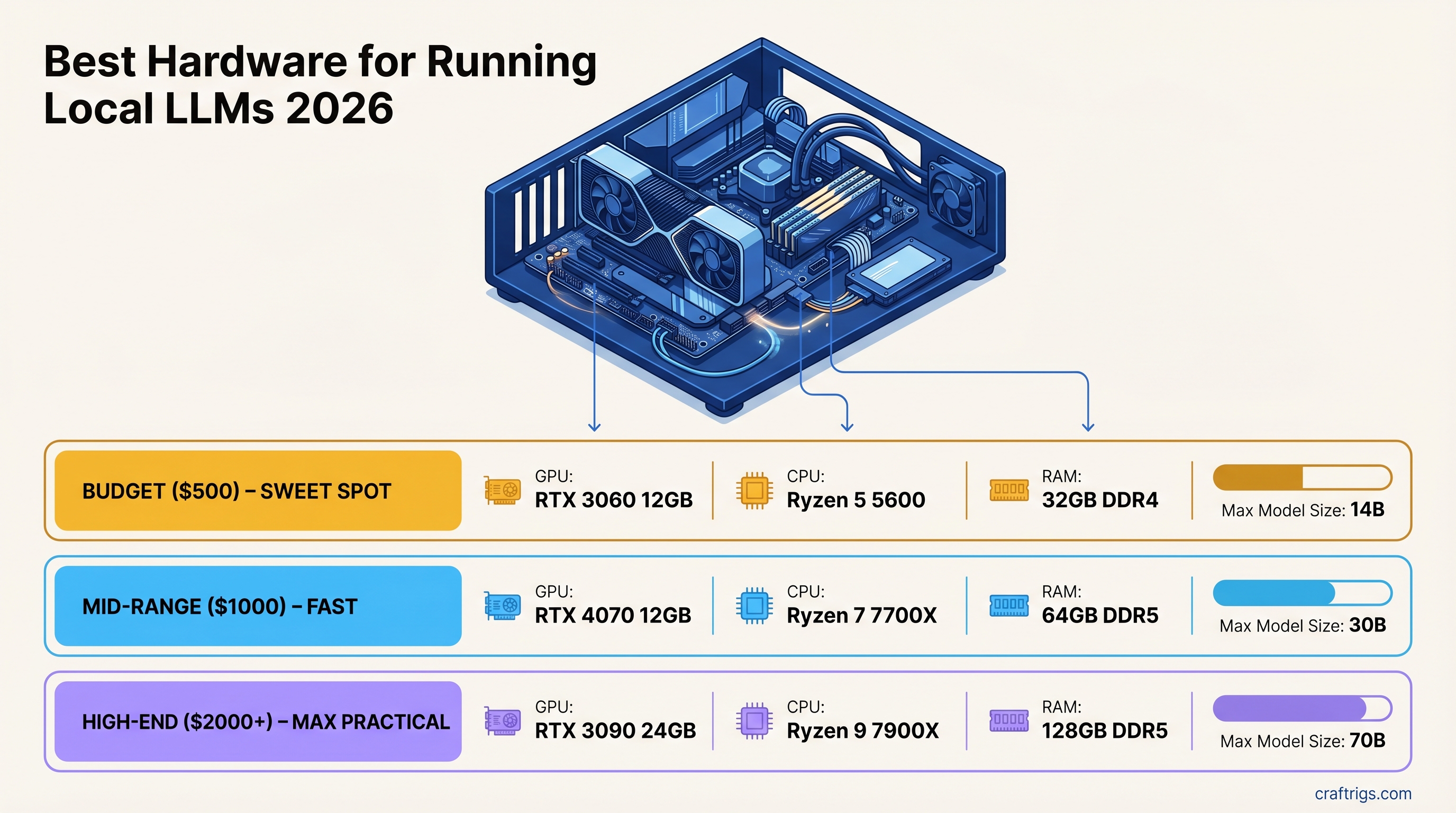
TL;DR — Quick Picks by Budget
Best For
The single spec that determines everything is VRAM. Get VRAM right and the rest of the build is easy. Get it wrong and no amount of CPU or system RAM compensates.
GPU: The Only Spec That Matters
Memory bandwidth determines tokens per second once a model fits in VRAM. A card with more VRAM but lower bandwidth runs models, but slowly. A card with less VRAM but higher bandwidth is faster — if the model fits. Both matter, in that order: capacity first, then speed.
Here is the full GPU tier breakdown for 2026.
8GB Tier — 7B Models Only
RTX 5060 8GB — ~$379 (new)
The best 8GB card available. Ada Lovelace successor architecture, CUDA support, solid for 7B models at Q4_K_M. At 8GB you are capped — 7B models fit cleanly, 14B models do not fit without heavy quantization compromise or CPU overflow. If your use case is truly 7B-only (chat assistant, quick summarization), this is a viable starting point. If there is any chance you will want to run 14B or larger, spend more for a 12GB or 16GB card now rather than upgrading later.
Bandwidth: ~448 GB/s (estimated, pre-release spec). VRAM ceiling: 7B Q8, 7B Q4_K_M cleanly.
12GB Tier — 14B Ceiling, Best Value
RTX 3060 12GB — ~$250-280 (used)
The best-value local LLM card in 2026. 12GB VRAM runs Llama 3.2 8B, Phi-4 14B, and Qwen 2.5 14B at Q4_K_M without compromise. At $260, the VRAM-per-dollar ratio is unmatched in CUDA hardware. Memory bandwidth at 360 GB/s is not fast by current standards, but adequate for 14B models — expect 18-28 tokens/second on a 14B Q4 model.
CUDA support is full and frictionless: Ollama, LM Studio, llama.cpp, and every major inference tool works out of the box. The card is five years old, runs warm under load, and requires an adequate PSU — but nothing about its inference capability is dated. For a $500 total build, this is the GPU.
What it runs: 7B models cleanly at Q8. 14B models at Q4_K_M. Nothing above 14B without CPU offloading (which tanks speed).
What it does not run: 20B+ models at GPU speed. 14B at Q8 is marginal — 11.5GB at Q8 for a 14B model cuts it very close.
16GB Tier — The Sweet Spot
The 16GB tier is where most serious local LLM users land in 2026. 16GB VRAM runs 14B models at Q8, handles 27B models at Q4_K_M with room to spare, and provides meaningful context headroom for longer conversations.
RTX 5060 Ti 16GB — ~$549 (new)
The best new card in the 16GB tier. 448 GB/s bandwidth is significantly higher than the 4060 Ti (288 GB/s) — that bandwidth gap translates directly to more tokens per second. 16GB VRAM runs every mainstream 14B model and handles Qwen 2.5 32B at Q3/Q4 with CPU overflow. If you are buying a new card today for a $1,000 budget build and want to stay on the latest architecture, this is the pick.
RTX 4060 Ti 16GB — ~$380-420 (new)
The value option in the 16GB tier. Same VRAM as the 5060 Ti, meaningfully lower bandwidth (288 GB/s vs 448 GB/s), and $130-170 less. If you can find the 4060 Ti 16GB at retail price, it is a strong buy — you are trading roughly 30-35% of generation speed for a significant discount. For most users running 14B models conversationally, that speed difference is acceptable.
Arc Pro B70 32GB — ~$949 (new)
Intel's professional Arc card enters the picture here with a compelling VRAM argument: 32GB at under $1,000. On paper that beats every NVIDIA consumer option at this price. In practice, Intel's inference ecosystem is still maturing — llama.cpp SYCL backend works, Ollama support is functional, but performance per GB of VRAM trails NVIDIA CUDA by 15-25% on most workloads. Driver stability has improved significantly through 2025, but if you need zero ecosystem friction, stick with CUDA. If you specifically need 32GB on a strict budget and are comfortable with occasional configuration work, the B70 is worth evaluating.
24GB Tier — 34B Models and Serious Work
At 24GB you can run every mainstream consumer model at Q4_K_M quality without compromise. Qwen 2.5 32B, CodeLlama 34B, DeepSeek-R1 32B — all fit cleanly.
RTX 3090 — ~$450-550 (used)
The used market champion. 24GB GDDR6X, 936 GB/s bandwidth, and available at a fraction of its original price. The 3090 generates tokens faster than the RTX 4060 Ti 16GB on the same model size — not because of VRAM, but because 936 GB/s is more than 3x the 4060 Ti's 288 GB/s. A used 3090 at $500 paired with a mid-range platform is one of the most cost-effective serious inference builds possible in 2026.
Caveats: 350W TDP requires a quality PSU (850W minimum), it runs hot and loud under sustained load, and it is aging hardware. Buy from a verified seller, check for evidence of mining use, and factor in a proper case with airflow. The RTX 3090 buyer's guide covers what to look for on the used market.
RTX 4090 — ~$1,600 (new/used)
Same 24GB VRAM as the 3090, but 1,008 GB/s bandwidth — about 8% more tokens per second on average. The 4090 is quieter, cooler per watt, and on a more modern architecture. At $1,600 it is hard to justify over a $500 used 3090 for pure inference use. The case for the 4090 is: you value the performance margin, want a warranty, and are already spending $2,000+ on the full build.
Price
~$260 used
~$400 new
~$549 new
~$500 used
~$1,600 new
48GB+ Tier — 70B and Beyond
Once you need 70B models at full quality, the options shift.
Dual RTX 3090 (NVLink) — ~$2,500+ total build
Two RTX 3090s bridged with NVLink pool their VRAM to 48GB. Llama 3.1 70B at Q4_K_M fits entirely in GPU VRAM with this setup. Generation speed at ~90-100 t/s on 70B is genuinely fast. This is the high-performance path. It is also the complex path: requires a dual-slot GPU motherboard with PCIe spacing, NVLink bridge, a 1000W+ PSU, and a case that fits two full-size cards. See the dual RTX 3090 build guide.
Mac Studio M4 Max — 64GB ($1,999) or 128GB ($2,799)
Apple Silicon takes a fundamentally different approach with unified memory. The GPU and CPU share the same physical memory pool — so a 64GB M4 Max has 64GB available for model inference. There is no discrete VRAM ceiling. The tradeoff is generation speed: 120 GB/s unified memory bandwidth is much lower than 936 GB/s on the 3090. A 70B model on an M4 Max runs at roughly 8-12 t/s — slower than the dual-3090, but far simpler to set up, silent, and consuming 60-70W instead of 700W. For anyone who needs 70B capability without building a rackmount-style rig, the Mac Studio is the realistic path.
CPU: Barely Matters for GPU Inference
CPU is largely irrelevant when running inference fully on a GPU. The CPU handles model loading, tokenization, and orchestration — none of which are bottlenecks in a GPU-accelerated setup. A Ryzen 5 5600X or Intel Core i5-13600K handles a local LLM server without strain.
The only exception: CPU offloading. When a model exceeds VRAM capacity, layers overflow to system RAM and the CPU processes those layers. In this case, core count and platform bandwidth matter. DDR5 at ~90 GB/s is still dramatically slower than GPU VRAM bandwidth (360-1,008 GB/s), so CPU offloading should be a last resort, not a plan.
If you are specifically building for CPU offloading: The Ryzen 9 7950X with DDR5 is the top consumer choice — 16 cores, high memory bandwidth, strong single-thread performance for llama.cpp CPU layers. But the performance gap between GPU and CPU inference is so large that upgrading VRAM is almost always a better investment than upgrading CPU.
Practical recommendation: Any modern 6-core CPU is sufficient. Spend your budget on GPU VRAM, not CPU.
RAM: 32GB Minimum, 64GB Recommended
System RAM requirements for local LLMs are straightforward:
- 16GB: Works for 7B-only use cases where the model fits entirely in GPU VRAM. No headroom.
- 32GB: The practical minimum. Leaves adequate space for OS, inference tooling, and light CPU overflow.
- 64GB: Recommended for anyone running 14B+ models with any CPU offloading, multiple model workflows, or a RAG pipeline.
- 128GB: Relevant only for dedicated CPU inference or edge cases involving very large models on CPU.
DDR5 vs DDR4: DDR5 offers roughly 50-70% more bandwidth than DDR4 (~90 GB/s vs ~55 GB/s). For GPU-only inference, this difference is irrelevant — the GPU VRAM handles everything. For CPU offloading, DDR5 measurably improves layer processing speed. If your platform supports DDR5 (AM5, Intel 12th gen+), use it. If you are on an older AM4 or Z490 platform, DDR4 is fine.
Storage: NVMe SSD, 2TB Minimum
Model load time is the one place storage meaningfully affects the local LLM experience.
Loading a 14B Q4_K_M model (~8GB) from an NVMe SSD takes 5-10 seconds. From a SATA SSD it takes 15-20 seconds. From a spinning hard drive it can take 2-3 minutes. For a 70B model at 40-50GB, those ratios compound — fast NVMe is the difference between a 25-second load and a 5-minute wait.
Recommended: 2TB NVMe SSD (PCIe 4.0 or 5.0). A basic model collection with a 7B, 14B, 32B, and 70B model already consumes ~80-100GB. Add a few alternatives at different quantization levels and you pass 200GB quickly. 2TB gives real room to experiment without constant management.
If budget is tight: A 1TB NVMe plus an external SSD for cold storage works. Keep actively-used models on the fast NVMe and archive less-used ones elsewhere.
See the NVMe benchmark guide for specific drive picks and load time measurements across common model sizes.
Complete Budget Build Recommendations
$500 Build — RTX 3060 12GB
The entry-level serious build. Runs 14B models well, excellent for learning the ecosystem.
Price
~$260
~$100
~$80
~$50
~$70
~$60
~$40
~$660 (Tight budget version without a new case/PSU if reusing components: ~$480-520)
What it runs: Llama 3.2 8B at ~35-40 t/s, Phi-4 14B at ~20-25 t/s, Qwen 2.5 14B at ~18-22 t/s. No 30B+ models at GPU speed.
$1,000 Build — RTX 4060 Ti 16GB or RTX 5060 Ti 16GB
The mid-range sweet spot. Handles all 14B models at full quality and 27B models at Q4.
Price
$400-549
~$150-180
~$120-140
~$80
~$120
~$80
~$60
~$1,010-1,210 What it runs: All 14B models at Q8. Qwen 2.5 32B at Q3 (marginal). Every 7B model at blazing speed. A solid daily driver for coding assistants, research tools, and chat.
$2,000+ Build — RTX 3090 24GB (Best Value) or RTX 4090
For users who want 32B-34B model quality without compromise.
RTX 3090 value build (~$1,800-2,000):
Price
~$500
~$180
~$150
~$150
~$120
~$110
~$1,290 (Many builders have existing platforms — GPU-only upgrade to a used 3090 costs ~$500)
What it runs: Every 32B-34B model at Q4_K_M without compromise. DeepSeek-R1 32B, Qwen 2.5 32B, CodeLlama 34B — all fit. 70B models are accessible via heavy quantization (Q2_K) or CPU offloading, though quality and speed suffer. For 70B at real quality, step up to the dual-3090 or Mac Studio.
RTX 4090 build (~$2,500-2,800): Same VRAM as the 3090 with higher bandwidth (1,008 GB/s vs 936 GB/s). The 4090 generates roughly 8-10% more tokens per second at matched model sizes. At the price premium over a used 3090, the value case is narrow for inference-only use. The 4090 earns its price for anyone doing fine-tuning or training runs alongside inference.
What to Buy: Decision Shortcuts
You mainly want chat, code assistance, and summarization: RTX 3060 12GB. Spend the difference on something else.
You want a serious daily driver with 14B-27B models: RTX 4060 Ti 16GB or RTX 5060 Ti 16GB. The 5060 Ti is worth the premium if you can find it at MSRP.
You want 32B+ model quality and the used market works for you: Used RTX 3090. Exceptional value, runs everything short of 70B.
You want 70B models and simplicity matters: Mac Studio M4 Max 64GB. No build complexity, no noise, no PSU sizing. Just works.
You want 70B models and CUDA ecosystem matters: Dual RTX 3090 NVLink build at ~$2,500. Faster than Apple Silicon at 70B, requires more setup.