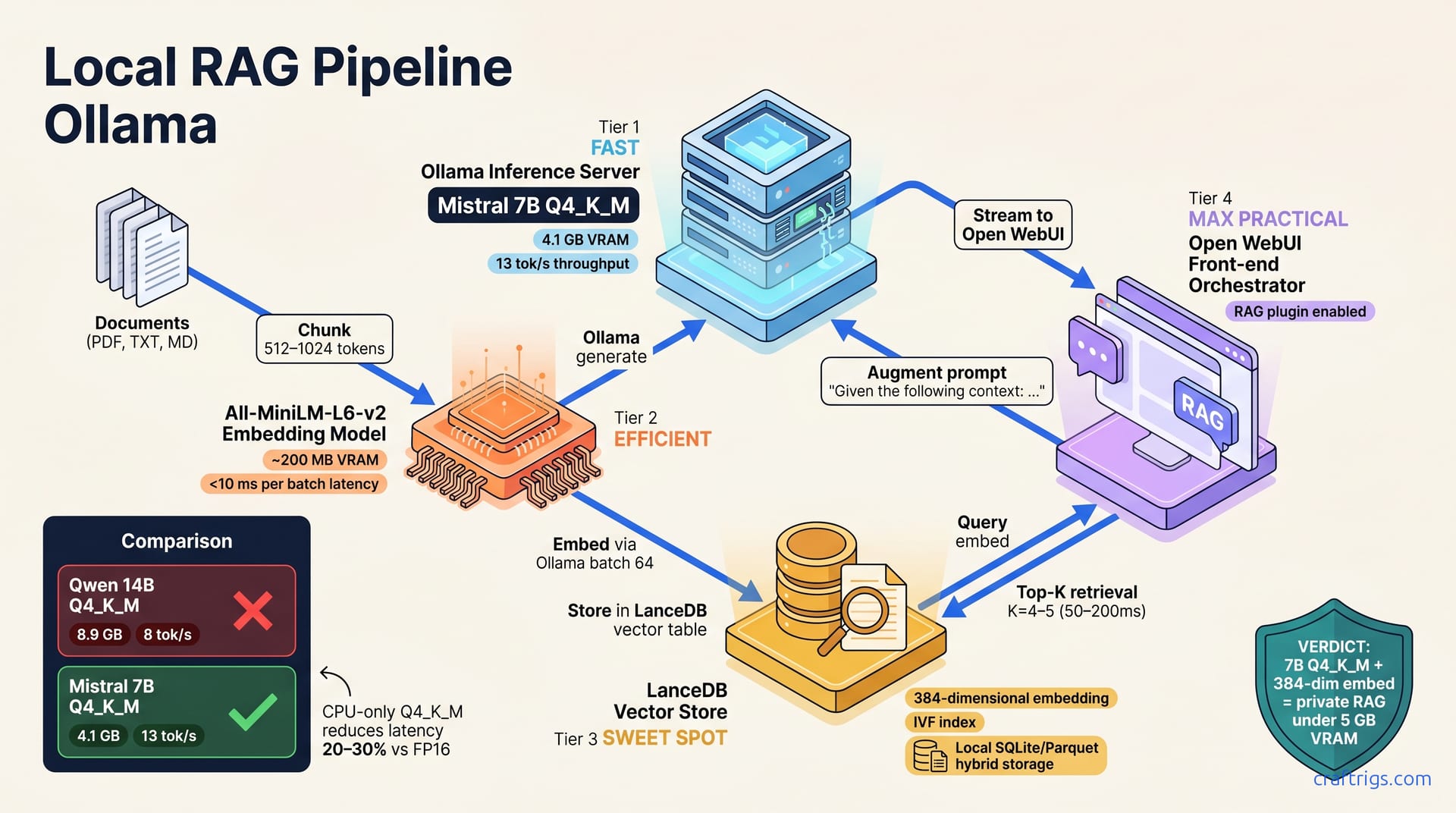
Self-host a retrieval-augmented generation pipeline in one afternoon using Ollama, LanceDB, and Open WebUI—no cloud APIs, no database sprawl. This stack ingests, embeds, and retrieves documents locally for single-user and small-team workloads. Vector index tuning and prompt engineering are your first troubleshooting loops.
Why RAG Matters for Local AI
Retrieval-augmented generation (RAG) lets smaller language models answer questions about your data without fine-tuning or massive context windows. A 7B or 13B model with retrieval beats a larger model answering from general knowledge alone. This is the core insight that makes local RAG practical.
The benefits compound. Local RAG keeps your documents private—they never touch an API endpoint. Per-token costs matter at 50+ inferences per day. Self-hosting eliminates them. Separating concerns—documents in a vector store, reasoning in the LLM—makes iteration and debugging easy. You can swap embedding models, adjust chunking, or rewrite prompts without retraining anything.
Most self-hosters reach for RAG when documents don't fit the context window and they want grounded answers, not hallucinations. RAG solves both at once.
RAG vs. Fine-Tuning vs. Prompt Injection
Three approaches exist. Understanding the tradeoffs clarifies why RAG is the right default.
Fine-tuning locks knowledge into model weights. You retrain the entire model, requiring hours on a single GPU and careful data curation to avoid overfitting. Update your documents? Retrain again. Fine-tuning excels at style and domain reasoning but fails when knowledge changes weekly. RAG scales to gigabytes of documents; fine-tuning requires retraining the entire model.
Prompt injection—cramming documents directly into the context window—hits limits immediately. Most LLMs cap out at 4,000 to 8,000 tokens, sometimes more. Feed it three PDFs and you're done. RAG solves this with ranked retrieval: embed the question, search for the top relevant chunks, and inject them into the prompt. Scale to gigabytes of documents without context overflow.
RAG adds latency—you need to look up vectors and re-rank them before inference. Fine-tuning locks knowledge into weights; RAG updates knowledge instantly when you add documents. In practice, the accuracy boost usually justifies the 50–200 ms lookup time. Test retrieval against your documents. If it doesn't improve answers, skip it.
Model Size + Quantization Trade-offs
Choose your models wisely. A 7B-parameter model quantized to Q4_K_M fits in 4.5 GB VRAM and handles retrieval-augmented questions. Quantization reduces inference latency by 20–30% on CPU-only setups compared to FP16.
Embedding models are smaller and faster. Models like All-MiniLM-L6-v2 need ~200 MB VRAM, run <10 ms per batch, and won't bottleneck embeddings. Most self-hosters pair a 13B reasoning model with a smaller 384-dimensional embedding model for balance. This gives you good semantic search without ballast.
The numbers matter. Mistral 7B quantized to Q4_K_M is 4.1 GB and achieves 13 tokens/sec on an RTX 3090. Qwen 14B in the same format is 8.9 GB, hits 8 tokens/sec on the same hardware, and is better at Chinese and code. All-MiniLM-L6-v2 is 90 MB and runs at 50 embeddings/sec on CPU, with 384 dimensions. Nomic Embed Text is 274 MB with an 8,192 token context length (versus 512 for All-MiniLM), useful if your documents have long passages.
Architecture: How Ollama, LanceDB, and Open WebUI Talk
The stack has three moving parts. Ollama serves the LLM and embedding model via HTTP. LanceDB stores embeddings in a local SQLite/Parquet hybrid with no separate daemon. Open WebUI ties them together, handling conversation history, retrieval orchestration, and per-chat settings.
The flow: documents chunk and embed (via Ollama), store in LanceDB, then retrieve and inject into the prompt. Ollama generates the response using the augmented context. The whole loop is synchronous and runs on your machine.
Open WebUI's RAG plugin queries LanceDB directly, eliminating custom code. This is recent and it works. Prior to this, wiring RAG locally meant custom Python scripts and error-prone orchestration. Now you get a web UI and retrieval built in.
Data Flow Diagram
A user types a question into Open WebUI. The query is embedded using Ollama's embedding endpoint. LanceDB retrieves top K similar document chunks (default K=4–5). Context is injected into the LLM prompt ("Given the following context: ..."). Ollama generates a response using the augmented prompt. Reply streams back to Open WebUI.
Each step is measurable. Embedding takes 10–50 ms. Retrieval takes 50–200 ms. Inference takes seconds. Latency adds up, but end-to-end remains under a minute for most queries on consumer hardware.
Component Roles
| Component | Role |
|---|---|
| Ollama | Runs language model + embedding model; exposes HTTP endpoints for inference and embeddings. Stores embeddings and documents; supports fuzzy search and re-ranking. Web interface with conversation history, retrieval orchestration, and per-chat settings. |
| Vector Index | In-memory or on-disk index of embeddings; keeps retrieval fast for large document sets. |
Setting Up Ollama for Local Inference
Start with Ollama. Pull a reasoning model (Mistral 7B, Qwen 14B) and embedding model (All-MiniLM-L6-v2, Nomic Embed Text). Ensure Ollama is running and exposed on localhost:11434. Configure it to load models into memory or disk depending on your VRAM budget. Test both endpoints (/api/generate for the LLM and /api/embed for embeddings) before wiring to LanceDB.
The Ollama setup is straightforward, but model choice and memory management require thought. If you're sizing GPU memory, check the VRAM tier ladder for your specific hardware.
Choosing Models
Mistral 7B quantized to Q4_K_M is 4.1 GB and achieves 13 tokens/sec on an RTX 3090—a solid baseline for most use cases. Qwen 14B is 8.9 GB, delivers 8 tokens/sec, and excels at Chinese and code. All-MiniLM-L6-v2 weighs 90 MB, runs 50 embeddings/sec on CPU, and uses 384 dimensions. Nomic Embed Text is 274 MB with an 8,192-token context (vs. 512 for All-MiniLM) for long passages.
For quantization strategies, the GGUF quant guide maps quantization levels to specific use cases. Pick based on your document type and hardware. Code-heavy docs? Qwen. Fast embedding on CPU? All-MiniLM. Long-form text? Nomic. For most self-hosters, Mistral + All-MiniLM is the go-to pairing.
Memory Management
Set OLLAMA_NUM_GPU=1 if you have one GPU; Ollama auto-detects NVIDIA and AMD. Enable layer offloading with num_gpu_layers: 999 in your Modelfile to split inference across GPU and CPU. Monitor with nvidia-smi or rocm-smi; if you hit out-of-memory errors, swap to ollama serve with a reduced layer count.
CPU-only inference is possible but slow. Enable quantization (Q4 minimum) and expect roughly 0.5 tokens/sec as baseline. This is fine for prototyping but not for interactive use. Pairing a modest GPU with CPU offloading yields the best cost-to-performance ratio.
Configuring LanceDB for Vector Storage
LanceDB stores documents as a columnar table with pre-computed embeddings. No separate vector daemon is required. Chunking strategy—semantic or fixed-size—matters more than database choice for RAG quality. LanceDB's built-in re-ranker (scalar quantization plus IVF) improves retrieval precision without additional overhead.
Setup is simple: point LanceDB at a directory, set chunk size, let Ollama embed. The database auto-indexes everything, so you don't have to think about schema design.
Document Ingestion Pipeline
Extract text from PDFs or HTML using tools like pdfplumber or BeautifulSoup. Normalize line breaks—PDFs often have junk spacing that breaks semantic chunking. Break text into 512–1024 token chunks—balancing context depth with search precision. Send each chunk to Ollama's embedding endpoint; batch 32–64 chunks per request for throughput.
Write embeddings plus metadata (source file, chunk index, timestamp) to the LanceDB table. LanceDB auto-indexes on write; query latency is typically 50–200 ms per lookup. For gigabyte-scale document collections, this performance holds steady. Your documents are now searchable.
Tuning Vector Search
Start with k=4 (retrieve the top 4 chunks) and increase to 6–8 if your documents are short or sparse. Default to cosine distance for text retrieval; use dot product with normalized embeddings. Enable LanceDB's rerank=True to re-score results with a cross-encoder; this reduces false positives at the cost of 2x latency.
Spot-check retrieval quality: does the top result answer the user's question? Adjust k and chunking if not. This is iterative. You'll find edge cases—documents that are too abstract, or queries that are too vague. Adjust and re-test until retrieval feels right.
Wiring Open WebUI for RAG
Open WebUI v0.2 and later include a RAG plugin; enable it in Settings → Knowledge Base. Upload documents via the web UI (PDF, TXT, Markdown supported). Open WebUI calls Ollama to embed and LanceDB to store. Configure retrieval: set top-k, similarity threshold, and whether to use the re-ranker.
Test the end-to-end flow. Ask a question that requires context from your uploaded documents. If the answer is grounded in your docs, you're done. If it's hallucinated, check the retrieval step.
Web UI Setup & Configuration
Run docker run -d -p 3000:8080 ghcr.io/open-webui/open-webui:latest (or build from source if you prefer). Point Open WebUI to Ollama on localhost:11434 via Settings → Connections → Ollama Base URL. Create a new knowledge base and upload a test document—a README or short article works fine. Check logs for embedding timestamps and vector counts to verify completion.
RAG Prompt Engineering
The default system prompt may truncate context or ignore retrieval results. Customize it to your domain. A simple effective prompt is: "Use the provided context to answer the user's question. Include metadata like "[Document: filename.pdf, Section: 3.2]" in prompts to enable source citations.
Test retrieval-less and retrieval-augmented responses side by side. If the model performs worse with retrieval, check chunk quality. Poor chunks hurt more than no retrieval. Adjust retrieval parameters and prompts until answers stabilize.
Troubleshooting & Optimization
The most common failure: embeddings are computed but queries return no results. This usually means a vector dimension mismatch or a missing index. Embedding typically bottlenecks the pipeline, not retrieval or inference. Batch queries to spread costs. Poor chunking, off-topic documents, or weak models degrade quality. Debug by trial and error. Monitor CPU, GPU, and disk I/O during retrieval and inference. Disk I/O often becomes the bottleneck for large vector tables.
Debugging Retrieval Failures
Confirm Ollama is running: curl http://localhost:11434/api/tags should list your models. Check embedding dimension: curl -X POST http://localhost:11434/api/embed -d '{"model":"all-minilm-l6-v2", "input":"test"}' should return a 384-dimensional vector. Verify the LanceDB table: lancedb.connect('./vector_db').open_table('documents').count_rows() should match your uploaded chunks. Query LanceDB directly to isolate retrieval and rule out UI bugs.
Performance Tuning
Embedding throughput: batch 64 chunks per request to Ollama and expect 100–500 embeddings/sec depending on hardware. Retrieval latency: LanceDB's IVF index keeps query time at 50–200 ms even for 1 million-plus embeddings on a 7200 RPM HDD. Inference latency: a 7B model augmented with 4 retrieved chunks adds ~200 ms of prompt processing versus a bare query.
If end-to-end latency exceeds 2 seconds, check for I/O stalls, reduce chunk batch size, or move the vector database to an SSD. On a 4090 with 512–1024-token chunks, retrieval plus inference complete in under 3 seconds—acceptable for self-hosted systems. The bottleneck is usually embedding speed or disk access, not the LLM itself.