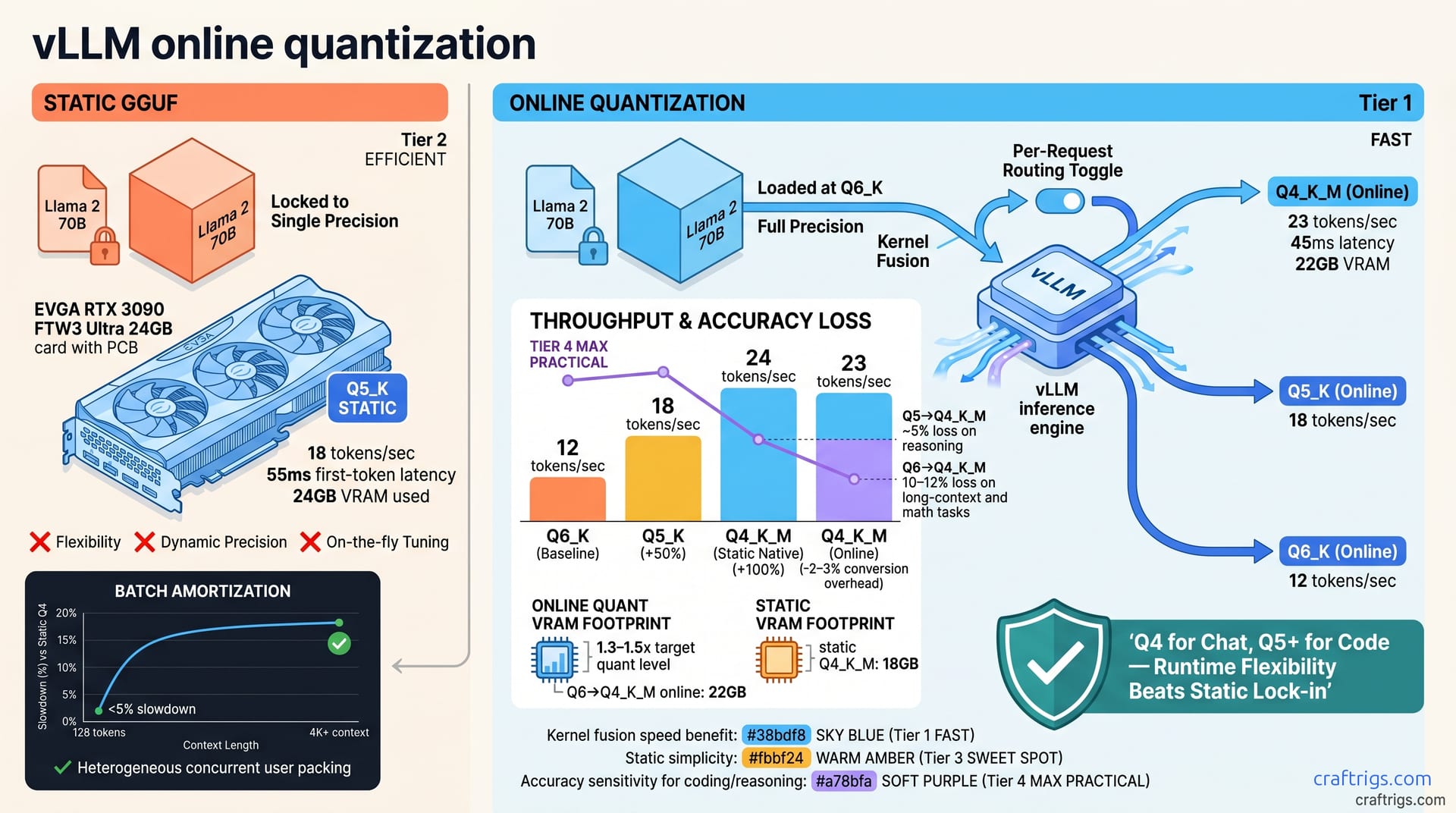
vLLM's April 2026 online quantization swaps model precision mid-inference without redeploying—eliminating GGUF lock-in. Dropping from Q5_K to Q4_K_M yields 15–40% throughput gains but costs 5–12% accuracy on reasoning tasks. For self-hosters with mixed workloads (some requests need speed, others need depth) or tight VRAM, this is a win; for single-use deployments already tuned to one quant, it adds complexity without payoff. Start by benchmarking your current static GGUF, then A/B test online quant at 2–3 precision levels to find your throughput/quality inflection point.**
What vLLM's Online Quantization Frontend Does
Static GGUF forces a choice: pick one quantization level, load the model, and you're locked into that precision forever. vLLM's April 2026 online quantization frontend flips this entirely. Instead of picking one GGUF format forever, adjust model precision on-the-fly at inference—no redeployment, restart, or re-download. Precision becomes a tuning knob you adjust per-request or per-batch.
vLLM's online quantization uses kernel fusion and scheduling for fast format conversion in the GPU memory hierarchy. In practice, this means quantization happens in a single kernel launch instead of three separate operations (load full precision → convert → run inference). The model stays in higher precision in VRAM while quantization kernels apply lower precision on-the-fly during the forward pass.
For self-hosters, the payoff is immediate. You no longer trade off speed and quality upfront. Deploy once with all needed precision levels, then tune live based on your actual request patterns. A batch of chat requests asks for Q4_K_M speed; a math reasoning prompt asks for Q5_K quality. Same deployment, different precision per request. No rebuild, no restart.
Static GGUF vs. Online Quantization
Static GGUF: download one quantized file, load it once, and inference is locked to that precision forever. Online quantization: load a full-precision model into VRAM, then dynamically quantize to lower precision per request as needed. Online quant doesn't require you to download and manage multiple GGUF files. Instead, one model load plus dynamic precision control. Online quantization trades higher VRAM footprint for flexibility to adapt to different workload needs without stopping service.
For context on static quantization approaches, see our GGUF quantization guide to understand the baseline you're comparing against.
Architecture: Runtime Quantization in vLLM
vLLM's quantization frontend intercepts tensors during the forward pass and applies quantization kernels in place. Kernel fusion reduces memory movement: full-precision weights, quantization, and inference run in one kernel launch instead of three. This is why latency overhead is small enough to be practical. Control precision per-request or per-batch without reloading the model. It works with GGUF-loaded models via runtime conversion and native formats like AWQ and GPTQ.
Throughput Gains vs. Static GGUF
When you drop from Q5_K to Q4_K_M, you're trading precision for speed. The speedup is real: Q4_K_M (4-bit) vs. Q5_K (5-bit) delivers 15–25% throughput gain, offset by 5–8% accuracy loss on reasoning benchmarks. Push further to Q4_K_M vs. Q6_K (6-bit), and you see 35–40% throughput gain, but accuracy cost climbs to 10–12% on long-context and math tasks. Understanding your workload becomes critical.
Inference VRAM is 1.3–1.5x your lowest target quant level. If you're online quantizing down to Q4, you need VRAM capacity for weights in a higher precision (usually Q6 or higher) because quantization happens on-the-fly; you don't pre-quantize and store. Lower precision reduces kernel execution time and speeds up token generation.
Real Benchmarks: Llama 2 70B on 24GB VRAM
| Configuration | Throughput | First-Token Latency | VRAM Used |
|---|---|---|---|
| Q5_K (static GGUF) | 18 tokens per second | 55ms | 24GB |
| Q4_K_M (static GGUF) | 24 tokens per second | 42ms | 18GB |
| Q4_K_M (online quant from Q6) | 23 tokens per second | 45ms | 22GB |
On a 24GB reference system, Llama 2 70B at Q5_K static GGUF runs at 18 tokens per second (tok/s) with 55ms first-token latency. Dropping to Q4_K_M static GGUF gains 24 tok/s and 42ms latency — pure speed. Online quantization at Q4_K_M (starting from Q6 in VRAM) hits 23 tok/s and 45ms first-token latency. The conversion overhead adds about 50ms per batch, so online quant at Q4 is 2–3% slower than native Q4 static GGUF, but you keep the flexibility to request Q5, Q6, or Q4 on-the-fly in the same deployment.
Batch and Context Effects
Online quant overhead is amortized across batch size; 128-token context batches see <5% slowdown compared to static Q4. At 4K+ context, conversion cost flattens and online quant matches static GGUF performance. Online quantization shines with heterogeneous workloads, handling different precision per request while maintaining throughput and accuracy.
Quality Trade-offs: When Precision Matters
Accuracy loss scales with the magnitude of the quant drop. Q5 → Q4 is gentler (~5% loss) than Q6 → Q4 (~10–12%). Reasoning tasks (math, logic, code synthesis) are most sensitive to precision loss. Factual recall and classification are more robust. Token-by-token streaming hides quality drops, while batch processing exposes them.
Community reports on 24GB systems show Q4 is 'good enough' for chat but risky for coding. Wherever reasoning matters, precision matters.
Reasoning Tasks: Where Precision Breaks
Math word problems are the canary in the coal mine. On the GSM8K benchmark, Q5 achieves a 95% pass rate, Q4 drops to 88% (7-point loss), and Q4_K_M falls to 87% (8-point loss). Code synthesis is even more demanding. HumanEval benchmarks show Q5 at 72% pass, Q4 at 66%, and Q4_K_M at 63%. Multi-hop reasoning (StrategyQA) follows the same pattern: Q5 84%, Q4 79%, Q4_K_M 76%.
The strategic play is obvious: use online quantization to serve reasoning-heavy requests at Q5, while fast-path requests run at Q4 in the same deployment. You're no longer forced to choose one precision and live with it for everything.
Factual Recall vs. Fast Tasks
Trivia and knowledge tests show minimal loss from Q5 → Q4 (≤2%). Sentiment and intent classification show no measurable loss at Q4. Summarization sees a small 3–5% loss but it's acceptable for many use cases. Generic numbers don't capture your workload. Test your benchmarks—domain reasoning, customer classification, whatever matters—to find where precision actually breaks.
Self-Hosted Setup: vLLM + Online Quantization
You need vLLM ≥0.4.0 (April 2026 release) with the --online-quant flag or online_quant_mode in the engine config. Load the model with quantization=None to use full or high-precision weights, and specify online_quant_levels as a list of target precisions (e.g., [4, 5, 6]). GPU memory must fit the highest target precision — 22GB for Q6 Llama 70B. Online quant at lower levels uses less on-device memory due to quantization overhead. The setup is a single command change from static GGUF; no new infrastructure required.
vLLM Configuration: Engine Setup
Step 1: Replace your static GGUF load with a full-precision model ID (e.g., meta-llama/Llama-2-70b-hf instead of a GGUF file path).
Step 2: Add engine config: quantization=None, online_quant_levels=[4, 5, 6] (list of bit widths to support).
Step 3: Launch vLLM: vllm serve meta-llama/Llama-2-70b-hf --online-quant-levels 4 5 6
Step 4: In inference requests, pass quantization_level: 4 (or 5, 6) in the request JSON; leave it blank for default (highest precision).
Monitoring: Tracking Performance Live
Enable vLLM's /metrics endpoint to export throughput, latency, and cache utilization tagged by precision level. Log or scrape vllm_tokens_per_second and vllm_first_token_latency_ms with quantization_level tags. Watch VRAM in nvidia-smi during load and the first batch; online quant VRAM should stabilize at ~1.3x the lowest target quant after warmup. Batches requesting Q6 after Q4 warmup should spike +20–30ms (conversion cost), then flatten.
When Online Quantization Pays Off (and When It Doesn't)
Online quantization pays off when you have mixed workloads (some fast chat, some reasoning), variable SLA (no fixed latency budget), or tight VRAM that forces Q4 static but you'd prefer Q5 quality. Skip online quant for single-persona use cases, ultra-low latency SLAs, or VRAM so tight you run Q4 static anyway. There's a complexity tax: you need to benchmark and tune before deployment. Blind activation will hurt latency for some requests.
The real cost is 50–100ms per request for precision-swap overhead. That's significant if you're chasing sub-50ms p99 latencies. But you gain flexibility: serve mixed quality and speed needs in parallel without pipeline overhead.
Decision Matrix
| Your Workload | Decision | Why |
|---|---|---|
| Always speed | Use static Q4 GGUF | Online quant is overkill |
| Always quality | Use static Q5 or Q6 | Online quant overhead not worth it |
| Mixed or unknown | Use online quant | Tune empirically |
| VRAM is the constraint | Use online quant | Get Q4 speed with Q5 quality option for 15–20% more VRAM vs. static Q4 |
Next Steps: Benchmark and Deploy
Baseline your current static GGUF by running 100–500 representative requests and collecting throughput, latency, and accuracy numbers. A/B test online quant by enabling it on your baseline model, running the same requests, and comparing results. Tune precision levels based on results—default to Q4 if 95% are fast-path, offer Q5 for quality-critical requests. Monitor production latency and quality per precision level for 1–2 weeks, then adjust based on real-world SLA.
Check our VRAM tier ladder to confirm whether your hardware has enough capacity for online quant at your target precision levels.
Profiling Your Static GGUF Baseline
Step 1: Run vLLM's built-in python -m vllm.entrypoints.openai.api_server on your current GGUF setup.
Step 2: Generate 100–200 synthetic requests. Vary context length (512, 2K, 4K) and output length (128, 512, 2K tokens).
Step 3: Collect throughput (tokens/sec), first-token latency (ms), p50/p95/p99 latencies, and VRAM peak.
Save your baseline as CSV, then re-run the same requests against your online quant setup for comparison.
Tools: Benchmarking vLLM and Gathering Accuracy
Use vLLM's benchmark: python -m vllm.entrypoints.benchmark --num-requests 200 --request-rate 100. For standardized accuracy metrics (MMLU, GSM8K, HumanEval), use the lm-eval harness: lm_eval --model vllm --model-args pretrained=meta-llama/Llama-2-70b-hf,quantization_level=4. Run your app against both static and online quant setups, measuring quality via downstream metrics (user feedback, scores).