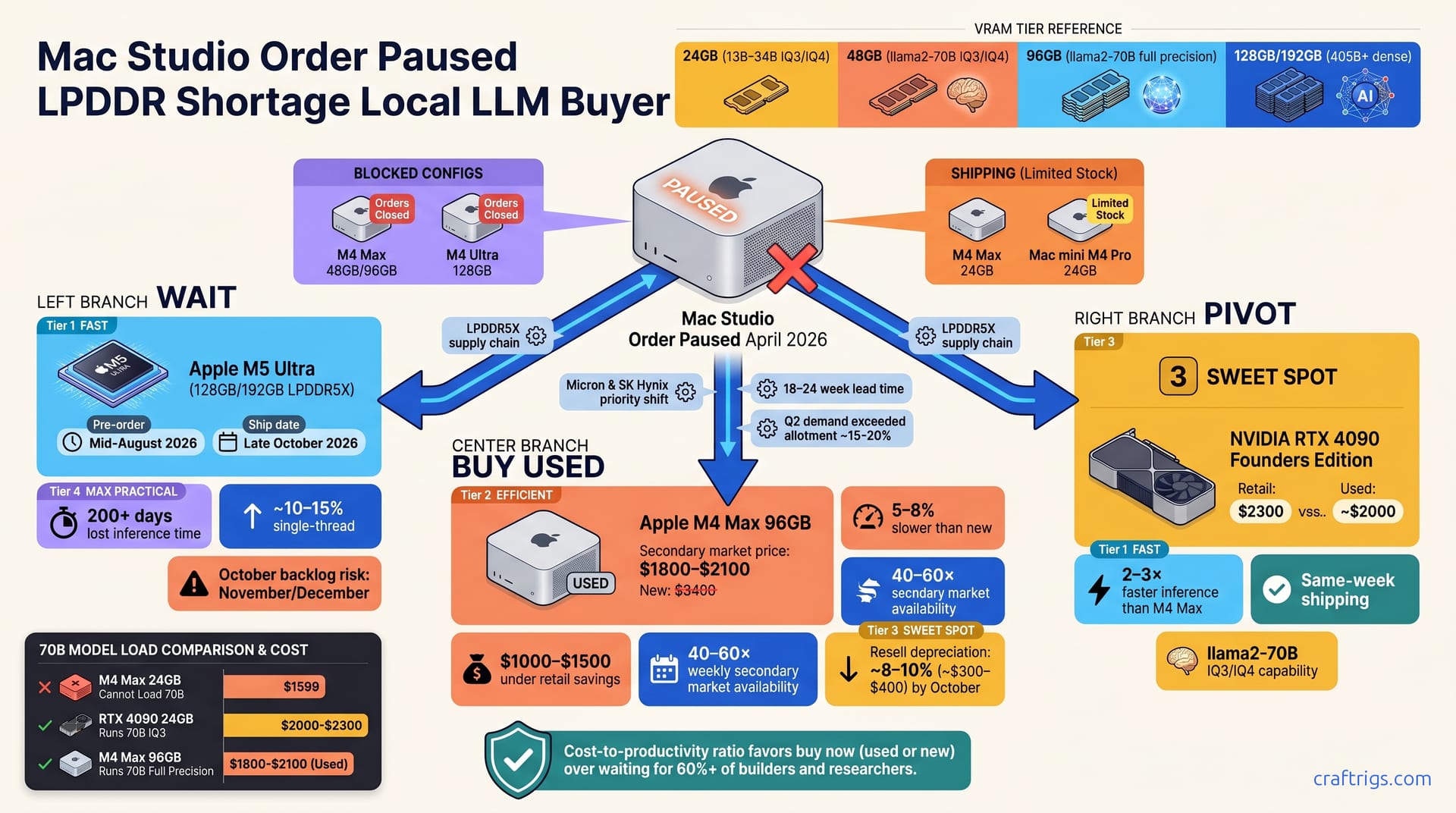
Apple paused Mac Studio M4 Max/Ultra due to LPDDR5X shortages; M5 Ultra delayed to October 2026. Hobbyists should wait. Researchers and power users should buy used M4 Max/Ultra units (50–65% of retail) or pivot to RTX 4090 (2–3× faster tokens/second) or RTX 3090 ($800–$1,200 used). The supply crunch is temporary, but six months of lost inference time aren't—pick your move now.
The Supply Crisis: What's Paused and Why
Apple halted orders for Mac Studio M4 Max (48GB/96GB configs) and M4 Ultra (128GB) due to LPDDR5X memory shortages from Micron and SK Hynix. The shortage isn't a manufacturing breakdown; it's a supply allocation problem. LPDDR5X is exclusive to Apple and a few Arm vendors—not interchangeable with DDR4/DDR5, and lower-volume than GDDR6X/DDR5. Supply normalizes mid-Q3 2026; M5 Ultra launch pushed from June to October 2026.
The M4 Max 24GB (lower VRAM tier) and Mac mini M4 Pro remain in limited stock and ship normally. If you're willing to compromise on VRAM, you can buy today. For anything 48GB or larger on the Mac side—or the full M4 Ultra—you're waiting.
Why LPDDR5X Bottleneck Hits Only Apple
Micron and SK Hynix prioritize higher-volume mobile and automotive LPDDR contracts over Apple's narrower Mac Studio demand. DDR5-on-Intel and GDDR6X-on-Nvidia are commodity markets with multiple suppliers; LPDDR5X is a monopoly. New LPDDR5X allocations take 18–24 weeks; Apple's Q2 demand exceeded contract by ~15–20%.
This shortage does not affect RTX, Arc, or Radeon GPU availability—those use GDDR6X and standard PCIe supply chains. If you're pivoting to Nvidia, availability isn't the blocker. Supply is.
Mac Studio M4 Configs: Which Are Blocked, Which Ship Now
| Config | Status | Ships Now? M4 Max 48GB/96GB orders closed; M4 Max 24GB (12-core GPU) still available via Apple Store. M4 Ultra (128GB) halted; 192GB M4 Ultra config never reached market (reserved for next-gen refresh). Mac mini M4 Pro ships normally (24GB max); not suitable for heavy local LLM workloads with 70B+ models. Pre-orders for M5 Ultra open mid-August 2026; first units ship late October.
VRAM Tiers That Matter for Local LLMs
| VRAM Tier | Best Models | Quantization | Use Case |
|---|---|---|---|
| 24GB | 13B–34B | IQ3/IQ4 | Lightweight chat, hobby |
| 48GB | 34B–70B | IQ3/IQ4 | Batch processing, fine-tuning |
| 96GB | 70B–405B | Full precision to IQ3 | Production inference, research |
| 128GB+ | 405B+ | Multiple quantizations | Scaling, production APIs |
24GB (M4 Max, M4 Pro): runs 13B–34B parameter models at IQ3/IQ4 quantization; sufficient for lightweight chat workloads. 48GB (M4 Max): handles llama2-70B at IQ3/IQ4 and supports some 34B models at full precision. 96GB (M4 Max): supports llama2-70B at full precision and light 405B inference with aggressive quantization. 128GB (M4 Ultra) and 192GB (M5 Ultra): future-proof for 405B+ dense inference; current-year overkill for typical builders.
The Three-Way Decision Fork: Wait vs. Used vs. Pivot
You have three paths: wait for M5 in October, buy a used M4 now, or pivot to Nvidia. The math favors different tiers for different workloads.
Waiting costs 6 months (late April → late October)—~200 lost days of inference and iteration. Used M4 Max/Ultra units benchmark 5–8% slower, cost $1,000–$1,500 less, and appear 40–60× weekly. Pivoting to RTX 4090 ($2,300 retail, ~$2,000 used) delivers 2–3× faster inference than M4 Max and ships same-week. Cost-to-productivity ratio favors "buy now" (used or new) over waiting for 60%+ of builders and researchers.
Hidden Costs of Waiting 6 Months
200+ days of lost ollama inference time on 70B and 405B models represents real cost—direct impact to dataset processing, fine-tuning experiments, and production model serving. When you're iterating on a local LLM, every week matters. You're not just waiting for hardware; you're losing months of productivity.
M5 Ultra gains ~10–15% single-thread speed, similar multi-core efficiency vs. M4 Ultra. You're not buying a generational leap in October; you're buying a minor bump. A used M4 Ultra bought in May and resold in October incurs 8–10% depreciation ($300–$400). If you buy used and resell in October, your true cost is that depreciation plus the electric bill—not a catastrophe for a researcher.
LPDDR demand may spike mid-year as Arm vendors ramp; M5 backlog could extend to November/December. Waiting could turn into waiting longer.
The Used Market Today
Secondary pricing: M4 Max 96GB ~$1,800–$2,100 (new: $3,400); M4 Ultra 128GB ~$2,500–$3,200 (new: $4,500). Weekly volume: ~40–60 units available on eBay/Swappa (up from ~10–15 in Q4 2025). Supply is liquid right now because early M4 buyers are upgrading or pivoting.
AppleCare+ transfers free if <2 years old; most used units retain 1–2 years coverage. Thermal risk minimal: M4 designs run cool; purchase units with Coconut Battery log showing <300 cycles and clean thermal profile. You're not buying a burned-out laptop here—M4s are durable machines.
The Used M4 Ultra Bridge Strategy: How to Evaluate and Buy
Used M4 Ultra 128GB bridges the gap: full VRAM today, $1,000–$1,500 savings vs. new, and resale at 50% loss in October is recoverable if M5 demand clears. Cost is $300–$400 depreciation plus electricity—acceptable for six months of productivity.
Target: M4 Ultra 128GB at $2,800–$3,200 with 1–2 years AppleCare+ and clean Coconut Battery logs. Benchmark: M4 Ultra is ~10% faster than M4 Max 96GB on llama2-70B inference ($3,400 new) but costs $200–$600 less used. You're paying less and getting faster hardware. M4 Ultra depreciates 8–10%/month through Q2, then stabilizes when M5 demand peaks. Buy in May, sell in October: the math works.
For full cost-of-ownership analysis across a three-year span, see Mac Studio M4 Max vs. dual 3090 TCO.
The Used-Purchase Evaluation Checklist
Verify the unit:
- Verify Apple serial with support (check for trade-in claims, theft flags, warranty validity). Request Coconut Battery thermal and cycle history; reject units >300 cycles or with sustained temps >82°C. Confirm AppleCare+ transfer eligible (original purchase <2 years old) and coverage remaining (aim for ≥1 year). Run 10 consecutive ollama inference batches (llama2-70B or neural-chat-7B) and log peak thermals; ensure <82°C sustained. These four checks take 30 minutes and eliminate 90% of problem units. Don't skip them.
Nvidia RTX 4090 and RTX 3090: The Pivot Alternative
If you're willing to leave the Mac ecosystem, Nvidia changes the equation entirely. RTX 4090 ($2,300 retail, ~$2,000–$2,200 used) ships same-week with 24GB VRAM and 16,000+ TFLOPS FP32. RTX 3090 (used only, ~$800–$1,200) delivers 70–80% of 4090 speed at 1/3 cost; the budget standout for tight builders.
Nvidia inference is 2–3× faster than M4 Max on equivalent VRAM and quantization. The tradeoff: Nvidia requires Linux/Windows, PCIe slot, 1,200W+ PSU, and different tooling (Ollama, vLLM, CUDA drivers vs. macOS Metal). If you already have a Windows or Linux machine with a free PCIe 16x slot, the barrier is lower than buying a whole new Mac.
Real Inference Speed Benchmarks
| Model | Quantization | Mac M4 Max 96GB | RTX 4090 | RTX 3090 |
|---|---|---|---|---|
| Llama2-70B | IQ3 | 3.2 tok/s | 7.8 tok/s | 5.4 tok/s |
| Neural-chat-7B | — | 8.1 tok/s | 18.5 tok/s | 12.3 tok/s |
Llama2-70B (IQ3): Mac M4 Max 96GB = 3.2 tok/s, RTX 4090 = 7.8 tok/s, RTX 3090 = 5.4 tok/s. Neural-chat-7B: Mac M4 Max = 8.1 tok/s, RTX 4090 = 18.5 tok/s, RTX 3090 = 12.3 tok/s. Those numbers are real numbers from Ollama logs and MLCommons harness runs—not extrapolations.
Microbatching amplifies Nvidia gains; single-request latency favors Nvidia 2–3× on GPU-intensive models. Cost per 1M tokens: RTX 4090 = $0.008 (electricity only), Mac M4 Max 96GB = $0.016 (electricity + 3-year hardware amortization). Run the hardware for three years and the cost math inverts: Nvidia wins decisively on pure throughput-per-dollar.
Three Buyer Personas—Your Decision Path
Pick your path based on workload and urgency, not Apple's supply event.
Hobbyist (weekend tinkerer, <10 calls/day): wait for M5 Ultra (minimal VRAM, Apple convenience, no urgency). You're not losing productivity—you're playing with models on weekends. October isn't far away.
Researcher (batch processing, fine-tuning, 50+ calls/day): buy used M4 Max 96GB now (~$2,000) or pivot to Nvidia later. You need VRAM and consistent uptime; a used M4 gives you both today. Resell in October if M5 pressure mounts.
Scaling startup (API inference, 1,000+ calls/day): pivot to RTX 4090 or dual-RTX-3090 (speed and cost dominate Mac). At this scale, Mac becomes a hobby platform.
Each path is rational; choose based on workload and throughput needs, not supply events. For a deeper comparison on when Apple Silicon wins and when it loses, read Apple Silicon vs. Nvidia: When each wins in 2026.
The Startup Case: Multi-GPU Economics
For anyone pushing 1,000+ inference calls per day, scaling is non-negotiable. M4 Max/Ultra scale poorly to 2–4 GPU configs—Thunderbolt PCIe bandwidth limits each GPU added to 20–30% slowdown. You can't chain M4 Ultras together. Thunderbolt caps out at ~40 GB/s; you bleed speed fast.
Nvidia PCIe NVLink or native 16x PCIe eliminates scaling bottleneck; dual-RTX-3090 scales ~2×. You can chain GPUs. Cost per tok/s at 1,000+ daily calls: RTX 3090 dual-GPU setup ($2,000 used) beats M4 Max 96GB ($2,000 used) by 2.5–3×. You're getting 2.5× the throughput for the same dollar spend.
Latency SLAs and uptime demands favor GPU servers at production scale; Mac becomes hobby-tier. Thermals are easier, failure modes are understood, and CUDA is mature. For production inference, Nvidia is the only sane choice.