If you've been running local LLMs on a Mac, you know the feeling. Every r/LocalLLaMA benchmark comparison put Apple Silicon behind NVIDIA on raw throughput. You made peace with it — silent operation, unified memory, a machine that does everything — but the numbers stung.
Ollama 0.19 changes part of that. Not all of it. But a meaningful part.
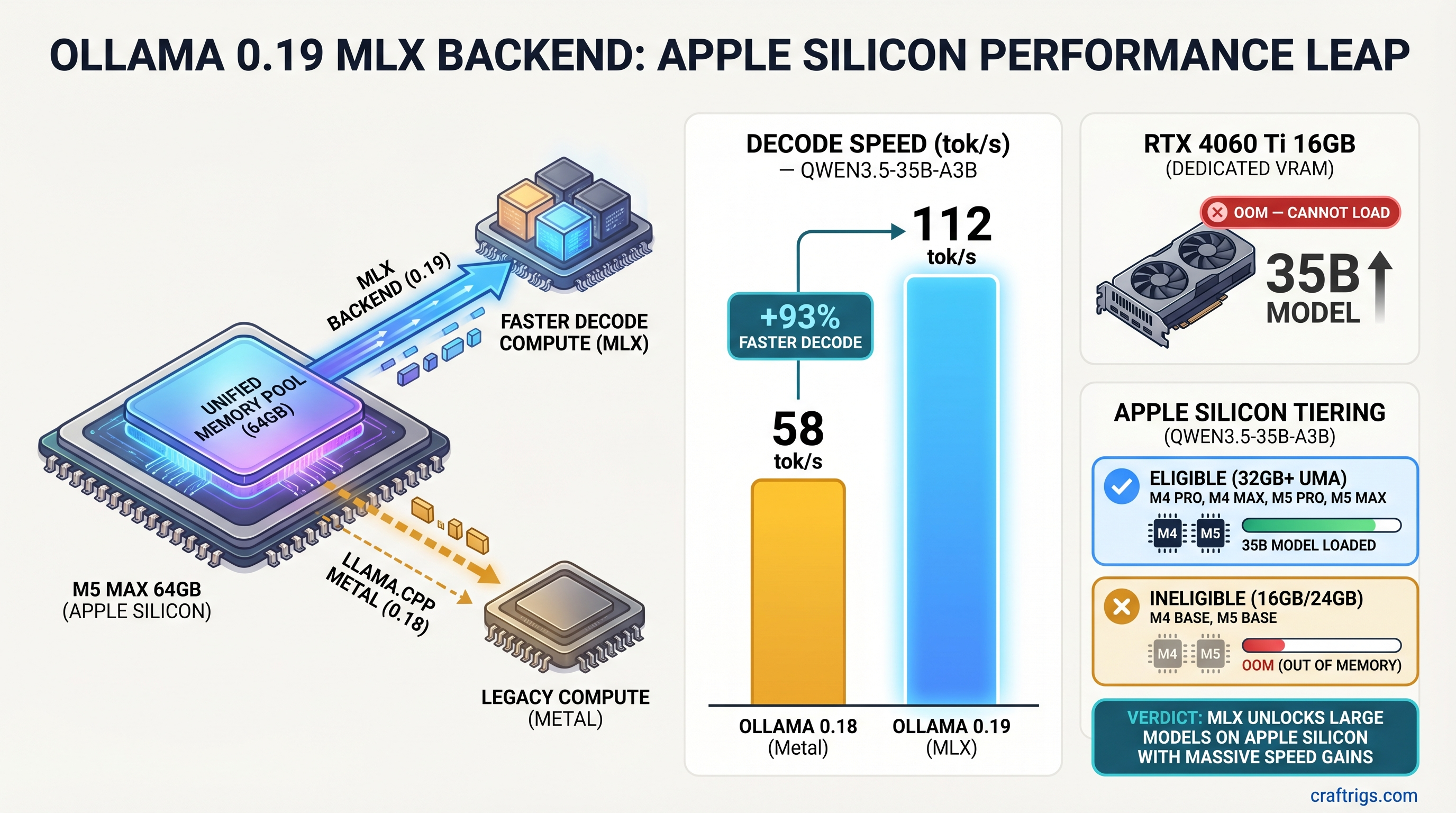
TL;DR: Ollama 0.19 ships a native MLX backend that delivers +93% decode speed and +57% prefill on eligible Apple Silicon hardware. The catch is real: the preview launched with exactly one model (Qwen3.5-35B-A3B), and your Mac needs more than 32GB of unified memory. If you're on a base M4 Mac Mini with 16GB, this update doesn't apply to your daily 14B workflow — yet. If you have the hardware, update today. At 35B, the RTX 4060 Ti 16GB can't even load the model you'd be running at 100+ tok/s.
The official numbers, from Ollama's MLX announcement (March 30, 2026, M5-generation hardware, Qwen3.5-35B-A3B at NVFP4):
| Metric | Ollama 0.18 (llama.cpp Metal) | Ollama 0.19 (MLX) | Change |
|---|---|---|---|
| Prefill (prompt processing) | 1,154 tok/s | 1,810 tok/s | +57% |
| Decode (generation) | 58 tok/s | 112 tok/s | +93% |
Note
Updated June 11, 2026. Ollama has moved well past 0.19 — the current release is v0.30.7 (June 7, 2026), and the MLX engine is no longer a single-model preview. Details in the current-version section below.
On this page:
- What's the Current Ollama Version on Mac? (June 2026 Update)
- What Ollama 0.19 MLX Actually Changed
- Who Actually Benefits — The Hardware Truth
- Mac Mini M4 vs. RTX 4060 Ti
- Which Mac Models Benefit Most
- Windows and Linux Users
- CraftRigs Take
- FAQ
What's the Current Ollama Version on Mac? (June 2026 Update)
As of June 2026, the current Ollama release is v0.30.7, shipped June 7, 2026 (release notes). The MLX path that debuted as a one-model preview in 0.19 has been expanding since:
- More MLX models. The Ollama library now carries MLX builds beyond the original preview model — including Qwen3.6 35B-A3B MLX variants — and release notes through the 0.30.x series added Gemma 4 running via MLX on Apple Silicon.
- Quantization improvements. v0.30.6 (June 5, 2026) switched MLX embedding layers to NVFP4 global scale for better quantization quality on Apple Silicon.
- The 32GB+ guidance still applies to the 35B-class MLX models — that's a function of model size, not the backend.
The rest of this article covers the original 0.19 announcement — the numbers, the hardware eligibility, and the Mac-vs-NVIDIA picture, which all still hold.
What Ollama 0.19 MLX Actually Changed — The Numbers That Matter (April 2026)
Before 0.19, Ollama's Apple Silicon inference ran through llama.cpp compiled for Metal — Apple's GPU compute API, but with a translation overhead. It worked. It wasn't native. Every compute call passed through llama.cpp's abstraction layer on the way to Apple's GPU, and some cycles got wasted in the translation.
MLX is Apple's own ML framework. Direct Metal access, built specifically for Apple Silicon's unified memory architecture. When Ollama swapped its backend to MLX, it removed that overhead entirely — not a parameter tweak, a full compute path replacement.
The official benchmarks, run on M5-generation hardware with Qwen3.5-35B-A3B:
| Metric | Ollama 0.18 | Ollama 0.19 (MLX) | Change |
|---|---|---|---|
| Prefill | 1,154 tok/s | 1,810 tok/s | +57% |
| Decode | 58 tok/s | 112 tok/s | +93% |
Source: Ollama official blog, March 30, 2026. On M5, M5 Pro, and M5 Max chips, Ollama additionally uses the GPU Neural Accelerators to speed up time-to-first-token.
Prefill vs. Decode — Which Number Matters More for Daily Use?
Decode is the stat you feel. It's the streaming output — every token that appears while the model is responding. Going from 58 to 112 tok/s at 35B means roughly doubling how fast you see words on screen.
Prefill affects how long it takes to load context: long system prompts, pasted code blocks, RAG pipelines, multi-turn conversation history. The 57% gain there matters if you're feeding large inputs or doing document analysis.
For most people's daily use, decode is the headline.
How MLX Differs From the Previous llama.cpp Metal Path
Apple's unified memory means your CPU, GPU, and Neural Engine share the same physical memory pool — no copying data between separate VRAM and system RAM. Traditional GPU frameworks assume separate pools and carry overhead from that assumption.
MLX was designed from scratch around unified memory. It knows the data is already where the GPU can read it. The previous llama.cpp Metal path didn't have that advantage built in — it was ported from a cross-platform codebase. Ollama swapping to MLX is the difference between a translated text and one written natively in the language.
Note
MLX applies across all Apple Silicon (M1 forward), but Ollama's 0.19 preview is optimized for M5, M5 Pro, and M5 Max hardware. The benchmark numbers above are from M5 Max. If you're on M4 or older chips with eligible memory, expect proportional gains at lower absolute speeds.
Who Actually Benefits From Ollama 0.19 MLX — The Hardware Truth
Most coverage says "Apple Silicon users" and stops there. Here's the part that matters:
You need more than 32GB of unified memory. Not 16GB. Not 24GB. The MLX preview enforces this requirement, and the currently supported model (Qwen3.5-35B-A3B) needs it.
| Mac configuration | Unified memory | Eligible for 35B MLX? | Memory bandwidth |
|---|---|---|---|
| Mac Mini M4 (base) | 16–32GB | No — tops out at 32GB, requirement is more than 32GB | 120 GB/s |
| Mac Mini M4 Pro | 24–64GB | Yes at 48GB or 64GB | 273 GB/s |
| MacBook Pro / Studio M4 Max | 36–128GB | Yes | 410–546 GB/s |
| M2 Max (used market) | 32–96GB | Yes above 32GB | 400 GB/s |
| M5-generation chips | varies | Yes above 32GB | Ollama's benchmark platform — 112 tok/s confirmed |
Bandwidth figures from Apple's Mac Mini specs and chip spec sheets. Decode speed in local inference is largely memory-bandwidth-bound, so expect throughput to scale roughly with the bandwidth column — the 112 tok/s figure on M5-generation hardware is the only number Ollama has published for this backend.
Pricing as of June 2026: Mac Mini base M4 from $599; Mac Mini M4 Pro from $1,399, configurable to 48GB or 64GB (Apple).
If you bought the base M4 Mac Mini — and most people did — the honest read is this: the 93% decode improvement isn't something you'll see on your Qwen2.5 14B workflow. Ollama 0.19 still brings its general fixes and model-management improvements (see the release notes), but the headline performance gains require hardware most M4 Mac Mini owners don't have.
That's not a knock on the update. It's a preview. More models and lower memory thresholds are flagged as coming. But it's worth knowing before you update expecting a transformed experience on your $599 machine.
Warning
Comparing a 16GB M4 Mac Mini to an RTX 4060 Ti after Ollama 0.19 and expecting MLX gains won't work — those two configurations are in separate categories. For a fair post-0.19 comparison that captures the MLX improvement, you need a 32GB+ Mac and the Qwen3.5-35B-A3B model.
Mac Mini M4 vs. RTX 4060 Ti — Where the Comparison Actually Lives Now
The competitive story from this update isn't where most people expect. It's not M4 16GB vs. RTX 4060 Ti at 14B — that matchup is essentially unchanged. It's at 35B, where the hardware tiers diverge completely.
| Hardware | Memory | Qwen3.5-35B-A3B (NVFP4, ~20GB weights) | Loads the model? |
|---|---|---|---|
| RTX 4060 Ti 16GB | 16GB GDDR6, 288 GB/s | Weights alone exceed VRAM | No |
| Mac Mini M4 Pro 48GB | 48GB unified, 273 GB/s | Fits with headroom for KV cache and the OS | Yes |
Weight size is arithmetic: 35B parameters at ~4.5 bits/weight (NVFP4) ≈ 20GB. The full-precision bf16 build in Ollama's library is 70GB.
The RTX 4060 Ti 16GB carries 288 GB/s of GDDR6 bandwidth — genuinely fast memory. But it's 16GB. Qwen3.5-35B-A3B doesn't fit. The M4 Pro at 48GB unified memory with 273 GB/s bandwidth runs it fluently, sharing that pool across CPU, GPU, and Neural Engine.
At 35B, this isn't a speed comparison. It's "runs at 100+ tok/s" vs. "can't load the model."
At 14B and Below — Where NVIDIA Still Holds
The 14B tier is unchanged by this specific release. With llama.cpp Metal (the path all Macs still use for non-MLX models), decode speed is bandwidth-bound: a 14B model at Q4_K_M is roughly a 9GB read per token, so the theoretical ceiling is memory bandwidth ÷ 9GB:
- RTX 4060 Ti 16GB (CUDA, 288 GB/s): ceiling ~32 tok/s; community results typically land in the low-to-mid 20s
- M4 Mac Mini 16GB (Metal, 120 GB/s): ceiling ~13 tok/s; expect around 10
- M4 Pro 48GB (Metal, 273 GB/s): ceiling ~30 tok/s; expect low 20s
At 14B the RTX 4060 Ti is roughly twice as fast as a base M4 Mac Mini and on par with an M4 Pro — and since the MLX preview doesn't cover the Qwen2.5 14B or Llama family, none of these configs get the 93% uplift here. The RTX build stays ahead on prefill throughput and costs roughly half as much for a 14B-focused workflow.
The Real Decision: Total Cost and Use Case Fit
This isn't a clean winner-loser comparison — it's two different tools.
- Mac Mini M4 Pro 48GB wins on: silent operation, 35B model capacity, unified memory advantage at high parameter counts, MacOS as a daily driver, no separate GPU power draw
- RTX 4060 Ti build (~$950-1,050) wins on: raw prefill speed, CUDA software compatibility, lower cost for 14B work, upgrade path to dual-GPU 70B configs
If you're building specifically to run 14B models cheaply, the NVIDIA path is still better value. If you want a quiet machine that runs 35B for creative work or document analysis — and also happens to be your computer — the Mac is now the clear answer at this model tier.
Which Mac Models Benefit Most From Ollama 0.19
Gains scale with memory bandwidth. Higher bandwidth → faster data through the unified memory pool → higher tok/s at fixed model size.
M4 Base (16GB and 24GB) — General Improvements Only
The MLX preview doesn't apply here. Your 14B workflows continue on the llama.cpp Metal path, unchanged in throughput. You get Ollama 0.19's general improvements: smarter cache reuse reduces memory pressure across long sessions, and model management is cleaner. Not nothing — but not the headline numbers.
Best model pick for M4 16GB remains: Qwen2.5 14B Q4_K_M for quality, Qwen2.5 7B Q6_K when you want sub-5-second first token latency.
M4 Pro and M4 Max — Where This Update Matters
At 48GB, the M4 Pro hits the comfortable MLX entry point. Ollama's published figure is 112 tok/s on M5-generation hardware; the M4 Pro's 273 GB/s of bandwidth puts it somewhat below that, but still in a tier where a 35B-class model — borderline-unusable on the old Metal path — becomes a fluent daily driver.
M4 Max configurations with 64–128GB are the true sweet spot. For a full breakdown of which Mac makes sense at which model tier, see our Mac Mini M4 Pro vs Mac Studio M4 Max for local LLM comparison.
Older Apple Silicon (M1/M2/M3) With 32GB+
M2 Max 96GB, M3 Max 64GB — if you have the memory, you get the MLX path. Relative gains are similar; absolute speeds depend on each chip's bandwidth (an M2 Max carries 400 GB/s). Expect results below Ollama's 112 tok/s M5 figure but still a big leap from your own llama.cpp Metal baseline.
Windows and Linux Users — What Ollama 0.19 Gives You
Nothing from the MLX performance story. MLX is Apple's framework, Apple Silicon only.
Ollama 0.19 and the releases since still carry their usual cross-platform fixes and llama.cpp backend updates (changelog) — useful, not dramatic. The 57%/93% numbers don't exist on your platform.
Warning
If you benchmark a Windows machine against a 32GB+ Mac running Ollama 0.19 on Qwen3.5-35B-A3B and the Mac destroys it — that's expected, and the reason is hardware tier, not just software. The RTX 4060 Ti 16GB can't load that model at all.
CraftRigs Take — Ollama 0.19 MLX Rewrites the 35B Tier for Apple Silicon
Here's the claim most coverage buries or misses: at 35B, Apple Silicon is now in a category the RTX 4060 Ti 16GB literally can't enter.
That's a bigger story than "M4 16GB is now faster." It's narrower too. This preview works for one model, requires hardware most Mac Mini buyers don't have, and is optimized for M5-generation chips. But where it works, it genuinely works — 112 tok/s on a 35B model, on a machine that whispers, sleeps when you close the lid, and needs no separate GPU power cable.
What this doesn't change: fine-tuning, CUDA-dependent workflows, 70B inference for Mac users who can't afford Mac Studio pricing, and the value equation for anyone running 14B models on a budget.
What we said to watch in April — broader model compatibility — has started arriving. By June 2026, Ollama's library lists MLX builds of Qwen3.6, release notes added Gemma 4 via MLX, and NVFP4 quantization keeps improving across the 0.30.x series. The update still worth waiting for if you're on a 16GB Mac: native MLX paths for the common 14B-class models, which would change the eligibility picture completely.
For model picks by memory tier, see our Mac Mini M4 LLM model guide.
FAQ — Ollama 0.19 MLX on Apple Silicon [2026]
Do I need to do anything to enable the MLX backend in Ollama 0.19?
Yes. Pull the supported model with ollama pull qwen3.5:35b-a3b on a Mac with more than 32GB of unified memory. The MLX backend activates automatically for that model. No settings flag or manual configuration needed.
Does Ollama MLX work with all models, or only specific ones?
The March 2026 preview launched with a single model — Qwen3.5-35B-A3B in NVFP4 quantization. By June 2026 the MLX engine had expanded: Ollama's library carries MLX builds of Qwen3.6, and the 0.30.x release notes added Gemma 4 running via MLX on Apple Silicon.
Is the Mac Mini M4 now better than RTX 4060 Ti for local LLMs?
At 35B — the current MLX target — a Mac with 48GB+ unified memory runs the model where the RTX 4060 Ti 16GB can't load it at all. At 14B, where most daily workflows live, the RTX 4060 Ti holds its own in the low-to-mid 20s tok/s and costs less to build around. The right answer depends on which model size matters to you.
Will these gains appear in LM Studio or only Ollama?
LM Studio has run MLX-format models natively since it shipped its own MLX engine in version 0.3.4 back in late 2024. The Ollama 0.19 news is Ollama adding an MLX path of its own — if you wanted MLX speed before this release, LM Studio was already an option.
Does Ollama 0.19 MLX help older Apple Silicon (M1/M2/M3)?
Yes, with 32GB+ unified memory. MLX applies across all Apple Silicon generations. Absolute speeds will be lower than M5 hardware, but the relative improvement over your pre-0.19 baseline should be similar.