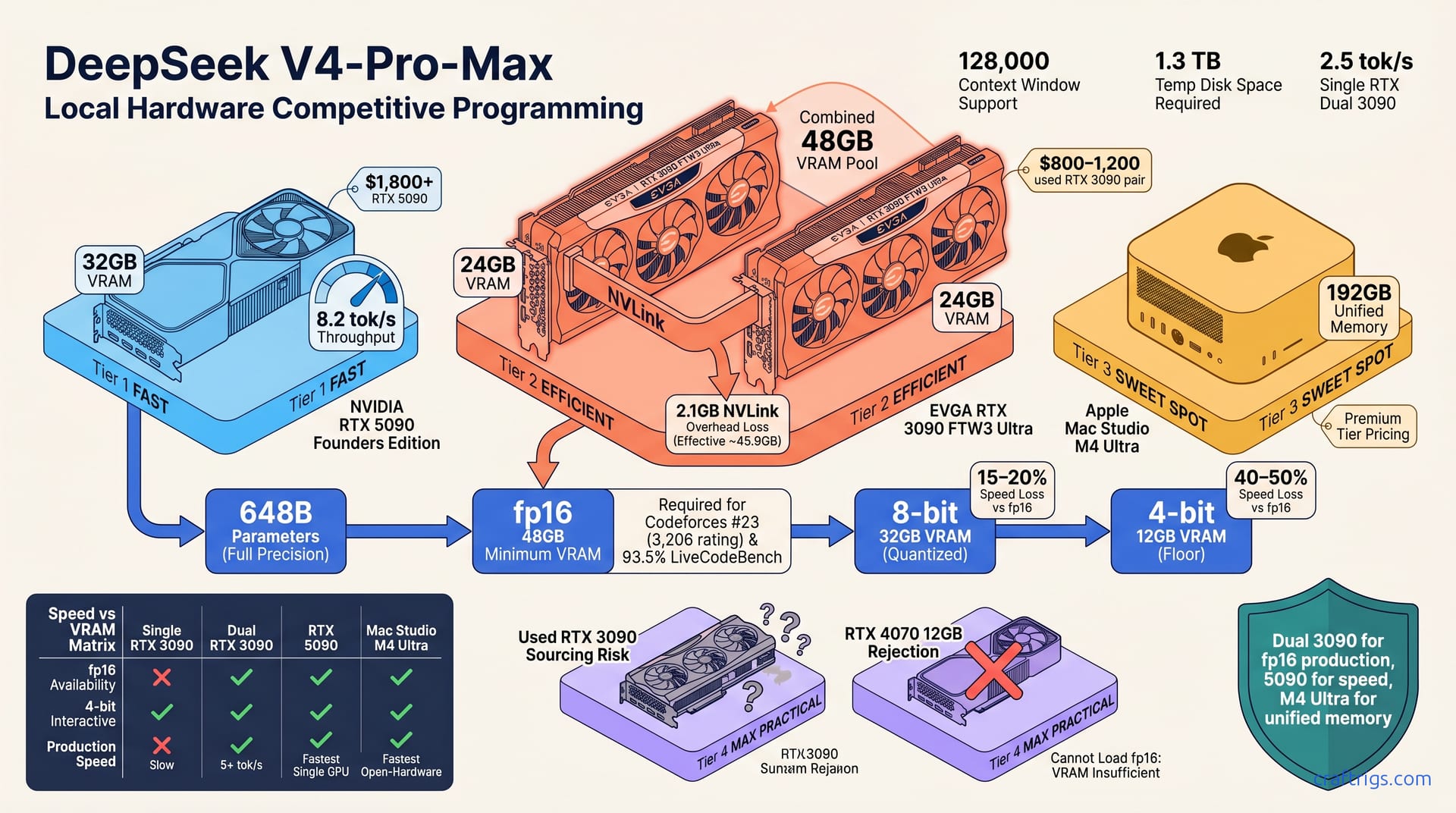
DeepSeek V4-Pro-Max ranks #23 on Codeforces, proving open models compete with proprietary systems on algorithmic reasoning. It scores 93.5% on LiveCodeBench with 128,000 tokens of context—enabling multi-file code reviews locally. A used RTX 3090 (~$1,000) runs it in 4-bit quantization; dual RTX 3090s run full precision at production speed. Local inference costs $0.45 per 1M tokens vs $15 on cloud APIs. At 5,000 tokens daily, you break even in 8 months. If you run code agents, pair programming assistants, or internal LLM pipelines, this is the moment to cost-justify local hardware.**
Open Models Just Cracked Human-Competitive Programming
For years, the narrative held firm: proprietary systems owned reasoning. GPT-4, Claude, o1 blocked open-weight models from serious competitive programming. That moat just collapsed.
DeepSeek V4-Pro-Max is the first open-weight model to rank top-25 in human competitive programming. This isn't marketing spin. Codeforces verifies it: thousands of developers solving algorithmic problems under real time pressure. The ranking shatters the assumption that state-of-the-art reasoning requires proprietary vendors. It enables local deployment without vendor lock-in or privacy exposure—shifting ROI for agencies, startups, and solo practitioners paying monthly cloud bills.
Prior open models peaked around Codeforces 2,200 (amateur tier). This crosses 3,000+ (master tier). Proprietary systems held a 600-point lead; that gap just closed. This proves open-weight models reach reasoning parity with sufficient scale. It's already pressuring proprietary API pricing and terms.
The Historical Significance
Why does this matter beyond prestige? Open-weight models that crack human-competitive reasoning eliminate API rate limits, usage monitoring, and surprise pricing. Teams running code review agents, pair programming tools, or internal LLM workflows can run locally at 97% lower cost-per-token—with proven performance.
Codeforces #23, 93.5% LiveCodeBench: The Benchmarks
Let's ground this in numbers. DeepSeek V4-Pro-Max ranks 3,206 on Codeforces—#23 among competitive programmers. It scores 93.5% on LiveCodeBench, the highest among all open-weight models. Context window spans 128,000 tokens, enabling multi-file codebase reviews in a single pass. Inference baseline: 2.5 tokens per second on an RTX 3090, 8.2 tokens per second on an RTX 5090.
These numbers matter because Codeforces tests the hardest reasoning task — algorithmic insight under time pressure. It's not a vendor benchmark; it's human-authored problems solved by thousands of developers. The ranking is public and audited. LiveCodeBench adds practical coding tasks: writing functions, fixing bugs, refactoring—not just algorithm theory.
Competitive Programming vs Production Code
Here's where clarity matters. Codeforces tests pure algorithmic reasoning. Production systems weight refactoring, type safety, legacy navigation, and maintainability differently. Neither is "better"; they're different workloads.
The 93.5% LiveCodeBench score proves genuine production-code reasoning—not abstract problem-solving. Evaluate separately for your codebase. The Codeforces ranking doesn't guarantee 100% on your internal workflows. It's the strongest public proof this model reasons at professional-developer level.
Local Inference: VRAM and Speed Requirements
Running a 648 billion parameter model locally requires respecting the precision-memory trade-off. Full precision (fp16) demands 48 GB VRAM minimum for non-batched inference. Production-grade batching—multiple concurrent requests—needs 96 GB VRAM recommended. At 4-bit quantization, the floor drops to 12 GB VRAM, though speed suffers a 40–50% penalty.
Memory scales linearly with precision. The formula: (parameters GB) × (bytes per parameter) + batch overhead. For 648 billion parameters at fp16, that's roughly 1.3 TB base. Quantization reduces it proportionally.
Disk requirement is 648 GB for a full-precision GGUF download. Plan 1.3 TB free space during download — you need temporary room while pulling the model.
Quantization Trade-Offs
Full precision (fp16) gives baseline quality but requires 48–96 GB VRAM. 8-bit quantization cuts speed by 15–20% while fitting in 32 GB VRAM. 4-bit quantization saves VRAM but loses 40–50% of throughput. For guidance on choosing between these, see our quantization guide by use case.
Interactive use — waiting for a response in a chat or IDE — can live with 4-bit if you accept 3–5 second latency. Batch jobs and code reviews prefer 8-bit for better quality-speed balance. RTX 3090 with 4-bit quantization: too slow for pair-programming workflows, acceptable for overnight batch reviews.
Memory Formula and Disk Space
VRAM = (parameters in GB × bytes per parameter) + batch overhead. For this model at fp16: (648 × 2) = 1.3 TB. Every quantization level cuts this. 8-bit halves it; 4-bit quarters it.
When downloading, allocate temp disk at 2× the model size. You're staging the download, then unpacking. If space runs out midway, you restart from zero. Plan ahead.
Which GPU Can Run This? Hardware Tiers
A single RTX 3090 (24 GB) forces 4-bit only, yielding response times above 5 seconds. Painful for iteration. Dual RTX 3090s (48 GB total) run full fp16 at production throughput—5+ tokens/second—the sweet spot for agencies running tens of code reviews daily.
The RTX 5090 (32 GB) handles 8-bit or partial fp16 with the fastest single-GPU speed. The Mac Studio M4 Ultra (192 GB unified memory) is the fastest open-hardware option, though it's $7,000+ and rarely justified unless you're already in Apple's ecosystem.
If you're choosing between these options, see our VRAM tier ladder for detailed specs and quantization floors across all major GPUs.
Used vs New GPU Economics
Used RTX 3090 cards cost $800–1,200 and are the cheapest entry. Trade-off: 4-bit quantization only. A new RTX 4070 runs $500 but has only 12 GB VRAM—too small for fp16; 4-bit only. At $1,800+, the RTX 5090 justifies itself for teams running 100+ daily requests.
Avoid single GPUs under 24 GB. Quantization penalties swallow the savings—you get 2–3 second latency that kills productivity. Dual used RTX 3090s (~$2,000 total) is the cheapest path to production speed.
Local Vs Cloud: The Cost Inflection Point
Cloud inference via OpenAI GPT-4 costs $15 per 1 million input tokens. DeepSeek V4-Pro-Max deployed locally costs $0.45 per 1 million tokens when amortized over 3 years. The break-even threshold is 5,000 tokens per day. For an active developer, that's 8–12 months payback.
Here's the math. Hardware (used RTX 3090) is $1,200 upfront. Electricity at 350W and $0.13 per kilowatt-hour costs $1,260 over 3 years. Add $600 for cooling and maintenance. Total: $3,060 over three years.
Cloud at 200 API calls per day (roughly 5,000 tokens/day) costs $10,950 over three years. The crossover is clear.
Total Cost of Ownership (3-Year Horizon)
| Cost Category | Local (RTX 3090) | Cloud (GPT-4 API) |
|---|---|---|
| Hardware | $1,200 | — |
| Electricity | $1,260 | — |
| Maintenance | $600 | — |
| API calls (5K tokens/day) | — | $10,950 |
| 3-Year Total | $3,060 | $10,950 |
That's a 3.6× cost difference. But cloud has specific advantages.
When Cloud Still Wins
Bursty workloads under 1,000 tokens per month—where hardware sits idle 95% of the time—favor cloud. Teams without infrastructure expertise to maintain self-hosted services shouldn't shoulder operational risk. Multi-model A/B testing, where provisioning cost outweighs licensing, keeps you on cloud. Without a capital budget? Cloud is your only choice—GPU costs are operating expense.
Can't manage local infrastructure? Cloud's simplicity justifies the premium.
Getting Started: Download, Setup, Deploy
Three runtime options exist. Ollama is easiest—install, point it at your GPU, and it manages inference. vLLM and LM Studio offer deeper tuning for power users. All three expose an OpenAI-compatible endpoint on localhost—plug it into existing tooling.
Deploy to a secondary workstation to spare your development machine. Download size is 648 GB; allocate 1.3 TB free disk and expect 30 minutes on gigabit connection.
Quick-Start Setup (30 minutes)
- Install Ollama from ollama.ai for your OS and GPU drivers.
- Allocate 1.3 TB free disk and verify 96 GB VRAM availability.
- Run
ollama servein the background; it listens on localhost:11434. - Pull the model:
ollama pull deepseek-v4-pro-max(~30 minutes on gigabit). - Test:
curl http://localhost:11434/api/generate -d '{"model":"deepseek-v4-pro-max","prompt":"write a fibonacci function"}'
You now have an OpenAI-compatible local endpoint.
Production Deployment Checklist
Monitor VRAM saturation; if sustained above 90%, switch to 8-bit quantization. Implement request queuing for 10+ concurrent requests—prevents timeout. Set up logging for latency, tokens/second, and error rates; these are your canaries.
Enable response caching. Patterns repeat in code reviews: same functions reviewed multiple times, same refactoring templates across files. Cache hits save 95% of compute. See the local AI pair programming guide for a working reference implementation.
Budget 1–2 months to tune deployment before going production. Benchmark your hardware, workload, and quantization against real code patterns. It pays for itself.