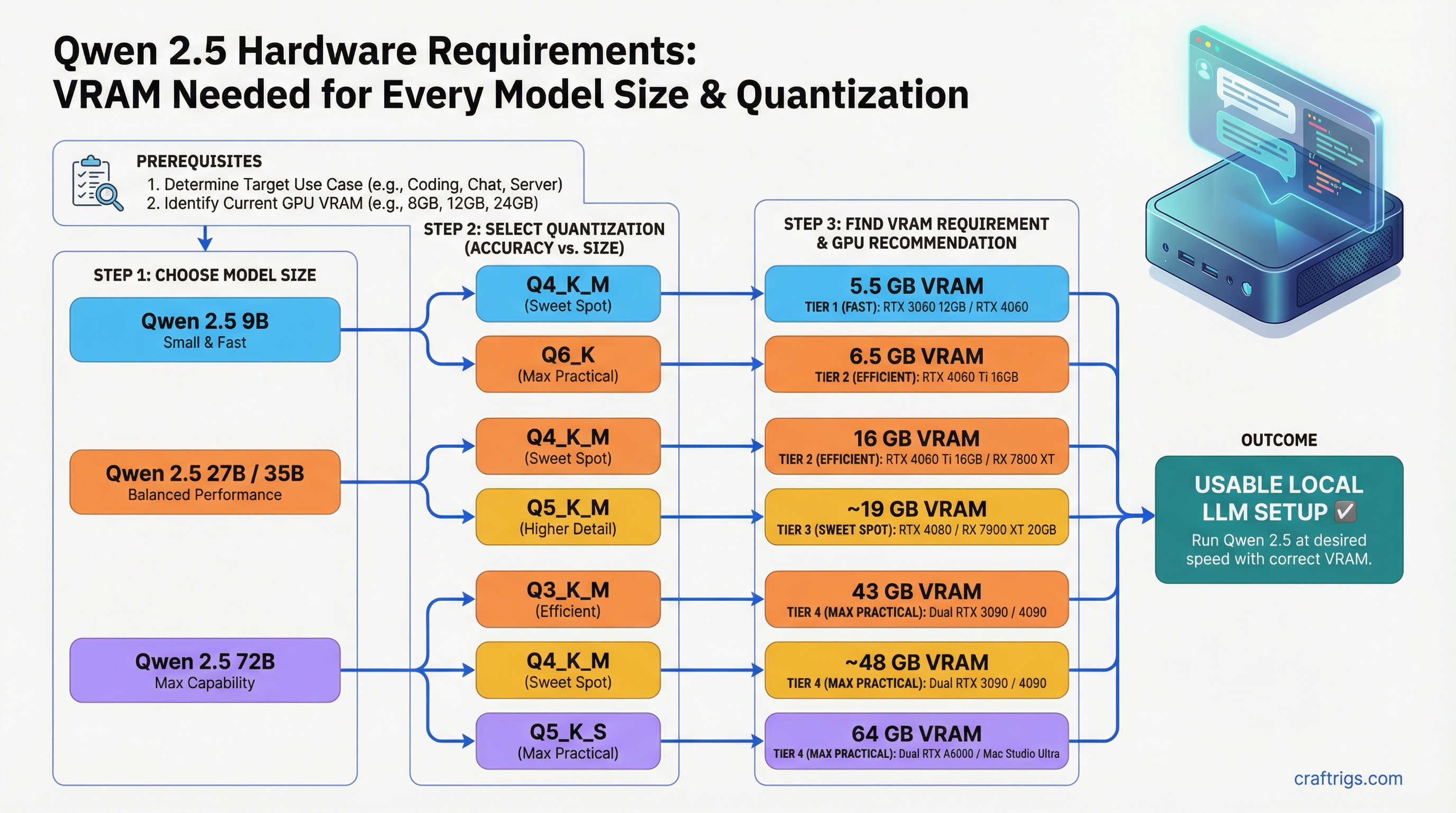
Qwen 2.5 has become one of the most-run model families in the local LLM community — and for good reason. The 72B instruction-tuned version competes with much larger models, the 7B and 14B variants punch well above their weight on coding tasks, and Alibaba's release cadence has been consistent. But the model family spans an unusually wide range of sizes, and the hardware requirements jump significantly between tiers.
This guide breaks down exact VRAM requirements for the four most commonly run sizes — 9B, 27B, 35B, and 72B — across the quantizations you will actually use. No vague ranges. Specific GPU recommendations for each tier.
Quick Summary
- 9B Q4_K_M needs ~5.5GB VRAM — fits on any 8GB GPU including RTX 3060 8GB
- 27B Q4_K_M needs ~16GB — RTX 4060 Ti 16GB is the minimum, RX 7900 XT is better
- 72B Q4_K_M needs ~43GB — requires dual GPU, Apple Silicon 64GB+, or AMD Strix Halo platform
VRAM Requirements by Model Size and Quantization
These figures include model weights plus baseline KV cache for modest context (4K tokens). Higher context lengths increase VRAM proportionally.
Qwen 2.5 9B
Notes
Fits on 8GB cards with context headroom
Still fits on 8GB, minimal quality improvement
Needs 12GB+ card; noticeably better output quality
Only for fine-tuning or research; no inference reason Minimum GPU: RTX 3060 8GB for Q4_K_M/Q5_K_M. RTX 3080 10GB for Q8_0.
The 9B is the "just works" tier. Any gaming GPU from the last four years handles it. If you are choosing between Q4_K_M and Q5_K_M on an 8GB card, Q5_K_M is worth the extra ~1GB — the quality difference is measurable on coding and reasoning tasks.
Qwen 2.5 27B
Notes
Tight on 16GB cards — watch KV cache at long context
Needs 20GB+ VRAM; RTX 3090 or RX 7900 XT
32GB cards or dual 16GB GPUs
Impractical on consumer hardware Minimum GPU: RTX 4060 Ti 16GB for Q4_K_M. RTX 3090 24GB or RX 7900 XT 20GB for Q5_K_M.
The 27B is arguably the best all-around Qwen 2.5 tier for users with 16–24GB cards. At Q4_K_M on an RTX 4060 Ti 16GB, you get solid performance but the card runs tight on long-context tasks. The RTX 3090 or RX 7900 XT give you meaningful headroom for Q5_K_M, which is noticeably better on complex instructions.
Qwen 2.5 35B (Dense MoE Variant)
Notes
Needs 24GB card minimum
Tight on 24GB cards; 32GB+ preferred
40GB+ VRAM or dual 24GB GPUs Minimum GPU: RTX 3090 24GB (tight) or RTX 4090 24GB for Q4_K_M.
The 35B is the awkward middle child in the Qwen 2.5 lineup. It requires a 24GB card — which already runs Qwen 2.5 27B at Q5_K_M with room to spare — for only a modest quality step. For most use cases, the 27B at Q5_K_M or Q8_0 (on an RX 7900 XTX or RTX 3090) is the better choice. The 35B makes sense if you specifically need that model's characteristics or are already on a 24GB card and want to squeeze out every bit of capability.
Qwen 2.5 72B
Notes
Dual 24GB GPUs, Apple Silicon 64GB+, AMD Strix Halo
Dual 24GB GPUs with room to spare; 64GB unified memory configs
Dual RTX 4090 (48GB total), Apple Silicon 128GB, or AMD AI Max 128GB
Server-class hardware only Minimum GPU: Dual RTX 3090/4090 24GB (48GB combined), Apple Silicon 64GB+, or AMD Strix Halo platform (64/96/128GB unified memory).
This is where consumer hardware hits its ceiling. On a single 24GB card, you cannot load 72B Q4_K_M into VRAM. You have two options: CPU+GPU hybrid inference (see our llama.cpp hybrid inference guide) or move to a platform with 48GB+ addressable memory. For general VRAM planning across different model sizes, see our how much VRAM do you need guide.
GPU Recommendations Per Tier
For Qwen 2.5 9B
Best value: RTX 3060 12GB — handles Q5_K_M with 5GB headroom for KV cache. Available used for around $200–230.
Best performance: RTX 4060 Ti 16GB — runs Q8_0 comfortably, future-proofs for larger models. Around $350–380 new.
AMD option: RX 7600 8GB for Q4_K_M (tight) or RX 7700 12GB for Q5_K_M. ROCm support is solid on Linux for these cards.
For Qwen 2.5 27B
Minimum: RTX 4060 Ti 16GB — Q4_K_M only, watch context lengths.
Sweet spot: RX 7900 XT 20GB — Q5_K_M without compromise. Better VRAM per dollar than the RTX 3090 if you are buying new.
Best single-card option: RTX 3090 24GB (used, ~$700–750) or RTX 4090 24GB (new, ~$1,800–2,000) — both run 27B at Q8_0 with room to spare and handle 35B Q4_K_M.
AMD: RX 7900 XTX 24GB — runs 27B at Q8_0 cleanly. ROCm 6.x support is mature for this card on Linux.
For Qwen 2.5 72B
Dual GPU: Dual RTX 3090 (used, ~$1,400–1,500 total) gives 48GB combined VRAM. llama.cpp tensor split handles layer distribution automatically. See our multi-GPU inference guide for setup.
Apple Silicon: M3 Max 64GB handles Q4_K_M comfortably via MLX. M4 Max 128GB runs Q8_0. MLX on Apple Silicon is faster than llama.cpp for inference on these models — see our MLX vs llama.cpp comparison.
AMD Strix Halo (mini PCs): Devices like the Minisforum AI X1 Pro ship with 64GB or 96GB of unified LPDDR5X that the integrated Radeon 890M can address. 96GB configs handle 72B Q4_K_M fully in GPU memory once GTT memory is properly configured (Linux only — see AMD Ryzen AI Max GTT guide).
Tokens Per Second on Common Hardware
Approx t/s
~18–22 t/s
~20–25 t/s
~28–35 t/s
~65–80 t/s
~25–35 t/s
~18–24 t/s Generation speed on consumer GPUs is limited by VRAM bandwidth, not compute. GDDR6X on the 4090 (1,008 GB/s) moves model weights faster than the 3090 (936 GB/s) but both dwarf anything running with CPU offloading.
Apple Silicon: MLX vs llama.cpp
Apple Silicon is uniquely suited to Qwen 2.5 because of its unified memory architecture — the same pool of RAM is accessible to CPU and GPU with no PCIe transfer overhead.
For Qwen 2.5 specifically, MLX tends to outperform llama.cpp on Apple Silicon by 15–25% on generation speed. If you are running on a Mac, use MLX:
pip install mlx-lm
mlx_lm.generate --model Qwen/Qwen2.5-72B-Instruct --prompt "Explain transformer attention"
For Qwen 2.5 27B, an M3 Pro 36GB handles Q5_K_M. M3 Max 64GB handles everything up to 72B Q4_K_M. The M4 Max 128GB is the current ceiling for single-box Apple Silicon inference.
Choosing the Right Tier for Your Hardware
Why
Maximum quality that fits
Big quality jump worth the tight fit
Q8_0 for quality; 35B if you need that specific model
72B is the clear choice at this tier
Sweet spot for Apple Silicon / AI Max
Near-full-precision at the consumer level One thing to keep in mind: the Qwen 2.5 coder models (1.5B through 32B) follow the same VRAM requirements as their base counterparts. If you are running Qwen 2.5 Coder 32B specifically, the RTX 3090 24GB is your minimum at Q4_K_M. For a dedicated Coder 32B guide, see Qwen 2.5 Coder 32B hardware requirements. For downloading the right quantized GGUF variant for your hardware, see our HuggingFace GGUF download guide.